• Hello ES! We could use some help to get us past the finish line on building the new knowledgebase for the forum.
    Can you donate? Please see our fundraising page. Thank you!

Bafang Canable Pro Master - discussion

Hi Stancecoke,
I connected with canable without changing any parameters and then disconnected and I still see the rider parameters on the display (DPC010).
 
Yesterday for that test 10km/h maybe you used this time in program the "assist limited" tab to save parameters? or did you use the tab "full assist"? It is indeed good news the riding params. are back but i wonder wat changed its behavior.
 
Hi DPC18RI,
I don't remember exactly which screen I started from, but I checked the two tabs and they were the same.
I don't understand this situation either, but I'm very relieved.
 
Hi DPC18RI,
I don't remember exactly which screen I started from, but I checked the two tabs and they were the same.
I don't understand this situation either, but I'm very relieved.
I just ordered one so i can see what gives with DPC010.
 
I'm going a bit off-topic, but maybe it'll be useful for software developers.
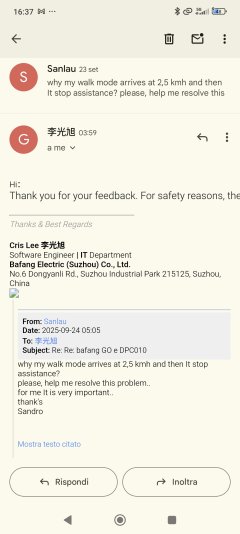
I wrote to baffang to complain about the walk mode, which no longer supports speeds above 2.5 km/h.
After asking me for the HW and SW versions of the controller and display, they replied that the speed is limited to 2.5 km/h for safety reasons.
I was irritated by the implicit falsity of this response, coming from a manufacturer that has made free power and free speed its flagship for all these years...
and I pointed out that with the DPC010 display, where you can't set the walk mode to 6 km/h, you can instead set the maximum speed to 40 km/h or 50 km/h.
After my reply, they again asked me for the serial number and SW version of the display.

I realize I've strayed from the main topic of the topic, and I apologize for that.
I posted the update in the hope that it might be useful to the developer.
In the meantime, we're waiting for the DPC18RI experience with the DPC010 display.
Thanks
 

Attachments

  • Screenshot_2025-09-24-16-37-30-918_com.google.android.gm.jpg
    Screenshot_2025-09-24-16-37-30-918_com.google.android.gm.jpg
    454.1 KB · Views: 16
  • Screenshot_2025-09-24-16-39-03-794_com.google.android.gm.jpg
    Screenshot_2025-09-24-16-39-03-794_com.google.android.gm.jpg
    261.4 KB · Views: 16
Can take a while. I ordered the BBS01B can from pswpower on Ali. The Bike i ordered with motor M410 arrived today. So i will ride with it for a while so i know how it behaves before i connect it. I assembled the bike but still need to do first ride.
Was your DPC010 included when you bought the BBS01B can? Seems like you can change max speed over 25? Not many DPC010 can do that, besides those from Varstrom i think and maybe a few sellers who get them perhaps from Varstrom. They claim to worked with Bafang for that but i would not point bafang too much to such display's who can alter max speed :)
 
Yes, I received the kit from PSW Power with the BBS01B and DPC010.
I should point out that it was PSW Power who pointed me to this display when I asked, a few days before purchasing it, how I could solve the problem of customizing the settings.
They told me to buy that display and that, with it and/or using the Bafang Go app, I could modify "many" parameters.
And so it was (although I still don't understand why at a certain point this option disappeared, only to reappear...).
As far as I'm concerned, the only problem remaining is the walk mode.
I can confirm that using the DPC010 display I was able to increase the maximum speed, in my case set to 30 km/h.
I had also seen the Varstrom video and was actually considering buying from them.
Then I read PSW Power's response and decided to trust them (also because the same kit from Varstrom cost a lot more).
 

Attachments

  • Schermata del 2025-09-24 20-48-20.png
    Schermata del 2025-09-24 20-48-20.png
    587 KB · Views: 5
Ive seen mixed suggestions as far as connecting the ground to the canable device. I assume it may not be necessary, but there's no danger in connecting it anyway, is that correct?
 
If you have an isolated canable, there is no danger. With a non isolated, there is a certain risk, if you have potential differences between your PC and the Bafangcontroller

Thanks for the reply. I'm using the FYSETC UCAN Board, which doesn't specify if it's isolated or not.

I tested last night, and it appeared to connect and read just fine with the ground connected. Would it be safer to pull the ground from the canable? Quite honestly, I dont understand how the signal wires would work without a ground return, but apparently it will.
 
I dont understand how the signal wires would work without a ground return
That's the logic of the CAN bus. CANH and CANL always are complementary. No voltage difference means logic high, a voltage difference means logic low. So you don't need a reference to GND. That's a big advantage, if the bus connects different devices that doesn't have a shared GND potential.

1758807640266.png
Source
 
Hi. I have an M625 motor and a vd618 display. Recently, I noticed the bike has become somewhat sluggish. I connected your program and discovered the ECO mode. I have no idea how it got there. Perhaps it was some random (secret) key combination I didn't know about. Moreover, the display itself doesn't seem to have a setting for ECO or Sport mode. What should I do now? Has anyone else had this experience?
And another problem with this motor. The lower shutdown threshold with a 52-volt supply is 46.5 volts, which is too high, but the display misleadingly shows 45 volts. Unfortunately, the changes in this program don't save. What a disaster.photo_2025-09-26_10-51-09.jpg
 
As mdi-9 mentioned before, you are probably the first in connecting a M620.
What do you mean with "disaster"? The motor or the program?

Regarding ECO i have seen that on several different Bafang display's always showing ECO even in Bafang tool itself so if your motor has become sluggish that "ECO" will not be the cause. Maybe it just designates the probably hardcoded assist level the display is set to startup with? i don't know and i would not worry about it.

Again, controllers although you can read the settings it does not mean you can save them all too. Some even doesn't allow to read settings. Sinds some time they let you change some settings via the GO app for several controllers which means you should be able to change those too with the program and also other settings but that depends on the controller. It looks like your controller is from year 2021? So it is maybe not as "open" as recent controllers.
All the above is just my own thought about it and i can be wrong.
 
In the meantime, we're waiting for the DPC18RI experience with the DPC010 display.
Thanks

The BBS01B canbus arrived today.

Did some first tests with DPC010. Changing the page "riding params" in the display reflects in the program. The other way around also. I used tab "full assist" and also "limited assist" to change a value without problems. The "riding params" in the display stay visible.

On the tab "controller" in the program, changing max speed works. But changing the other 2 that is wheel size and circumference does not work unless you change the max speed too. i tried a few times and it get send but not stored in controller. But say change speed from 25 to 24 and at same time also change wheel and circumference and then save, that get stored in controller. So after correct wheel size and circumference i just changed speed back to 25. (only changing the speed does work).

Then i tried undervoltage and recovery voltage, the value's for undervoltage etc. are correctly read. But when you change them and send it something go's wrong. It get send but not saved in controller and afterwards in CMD are errors (parsing errors 6011) although the value's still show with a read command.

But something must has changed because yes, the page with riding params in the display is gone..
I replicated it several times after getting each time the reading params in display back to working state.

That is, i found if they are gone, and although errors shows in CMD window after altering undervoltage or recovery, going to tab "assist limited" i changed for example for assist level 1 the value for "speed limit %" just one number is enough and then save it.

It writes the parameters ok to controller and afterwards the page with riding params in DPC010 is visible again... Until you try again to change undervoltage or recovery... So luckily the tab full assist or limited assist has saved the day.
The recovery voltage value showing, in this case 35000mV is correct, trying to change the number: A popup shows max "255" or lower.
I'm not a code guy so here it ends for me but i guess the settings undervoltage cutoff and recovery voltage that uses i believe 2 bytes there is probably something wrong in the "send" part?
 
Very interesting.
I'm not sure I understand everything, but I'm following with great interest.
Including the part about the disappearance and reappearance of the riders parameters menu.
 
Hi Dpc18ri,
have you had the chance to check if, with the bbs01b and dpc10, the walk mode is limited to 2.5 km/h?
 
No not yet, maybe in the weekend. But if you can not change it then it will be the same for me. With the M410 motor the program shows a walk speed 3.9 Km/h and not zero like in my BBS01B although it has a walk speed but indeed super slow.
Regarding undervoltage cutoff under load; if i use another (dumb) display and then change undervoltage in the program , it does not get stored in cntrl but all looks fine for the rest. But.. if i then replace that display with DPC010 the riding params are gone also.
I wonder how BB Racing from Dado behaves with DPC010. Anyway i can test all i want but that's it, to make changes in the code the skills from mdi-9 are needed and i don't know if he is still here.
 
There is no commit in the repo since three weeks now.

@DPC18RI: can you specify the needed changes? I can give it a try.
I took another approach, used another controller and other display just to see what happens. One thing i noted, the now used controller shows for example for undervolt under load 3100 mV my M410 also but BBS01B shows 31000 mV but i guess that is not the cause in the combination BBS01B and DPC010

I can report the program is completely fine used with another controller and display. Under electrical params i left system volt as is but ALL the rest i could change and after each separate try (i changed params one by one) i switched dumb display off, removed power from controller, removed dumb display and connected DPC010 and riding params in DPC010 each time still be there. (Remember I made the parameter changes when dumb display was connected).

I also changed Limp mode SoC limit % ok. Changed walk speed = ok. Changed start current under driving params =ok
So now that i know program is fine i will check BBS01B again but this time with dumb display, not with DPC010 to see if this time changes can be made for electrical parameters etc.
 
Last edited:
With BBS01B again, nope the only thing i could change was the current limit and speed settings. If i try to change other parameters it does not get stored in controller. And when i remove the display and connect a DPC010 the page in DPC010 with the riding parameters is gone.
However if i then go in the program to the tab "assist limited" and save it, then the page with riding parameters in the DPC010 is back... So maybe they changed something for BBS01B and when changing params and save them the procedure is maybe a little different for the BBS01B compared to older motors ??
Or is BBS01B just locked but then i guess the riding params should not disappear in the DPC010.
The controller i used before where i could change all params that one has no 6010 params, so no assist ratio% and no separate accell. levels for each assist level while the BBS01B does have those settings...
I also saw something new? With this 36 volt BBS01B. Max system light output 48 volt and max light power output 48.00 Watt.
 
Back
Top