• Hello ES! We could use some help to get us past the finish line on building the new knowledgebase for the forum.
    Can you donate? Please see our fundraising page. Thank you!

Bricked Ant BMS?

MX3K

🔌 New-ish
Joined
Aug 6, 2024
Messages
19
Location
United Kingdom
Hello, A while ago I bricked my Ant BMS 20S-110A by starting a firmware update which got stuck at 0.2%, after about 10 minutes I cancelled it and all of the fields were blank with only a warning to upgrade the firmware.
After poking around for a trying to upgrade the firmware I somehow made it worse and now it wont even connect on bluetooth.
I saw on a differnt thread here the PC version could reflash successfully so I ordered a USB to TTL adaptor directly from ANT BMS and it arrived today, when I connect it to my PC over the COM port the light turns green and then starts flashing blue for about 20 seconds before turning off. During this 20s window trying to "autosearching" with the ANT BMS pc app it tries COM1 and COM 3 at different baud rates before showing an error NoAvaliablePort.
In device manager USB-SERIAL CH340 does show up, so Im assuming its not an issue with my pc.

Is my BMS completely fried? or am I missing something.
 
Unfortunately I couldn't get anything to work so I just ordered a new BMS.
As a sidenote, I already had a USB to TTL adaptor that I wanted to reuse but couldnt find the pinout, for anyone else in a similar situation to me the ant BMS USB to TTL adaptor pinout is as follows Transmit-green (pin 4), Recieve-yellow (pin 3), 0v(ground)-black (pin 2), 5v(wake up signal)-Red (pin 1) All pins are on the COM port for the BMS side.
 
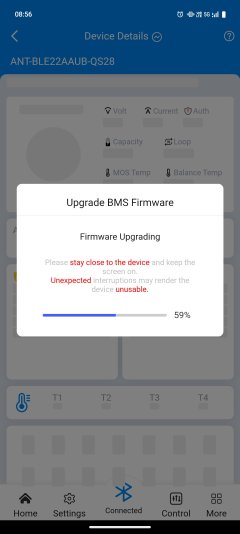
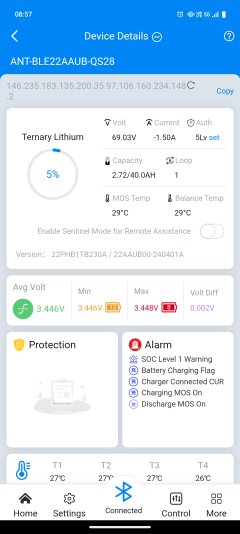
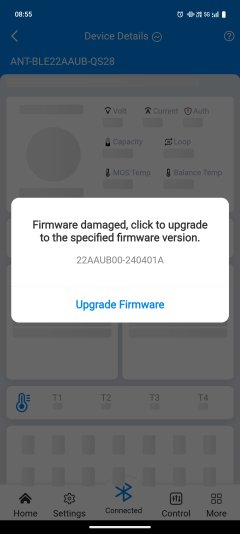
Hello, I had same situation and found how to Solve it.
You must find app that is called ANT BMS V2 for Android.
Then you can do upgrade with it and it will work and update your firmware.
I downloaded it here Bluetooth Apps | AMORGE POWER

Hope this will help
 

Attachments

  • Screenshot_20250627_085513.jpg
    Screenshot_20250627_085513.jpg
    352.4 KB · Views: 17
  • Screenshot_20250627_085616.jpg
    Screenshot_20250627_085616.jpg
    383.3 KB · Views: 15
  • Screenshot_20250627_085735.jpg
    Screenshot_20250627_085735.jpg
    575 KB · Views: 17
Hello, I had same situation and found how to Solve it.
You must find app that is called ANT BMS V2 for Android.
Then you can do upgrade with it and it will work and update your firmware.
I downloaded it here Bluetooth Apps | AMORGE POWER

Hope this will help
How is your UI different? I downloaded the V2 for android and it's the same old UI and doesn't look new like yours.
 
Did you downloaded the V2 ? ANT_BMS_V2.apk you sure ?
Because on the website the links between V1 and V2 we swapped, I had to contact them and they fixed it.
So be sure you download ANT_BMS_V2.apk
 
Hi everyone,


I recently faced an issue with my ANT BMS where the firmware update got stuck at 0.2%. After that, the BMS still appeared via Bluetooth with its usual name, but it didn’t show any cell voltages or temperature readings, and I couldn’t control the charge/discharge MOSFETs.


Here’s how I managed to recover it:


  1. I used a second, identical ANT BMS from another working battery to extract a working firmware .bin file.
  2. Then, using the ANT BMS Tool on my Windows PC with a BLE adapter, I connected to the bricked BMS (which appeared as DfuTarg in the tool).
  3. I reflashed the extracted firmware to the bricked BMS successfully.
  4. After flashing, the BMS rebooted and returned to normal operation with all functions working properly.
  5. I found this video and it describes the whole process in detail.

If you experience the same problem, I can share the working firmware file and guide you through the recovery process.
 
Last edited:
Hi everyone,


I recently faced an issue with my ANT BMS where the firmware update got stuck at 0.2%. After that, the BMS still appeared via Bluetooth with its usual name, but it didn’t show any cell voltages or temperature readings, and I couldn’t control the charge/discharge MOSFETs.


Here’s how I managed to recover it:


  1. I used a second, identical ANT BMS from another working battery to extract a working firmware .bin file.
  2. Then, using the ANT BMS Tool on my Windows PC with a BLE adapter, I connected to the bricked BMS (which appeared as DfuTarg in the tool).
  3. I reflashed the extracted firmware to the bricked BMS successfully.
  4. After flashing, the BMS rebooted and returned to normal operation with all functions working properly.
  5. I found this video and it describes the whole process in detail.

If you experience the same problem, I can share the working firmware file and guide you through the recovery process.
Hi Yokneamcity,

Can you share how you extracted the .bin file? I am in the same boat with a 16s BMS.
 
Back
Top