Gobbledygook
🧲 New user
Hi, I'm hoping someone can help with my problem as I'm stumped.
TL/DR The display on my LCD shows zero bars even though my 36v battery is providing 41.5v. The bike therefore won't power by throttle or when peddling. Any ideas what's wrong?
Long version: Cyclotricity 250W front wheel drive kit.
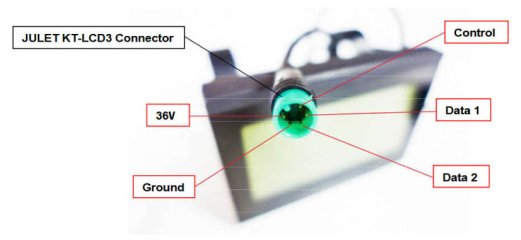
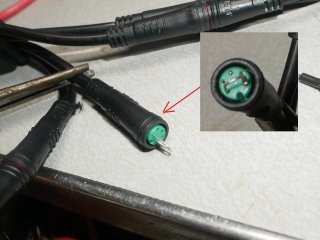
Worked fine for years, then there was an intermittent power problem (LCD occasionally powering off completely) which I traced to the main system cable. I replaced this and the battery indicator on the LCD showed no bars even when the battery was fully charged (all LEDs on the battery indicator are lit, 41.5v measured at the battery, the end of the main system cable and even on the circuit board inside the LCD when I took it apart). The bike therefore won't power by throttle or when peddling.
I assumed there was now an LCD fault so bought another one from Cyclotricity. When this was plugged in, the battery tripped (could be reset by turning it on and off), and kept tripping until I unplugged the controller. It's possible my dismantling of the old LCD resulted in controller damage, so I bought a new controller from Cyclotricity and the battery no longer trips, but both my new and old LCD show zero bars even though my 36v battery is providing 41.5v. I setup the P values on the new LCD as per the old (P1=87, P2=1, P3=1, P4=0, P5=12)
I contacted Cyclotricity and they talked me through some fault finding and then recommend replacing the system cable. I explain that this is already new, but they insisted it must be at fault. I belled out the cable and there's no fault, so I sent them back the LCD as I suspect it could be faulty. They send me a new LCD, with no comment as to whether the old one was faulty, and the replacement shows zero bars just like the other two!.
I've tried various P5 settings but no joy. Could a faulty battery or faulty motor cause this? I don't want to buy any more parts until I know what's wrong. Any ideas on how to diagnose this?
TL/DR The display on my LCD shows zero bars even though my 36v battery is providing 41.5v. The bike therefore won't power by throttle or when peddling. Any ideas what's wrong?
Long version: Cyclotricity 250W front wheel drive kit.
Worked fine for years, then there was an intermittent power problem (LCD occasionally powering off completely) which I traced to the main system cable. I replaced this and the battery indicator on the LCD showed no bars even when the battery was fully charged (all LEDs on the battery indicator are lit, 41.5v measured at the battery, the end of the main system cable and even on the circuit board inside the LCD when I took it apart). The bike therefore won't power by throttle or when peddling.
I assumed there was now an LCD fault so bought another one from Cyclotricity. When this was plugged in, the battery tripped (could be reset by turning it on and off), and kept tripping until I unplugged the controller. It's possible my dismantling of the old LCD resulted in controller damage, so I bought a new controller from Cyclotricity and the battery no longer trips, but both my new and old LCD show zero bars even though my 36v battery is providing 41.5v. I setup the P values on the new LCD as per the old (P1=87, P2=1, P3=1, P4=0, P5=12)
I contacted Cyclotricity and they talked me through some fault finding and then recommend replacing the system cable. I explain that this is already new, but they insisted it must be at fault. I belled out the cable and there's no fault, so I sent them back the LCD as I suspect it could be faulty. They send me a new LCD, with no comment as to whether the old one was faulty, and the replacement shows zero bars just like the other two!.
I've tried various P5 settings but no joy. Could a faulty battery or faulty motor cause this? I don't want to buy any more parts until I know what's wrong. Any ideas on how to diagnose this?