• Hello ES! We could use some help to get us past the finish line on building the new knowledgebase for the forum.
    Can you donate? Please see our fundraising page. Thank you!

Jetson bolt pro throttle replacement

Salazar081788

New here
Joined
Nov 25, 2025
Messages
4
Location
Fresno, CA
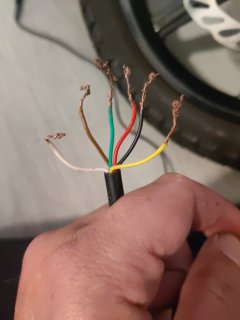
Okay so the throttle went out on my Jetson bolt Pro and so I'm trying to connect the new throttle I bought it's a one pz brand from Amazon and it has a display so it's already different than the original which I should have not done that but I did so anyways when I plugged it into the controller and it didn't do anything so I looked online and read that you have to cut the wires in change up how they're connected so I did that and I cannot get the throttle to make the wheel turn I got the display to turn on but that's about it so I don't know how to connect the wires correctly so I'm adding a picture of the colors coming from my controller and the colors coming from my throttle so I can get some help on how to make it work again please somebody help me I'm going crazy LOL the picture on the left is from the throttle and the picture on the right is the colors coming from the controller so the one with the two blacks is the wires coming from the controller
 

Attachments

  • image-1764407249182.jpg
    image-1764407249182.jpg
    571.2 KB · Views: 5
  • image-1764407288752.jpg
    image-1764407288752.jpg
    516.5 KB · Views: 4
Okay so the throttle went out on my Jetson bolt Pro and so I'm trying to connect the new throttle I bought it's a one pz brand from Amazon and it has a display so it's already different than the original which I should have not done that but I did so anyways when I plugged it into the controller and it didn't do anything so I looked online and read that you have to cut the wires in change up how they're connected so I did that and I cannot get the throttle to make the wheel turn I got the display to turn on but that's about it so I don't know how to connect the wires correctly so I'm adding a picture of the colors coming from my controller and the colors coming from my throttle so I can get some help on how to make it work again please somebody help me I'm going crazy LOL the picture on the left is from the throttle and the picture on the right is the colors coming from the controller so the one with the two blacks is the wires coming from the controller
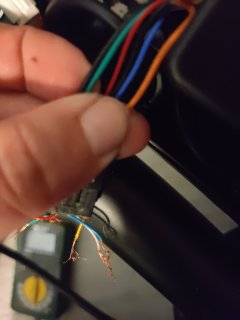
It might be a moot point, but maybe you could provide a pic of the new throttle and/or a link? The fact the the display turned on means one conductor is carrying full battery level voltage, so depending on how many random attempts you made, there’s a chance that you fried the new throttle or/and the controller already. Do you have a multimeter?
 
It might be a moot point, but maybe you could provide a pic of the new throttle and/or a link? The fact the the display turned on means one conductor is carrying full battery level voltage, so depending on how many random attempts you made, there’s a chance that you fried the new throttle or/and the controller already. Do you have a multimeter?
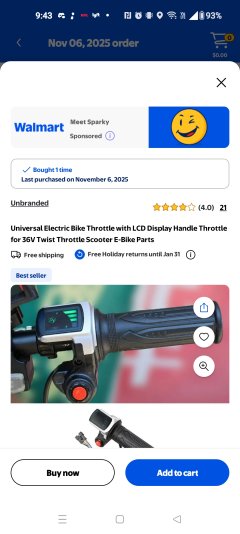
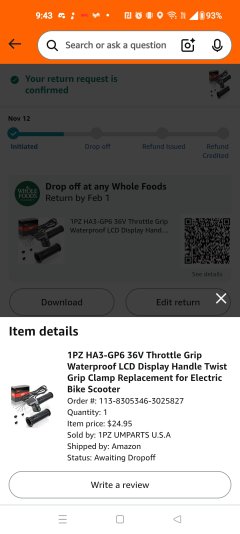
Okay so the first throttle I got off at Walmart and I'll be attaching a photo and then the second one I got off of Amazon and I'll be touching the photo from that so that way you can see which ones exactly that I got I think I'm going to try to get another one when I get paid so that way I can get the one that's originally on it and just get a duplicate of that instead of getting these display ones because I don't know if that's the issue but I seen it working before a little bit whenever I was taking off the original throttle wire because the person who had it before had the throttle wire cut and only the wire was exposed from the controller and whenever you kind of touch some wires together it would kind of go a little bit but it was definitely not a good idea so that's why I took the wire off and just thought I could do a plug-in-play directly from the new throttle to the Jetson but it didn't work out that way for either of them so when I cut the wires for both of them I tried to look up online the different diagrams but none of them ever match
 
These are the two different throttles I bought one off of Amazon and one off of walmart.com
 

Attachments

  • Screenshot_2025-11-29-09-43-43-41_5823b13702876a4d31361281686ee5c4.jpg
    Screenshot_2025-11-29-09-43-43-41_5823b13702876a4d31361281686ee5c4.jpg
    569.9 KB · Views: 4
  • Screenshot_2025-11-29-09-43-10-98_b5f6883d2c20a96c53babc0b4ac88108.jpg
    Screenshot_2025-11-29-09-43-10-98_b5f6883d2c20a96c53babc0b4ac88108.jpg
    436.7 KB · Views: 4
These are the two different throttles I bought one off of Amazon and one off of walmart.com
The bolt manual shows that the throttle on the right side includes a battery level display, and a button that controls lights and cruise control. On the left side is a button to turn on the bike.
The throttles you bought provide a battery level display, and a button that turns on both the bike and battery level display. So, the new throttles provide the on/off function of the stock left side button, and the throttle and level display of the right side stock throttle, with no support for cruise or lights.
You will need to swap/combine conductors from the left and right to support the new throttle, and figure out and possibly repurpose the stock left side switch to support cruise and lights.
 
Pretty common problem, connecting a throttle with a voltage display to a bike, except your bnike also had the same kind of throttler.

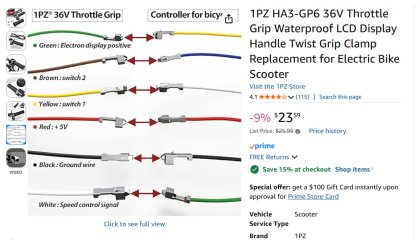
DId you see this for the PZ-model? Keep in mind that the yellow wire coming out of the Jetson controller is battery power. If you had connected it to the red or white wires from the PZ-throttle, the the throttke probably blew up,


22_jetson.jpg
 
Back
Top