• Hello ES! We could use some help to get us past the finish line on building the new knowledgebase for the forum.
    Can you donate? Please see our fundraising page. Thank you!

JN controller 5v logic cable location?

Bikeronin

New here
Joined
Feb 3, 2026
Messages
11
Location
wozve3-hisqak-Gafbiw
Hey everyone. I’m fairly new to this and I’m using this issue as a learning opportunity.

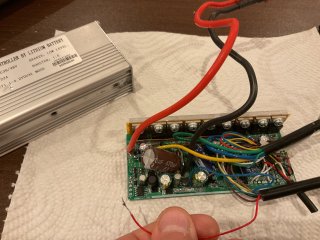
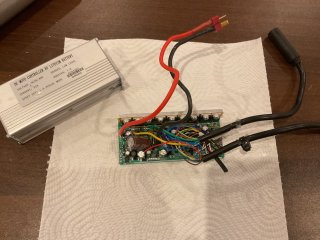
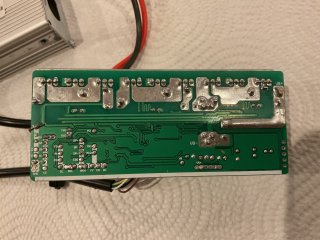
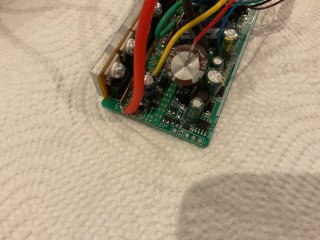
I have a JN controller that I received from Amazon as a secondhand. During installation, the Juliet connector got stuck, and when I pulled it out, the red wire was torn out of the controller. From what I understand, this red wire should be the 5 V supply for the display / logic, but I’m struggling to identify exactly where it should be reconnected.

I initially assumed it would go to a pad marked with a “+”, but measuring there with a multimeter shows no 5 V present. I also noticed a small piece of wire residue near the VB+ (48 V battery input) area, which confused me — it obviously wouldn’t make sense for the controller to send battery voltage directly to the display.

I’ve spent a couple of days probing the board with a multimeter and testing different points, but I can’t find a clear 5 V output anywhere near the front of the board. Based on how the wire tore out, it feels like it originally connected towards the back of the PCB, not the main power section.

Where does the Juliet red (5 V) wire typically connect on JN-style controllers?

Any guidance would be hugely appreciated


Thanks in advance.
 

Attachments

  • IMG_0090.jpeg
    IMG_0090.jpeg
    2.7 MB · Views: 6
  • IMG_0089.jpeg
    IMG_0089.jpeg
    3 MB · Views: 6
  • IMG_0088.jpeg
    IMG_0088.jpeg
    3 MB · Views: 7
  • IMG_0087.jpeg
    IMG_0087.jpeg
    3.1 MB · Views: 6
Hey everyone. I’m fairly new to this and I’m using this issue as a learning opportunity.

I have a JN controller that I received from Amazon as a secondhand. During installation, the Juliet connector got stuck, and when I pulled it out, the red wire was torn out of the controller. From what I understand, this red wire should be the 5 V supply for the display / logic, but I’m struggling to identify exactly where it should be reconnected.

I initially assumed it would go to a pad marked with a “+”, but measuring there with a multimeter shows no 5 V present. I also noticed a small piece of wire residue near the VB+ (48 V battery input) area, which confused me — it obviously wouldn’t make sense for the controller to send battery voltage directly to the display.

I’ve spent a couple of days probing the board with a multimeter and testing different points, but I can’t find a clear 5 V output anywhere near the front of the board. Based on how the wire tore out, it feels like it originally connected towards the back of the PCB, not the main power section.

Where does the Juliet red (5 V) wire typically connect on JN-style controllers?

Any guidance would be hugely appreciated


Thanks in advance.
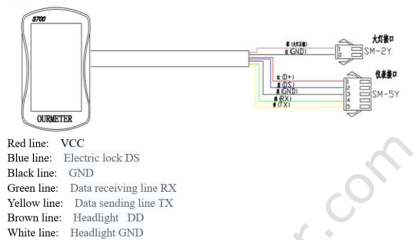
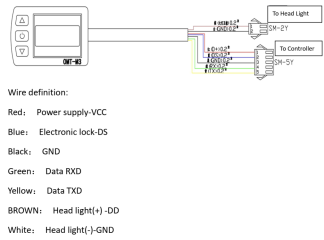
If you're referring to cable going from the controller to the display, that would rarely carry a 5V supply. Usually a display will have battery level voltage supplying it, and will have a second conductor that, when the display is turned on, will provide battery level voltage back to the controller to turn the controller on. The other conductors are logic/communications wires that send digital signals back and forth between the controller and display. The pinouts for whatever display you're using will confirm this if you have the manual.
Displays that also control lights may have a few additional conductors besides the 5 used to communicate with and operate the controller.
Three pinout examples of JN compatible displays:

1770321260762.png1770321293486.png1770321345471.png
 
Last edited:
I have to be honest, I’m struggling a bit to accept this, even though I know you’re right. I’ve checked the other displays I own and they all appear to be similar and powered at 48 V. I think what’s throwing me off is how thin the cable is.

I’ve been burned before with another controller: a rear light drew too much power and I ended up damaging the controller . Because of that experience, I’m very cautious about assuming voltage and power paths. The thin wire makes it hard for me to imagine it carrying 48 V, even though there really aren’t many other possibilities.

I haven’t actually tried it yet I’ll test it tomorrow. What you’re saying makes sense, but part of my head is still resisting it. I was also cross-checking with ChatGPT at the same time and still had trouble wrapping my head around it.

That said, I think you’re right. The interesting part is that I previously powered the controller with 12 V and it did turn on, which led me to assume it might be a 12 V line rather than 48 V. Either way, the controller is likely already dead, so this is a good learning experience.

Thanks for the advice I really appreciate it.

While I’m here, I have one related question. Is it possible to convert a controller that uses SM connectors to a waterproof (WP) cable system? I’m wondering whether this is purely a wiring/connector change, or if anything inside the controller needs to be modified to support the different signalling. My assumption is that it’s just a wiring change, but I’d like to confirm.
 
I have to be honest, I’m struggling a bit to accept this, even though I know you’re right. I’ve checked the other displays I own and they all appear to be similar and powered at 48 V. I think what’s throwing me off is how thin the cable is.

[snip]
The heat put out by a conductor goes up by the square of the current times the resistance. Since power (watts) equals the current (amps) times the voltage, a higher voltage for the same power will result in a lower current in the wire and less heat (P=IV). The higher the voltage, the thinner a wire you can use to transmit the same power. This is why electric utilities use high voltage transmission lines and then step down the voltage with transformers before it is connected to your home for safety reasons.
 
I have to be honest, I’m struggling a bit to accept this, even though I know you’re right. I’ve checked the other displays I own and they all appear to be similar and powered at 48 V. I think what’s throwing me off is how thin the cable is.

I’ve been burned before with another controller: a rear light drew too much power and I ended up damaging the controller . Because of that experience, I’m very cautious about assuming voltage and power paths. The thin wire makes it hard for me to imagine it carrying 48 V, even though there really aren’t many other possibilities.

I haven’t actually tried it yet I’ll test it tomorrow. What you’re saying makes sense, but part of my head is still resisting it. I was also cross-checking with ChatGPT at the same time and still had trouble wrapping my head around it.

That said, I think you’re right. The interesting part is that I previously powered the controller with 12 V and it did turn on, which led me to assume it might be a 12 V line rather than 48 V. Either way, the controller is likely already dead, so this is a good learning experience.

Thanks for the advice I really appreciate it.

While I’m here, I have one related question. Is it possible to convert a controller that uses SM connectors to a waterproof (WP) cable system? I’m wondering whether this is purely a wiring/connector change, or if anything inside the controller needs to be modified to support the different signalling. My assumption is that it’s just a wiring change, but I’d like to confirm.
It's signal wire. It carries a few miliamps. It's not powering the controller.

These skinny little wires carry 50,000V:
1770337618924.png
 
I believe the moral of the story here is that. Maybe I shouldn’t listen to ChatGPT so much. lol thank you chaps it seems to be working and yeah, I even got the control up and running. I haven’t tested it though so I’ll let you know if it’s still functional!
 
Hey, just wanted to post a quick update. I managed to get everything up and running so thank you.

I’ve since created a new problem (E07… entirely my doing), but honestly, I’m still calling this a win. I learned a lot, gained confidence, and can now actually solder properly.
I’m also working through the newbie discussion thread, which is helping me connect the dots.

Really appreciate the support looking forward to contributing something more useful soon.
 
Back
Top