• Hello ES! We could use some help to get us past the finish line on building the new knowledgebase for the forum.
    Can you donate? Please see our fundraising page. Thank you!

Sabvoton SVMC72150 parameters not saving

jd818

🧲 New user
Joined
Dec 5, 2025
Messages
4
Location
California
Searched through the forms, google, reddit youtube facebook, etc, and no dice. Hoping someone here can help if i post as a last resort before buying a new controller.

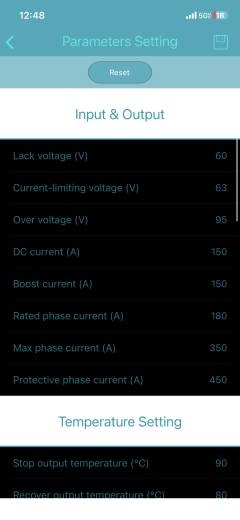
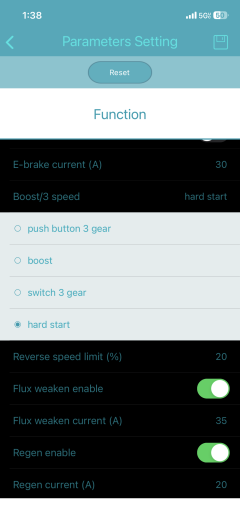
I have a SVMC72150, CA3 (connected via the shunt with throttle connecting to the CA3, not the controller) with a 72v 30ah Battery in my stealth bomber clone, and a QS clone motor. When I connect the MQCon app, it lets me change everything except Boost Current, “Boost/3speed”, and the Low Speed Limit. Those will revert as soon as i change.

Also, when changing other settings, although saving in app, the bike feels the exact same as before. So i believe nothing is in fact saving.

I would love to turn on hard start (i dont have a 3 speed switch installed), and raise my phase amps and finally have regen.

Would trying pc have better luck? should i just switch monitors? I love the bike but want more power and the Last thing id wanna do is switch controllers, definitely need pas if i do though.
 

Attachments

  • IMG_0646.png
    IMG_0646.png
    482.7 KB · Views: 1
  • IMG_0641.png
    IMG_0641.png
    582.6 KB · Views: 1
I don't know about this specific app and controller, but it is not uncommon for setup apps on IOS/android and setup programs on PC to have different sets of things they will access.

It is also not uncommon for manufacturers to make multiple versions of a controller with different capabilities / firmware, and so you might even have a version that doesn't allow changing those settings. It could even be a completely locked-down controller.


Additionally--if you have setup the CA for processing the throttle signal in any way, instead of BYPASS or PASSTHRU mode (check the manual for which best sends it thru unmodified), you could have settings in the CA that are limiting controller operation by not sending thru the full throttle amount you are inputting manually.
 
I don't know about this specific app and controller, but it is not uncommon for setup apps on IOS/android and setup programs on PC to have different sets of things they will access.

It is also not uncommon for manufacturers to make multiple versions of a controller with different capabilities / firmware, and so you might even have a version that doesn't allow changing those settings. It could even be a completely locked-down controller.


Additionally--if you have setup the CA for processing the throttle signal in any way, instead of BYPASS or PASSTHRU mode (check the manual for which best sends it thru unmodified), you could have settings in the CA that are limiting controller operation by not sending thru the full throttle amount you are inputting manually.
I got the bike used on facebook from the original builder, but, from what it seems, throttle input goes into CA3 and then into the controller from the CA3. My throttle is connected only to the ca3.

Also, the speed limit settings and related pages on CA3 do nothing at all, set limit to 35 mph earlier and hit 50+.

Im gonna grab a usb-usb on my break tmrw since my controller doesnt have the 3 pin ttl just a usb. And try that, i also contacted mqcon with no luck so might end up just completely switching controllers 🫩
 
I got the bike used on facebook from the original builder, but, from what it seems, throttle input goes into CA3 and then into the controller from the CA3. My throttle is connected only to the ca3.

Also, the speed limit settings and related pages on CA3 do nothing at all, set limit to 35 mph earlier and hit 50+.

What the CA does and how depends on the CA settings in *all* of it's menus, including which mode the throttle output is set to. If it's set to bypass the CA then nothing the CA is set to can affect it.

That's what you want while setting up and configuring your controller, so you know that whatever results you get are from the controller settings. If you have to deal with interactions between CA settings and controller settings, it will be difficult or impossible to tune the system to do what you want, or take a really long time to do so unless you just get lucky.

You can also bypass the CA by physically connecting the throttle only to the controller, leaving hte CA out of the loop. This is the best way to ensure you're only dealing iwth the controller.

This won't change the problem you're having with the contorller settings not "sticking", but it will ensure you know what is happening whne you *can* change a controller setting it *is* actually caused by the controller settings.
 
What the CA does and how depends on the CA settings in *all* of it's menus, including which mode the throttle output is set to. If it's set to bypass the CA then nothing the CA is set to can affect it.

That's what you want while setting up and configuring your controller, so you know that whatever results you get are from the controller settings. If you have to deal with interactions between CA settings and controller settings, it will be difficult or impossible to tune the system to do what you want, or take a really long time to do so unless you just get lucky.

You can also bypass the CA by physically connecting the throttle only to the controller, leaving hte CA out of the loop. This is the best way to ensure you're only dealing iwth the controller.

This won't change the problem you're having with the contorller settings not "sticking", but it will ensure you know what is happening whne you *can* change a controller setting it *is* actually caused by the controller settings.
No.

I have absolutely no way of knowing what your issue is.

I am suggesting ways to *find out what your issue is*.
Ok i get it now lmao read that when i was half asleep thank u 🙏 gonna test this out after work
 
Back
Top