• Hello ES! We could use some help to get us past the finish line on building the new knowledgebase for the forum.
    Can you donate? Please see our fundraising page. Thank you!

Ewheels EW-11 controller help

bobadababy

🧲 New user
Joined
Jan 13, 2026
Messages
10
Location
Texas
Hello everyone,

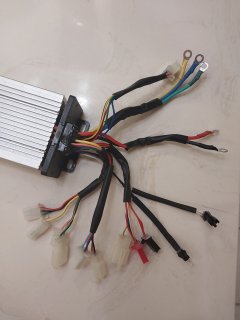
I bought new batteries for this scooter and shorted something, probably the controller, with my wrench while tightening a screw on one of the batteries. Everything works, horn, lights, signal turners, etc. Except the motor doesn't turn at all.

I'm wanting to know if the original controller is available or will I need to get a compatible one. I also need a wiring diagram because I'm not sure what each wire goes to. Suggestions on what and where to buy a replacement would be awesome.

Any help would be greatly appreciated.

Thank you in advance
 

Attachments

  • 20260113_183416.jpg
    20260113_183416.jpg
    1.3 MB · Views: 5
Also, where exactly would I connect the electric door lock wire? My original controller doesn't have this wire on it but, the scooter has a key lock to turn off/on and unlock the seat.
 
Also, where exactly would I connect the electric door lock wire? My original controller doesn't have this wire on it but, the scooter has a key lock to turn off/on and unlock the seat.
Electric Key Lock/Key Switch/Electric Door Lock/Ignition/Power Lock/Controller Power Wire : Controller on/off; usually applying battery level voltage to the signal wire turns on the controller (frequently a thin orange conductor)”
 
Ok, so I bought a new controller and same issue. I measured the voltage output on the throttle and it is a steady 2.3 volts with no change when twisting the throttle. Every now and then I hear a strange grumbling from the motor when I turn the scooter on. Would a bad throttle cause the scooter to not do anything? I jumped the red and green throttle wires but, nothing happens. I'm thinking about getting a new hall sensor for the throttle. Am I going in the right direction with this? Thanks
 
I connected the learning wires and the motor does run but, only in reverse. Also, it is very jerky. I think I just need to try a different combination of motor wire connections. I'm not sure if a new throttle hall sensor will correct this or not. I'm very new at this but, I do have a understanding of electronics and mechanics. Thank you for any assistance in getting this resolved.
 
Instead of shorting the throttle wires, you could try alternative ways to provide different voltage levels to the throttle inputs, for example up to 3 AA batteries in series or a switched power supply, if you have one.

But really, it could be any number of things. Maybe look up some videos on how to check for internal damage of motor controllers, such as this one:
 
I connected the learning wires and the motor does run but, only in reverse. Also, it is very jerky. I think I just need to try a different combination of motor wire connections. I'm not sure if a new throttle hall sensor will correct this or not. I'm very new at this but, I do have a understanding of electronics and mechanics. Thank you for any assistance in getting this resolved.
I started this thread since the self learning this has come up a few times within the last month. Maybe you aren't performing the right sequence.

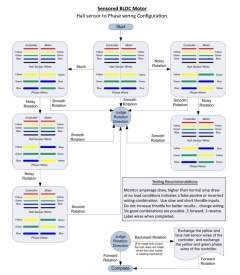
If you didn't run the right sequence for self learning, then the wiring combination may not be correct, which would explain the jerkiness. If for some reason the self learning can't detect the right combination, then you may need to go the brute force route and try all of the 36 combinations, or use this flow chart to reduce the number of tries to get it right
1768944369547.png
 
Instead of shorting the throttle wires, you could try alternative ways to provide different voltage levels to the throttle inputs, for example up to 3 AA batteries in series or a switched power supply, if you have one.

But really, it could be any number of things. Maybe look up some videos on how to check for internal damage of motor controllers, such as this one:
I actually watched that video not long ago. There were no blown mosfets as far as I could tell. I have new throttle mosfets coming tomorrow. Hopefully I'll see a change in voltage when I turn the throttle this time. Thank you for the great reply.
 
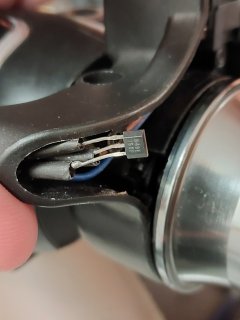
Well, I put a new mosfet in the throttle but, now the signal voltage reads 5 volts even when twisting the throttle. I used 49E just like the old one so, I'm not sure where to go from here. Maybe the new one is a dud? I'll try a different one tomorrow.
 

Attachments

  • 20260119_204104.jpg
    20260119_204104.jpg
    1.2 MB · Views: 4
I bought a new throttle and the wheels turn in the correct direction, forward and reverse, but it's jerky. So, I'm assuming the phase wires need moved around. I'm assuming since the 3 speed doesn't make a difference which position they're in, once I correct the phase, that will work as expected. What do you think?
 
Reversed phase wires would make the motor turn in reverse, as far as I know.

If you can rule out the throttle and the controller, it must be either the battery or the motor itself. To rule out the battery, it would be good to measure it under a load that is different from the motor, but unfortunately, I can't give you advice on how to do that, I have to find out myself, because I'm probably also going to have to do that at some point. Let me know if you find a good way :).
 
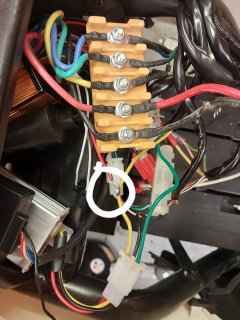
I'm so close at this point and really need your help here. I can get the scooter to go and almost everything works as expected. The only issue is that it only works when I have the main thick red wire and the door (key) switch wires connected together. Which means I don't need a key. I definitely don't want that. I soldered the door switch (see picture) to the key power line thinking that would work but, no go. I verified 48 volts when the switch is on. I'm thinking my wiring is wrong but, I can't see the reason why. Any help on how to resolve this would be greatly appreciated. Thanks
 

Attachments

  • 20260204_180251.jpg
    20260204_180251.jpg
    2.6 MB · Views: 3
So what was it that fixed the stuttering? Reverse phase wires after all?

From the wiring diagram on the amazon page it seems the key feature should be two cables, a yellow and black one. This probably means that it turns on when those two wires are connected together. normally you would wire a key switch in series, but if you don't want a key, you can also use a toggle switch. Just wiring the wires together is probably not a good idea, because then it would be constantly on.
 
I tried reversing phase wires using multiple combinations but, it still wasn't running smoothly. In the end, I put all phase wires to default color connections and used the learning wires several times (connecting/disconnecting) until it finally started working correctly.
 
Back
Top