• Hello ES! We could use some help to get us past the finish line on building the new knowledgebase for the forum.
    Can you donate? Please see our fundraising page. Thank you!

RIZE RX PRO Bafang M620 CAN Bus - Error 30, 0% Battery, & No Battery/Sensor Data in BESST

troyy

New here
Joined
Jul 20, 2026
Messages
5
Location
montreal
Hey everyone, looking for some insight on a Bafang M620 CAN bus setup giving me a persistent communication issue on a Rize RX Pro.

Component Setup (All Brand New):

  • Controller: New Bafang M620 CAN Bus Controller
  • Display: New Bafang DP C010.CB 2.0 (DPC18 style, 5-pin green triangular CAN connector) - Here is the exact screen I bought
  • Wiring: New 1T4 CAN Bus Harness Cable
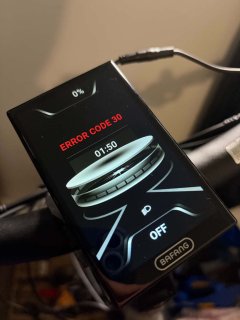
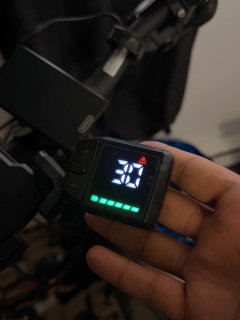
The Issue:When powering on the system, the display turns on but immediately throws Error Code 30 and shows 0% battery, when I press the throttle , the motor will not spin at all. However If I press Power + Down, the error message clears and the battery gauge jumps to 100%. But motor will not spin at all

BESST Tool Diagnostics & Readings:

  • Calibration Success (Motor Spins): I already successfully calibrated both the position sensor and the torque sensor using the BESST tool. During the position sensor calibration, the motor did give short spins, which confirms the controller is capable of driving the motor phases.
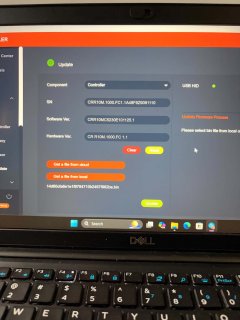
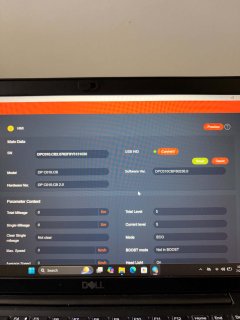
  • What Works: The BESST tool detects both the display (HMI) and the controller, pulling hardware/software versions and serial numbers without issue.
    • Controller SN: CRR10M.1000.FC1.1A48F8Z9091110 | SW: CRR10MC5230E101125.1
    • Display HW: DP C010.CB 2.0 | SW: DPC010CBF80202.2 (I also updated the screen firmware, but the issue remains).
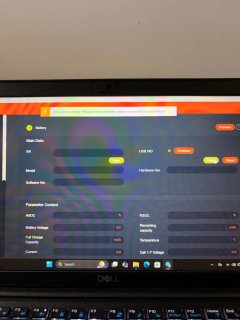
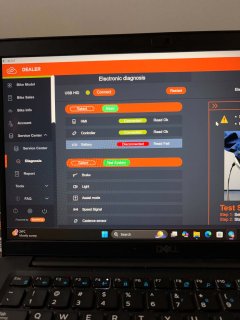
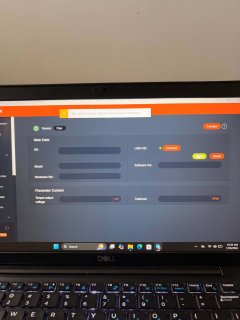
  • What Is Missing: Under the BESST diagnostic menus, I get no live reading for the battery and no reading for the sensors.
  • Isolating Peripherals: I have tested powering on with only the DP C010.CB screen attached to the 1T4 cable (throttle and brake sensors completely disconnected) to ensure a peripheral short wasn't pulling down the communication line, but the Error 30 persists.
Does anyone know what could be causing the controller to communicate its serial/software info to the BESST tool and successfully run calibrations, but fail to read the sensors/battery data and throw an Error 30 on the display? Could it be a firmware issue on the controller, or something else I'm missing?

Thanks in advance for any advice!
 

Attachments

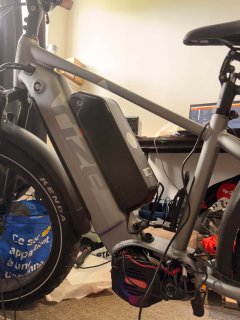
  • 5fca53a5-6d99-48f4-8424-ee5025cbf04f.jpg
    5fca53a5-6d99-48f4-8424-ee5025cbf04f.jpg
    138.8 KB · Views: 11
  • a9788a2c-0bbf-448c-a1d9-eef061be5082.jpg
    a9788a2c-0bbf-448c-a1d9-eef061be5082.jpg
    81.1 KB · Views: 8
  • 51927312-975d-4d40-b231-a85a7042f6b3.jpg
    51927312-975d-4d40-b231-a85a7042f6b3.jpg
    113.1 KB · Views: 8
  • 05536543-e0ec-4f3b-b360-27c52f05817e.jpg
    05536543-e0ec-4f3b-b360-27c52f05817e.jpg
    91.9 KB · Views: 8
  • 36036d3e-bf6b-40a6-b241-bb2e13500026.jpg
    36036d3e-bf6b-40a6-b241-bb2e13500026.jpg
    83.5 KB · Views: 8
  • 35d05b93-6383-4555-9ecb-0a663e05ba2b.jpg
    35d05b93-6383-4555-9ecb-0a663e05ba2b.jpg
    84.8 KB · Views: 11
  • f63b6281-6946-421a-9ac2-91bcf6517c8b.jpg
    f63b6281-6946-421a-9ac2-91bcf6517c8b.jpg
    78 KB · Views: 10
Hey everyone, looking for some insight on a Bafang M620 CAN bus setup giving me a persistent communication issue on a Rize RX Pro.

Component Setup (All Brand New):

  • Controller: New Bafang M620 CAN Bus Controller
  • Display: New Bafang DP C010.CB 2.0 (DPC18 style, 5-pin green triangular CAN connector) - Here is the exact screen I bought
  • Wiring: New 1T4 CAN Bus Harness Cable
The Issue:When powering on the system, the display turns on but immediately throws Error Code 30 and shows 0% battery, when I press the throttle , the motor will not spin at all. However If I press Power + Down, the error message clears and the battery gauge jumps to 100%. But motor will not spin at all

BESST Tool Diagnostics & Readings:

  • Calibration Success (Motor Spins): I already successfully calibrated both the position sensor and the torque sensor using the BESST tool. During the position sensor calibration, the motor did give short spins, which confirms the controller is capable of driving the motor phases.
  • What Works:The BESST tool detects both the display (HMI) and the controller, pulling hardware/software versions and serial numbers without issue.
    • Controller SN: CRR10M.1000.FC1.1A48F8Z9091110 | SW: CRR10MC5230E101125.1
    • Display HW: DP C010.CB 2.0 | SW: DPC010CBF80202.2 (I also updated the screen firmware, but the issue remains).
  • What Is Missing: Under the BESST diagnostic menus, I get no live reading for the battery and no reading for the sensors.
  • Isolating Peripherals: I have tested powering on with only the DP C010.CB screen attached to the 1T4 cable (throttle and brake sensors completely disconnected) to ensure a peripheral short wasn't pulling down the communication line, but the Error 30 persists.
Does anyone know what could be causing the controller to communicate its serial/software info to the BESST tool and successfully run calibrations, but fail to read the sensors/battery data and throw an Error 30 on the display? Could it be a firmware issue on the controller, or something else I'm missing?

Thanks in advance for any advice!
Any information you could share regarding the battery you are using?
 
Bad connections or bad display or not compatible display (might be not compatible firmware).

Does that BESST tool allow to change the support level and spin the motor with a throttle? If so then the display might be an issue.

If you can clear the error with display make sure you set the support level before trying to spin the motor (if support level is 0 the motor will not spin with throttle or with pedals).

If that BESST tool supposed to read the battery voltage then maybe the controller has ussies not reading the battery voltage. If it suppose to read only percentage of the battery then the firmware on the motor controller might be not set for proper voltage of the battery you have. Check if that BESST tool can setup the voltage of the battery and check the battery voltage (amount of series cells) matches what you set in that tool. The motor controller firmware might have protection if you connected it to a battery with voltage it does not expect.
 
Last edited:
i already updated the screen firmware , but still same issue
and for the screen i cant delete the error , but i can read code 30 on the screen ,
and for BESST tool it give u non of the battery information , like there is communication problem with voltage
i suspected the screen is the issue , i suspected that the screen is the issue, btw i already ordered another model of screen that support m620 bafang.
and i keep updated, Thanks for helping tpehak
Bad connections or bad display or not compatible display (might be not compatible firmware).

Does that BESST tool allow to change the support level and spin the motor with a throttle? If so then the display might be an issue.

If you can clear the error with display make sure you set the support level before trying to spin the motor (if support level is 0 the motor will not spin with throttle or with pedals).

If that BESST tool supposed to read the battery voltage then maybe the controller has ussies not reading the battery voltage. If it suppose to read only percentage of the battery then the firmware on the motor controller might be not set for proper voltage of the battery you have. Check if that BESST tool can setup the voltage of the battery and check the battery voltage (amount of series cells) matches what you set in that tool. The motor controller firmware might have protection if you connected it to a battery with voltage it does not expect.
 
I know Bafang motors go with 48V and 52V firmware. It might be the firmware on the motor is set for 48V while you connected 52V battery and it refuses to work with 52V or something. Check the sticker on the bottom of the motor, it should tell something about it.

I also know the displays have battery voltage settings if you go to the display settings menu, maybe try to see and change that thing also.
 
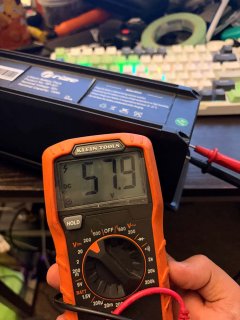
Battery voltage seems to match the controller voltage according to pictures.
If the battery has no canbus communication connected to the usually black 4 pin ( only 3 pins have wires) controller connector then no battery data can be shown. But without, motor should work fine too. For the torque sensor, if analog then no data shown in that last picture.
Good idea to order another different display, you never know.
You did not mention if under Tools / controller, if you can see parameter data. Does it show besides serial, softw. version etc. does it show parameter data voltage, speed limit, wheel size / circumference? Does it show on the right also a torque voltage which should change by putting pressure on the pedal with your foot while holding the brakes? Cadence will be at zero but if you turn the pedals it should show too.
 
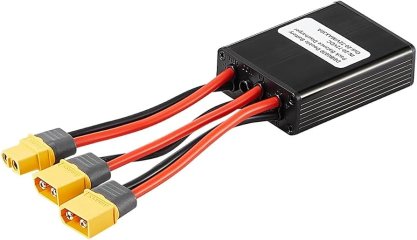
51iVO8nnQcL._AC_UF894,1000_QL80_.jpg
the bike comes with this adapter battery to combine both battery, i already mesured the voltage looks fine , same for the cables .
i did bypass for this adapter and plugged the battery directly to the controller but same problem unfortantly
 
UPDATE.
i just received this new screen that works with m620

but always the same with issue error 30 .

anyone can help Please
 

Attachments

  • e538f015-3617-45a2-92ce-a282b19516d6.jpg
    e538f015-3617-45a2-92ce-a282b19516d6.jpg
    55.6 KB · Views: 2
Why did you buy the BESST tool and calibrate the motor in the fist place? Is it because of the motor stopped working and you tried to troubleshoot with it? Or you purchased the whole set new (motor controller, display and the BESST tool for some reason) and it does not work?

If the motor worked fine and just stopped working for no obvious reason and changing the display did not help then the problem is likely the wiring (bad connections or broken wires) or the controller.

If you purchased whole set new from different sources then maybe everything is fine except the firmware on the controller (maybe Bafang changed firmware and it is not compatible with some displays or something). I know people change firmware on those motors somehow (I guess with that BESST tool), so maybe try figure out how they do it and install different firmware (dump the original firmware if it is possible just in case).

If you purchased the controller new and replaced the original controller with it then you need to double check you installed it correctly (jammed wires, damaged components during installation, not correctly connected cables to the controller, you can easily connect the torque sensor and temperature sensor wrong way to the controller PCB for instance, etc.)
 
Last edited:
Back
Top