• Hello ES! We could use some help to get us past the finish line on building the new knowledgebase for the forum.
    Can you donate? Please see our fundraising page. Thank you!

VESC based INNOTRACE motor controller for Bafang M620 CANbus

It looks like we need instructions about how to flash the STM32 chip of the motor controller with the bin firmware file.

When you have a blank controller STM32 chip with blank Bluetooth module NRF chip and want Bluetooth working then flash the Bluetooth module NRF chip first before flashing the controller STM32 chip like explained here


Here is the tools list you need (the same tools you need to flash the NRF chip of the Bluetooth module):

1) Obtain an ST-Link V2 dongle (ST-Link V2 dongles can be purchased here for example https://www.amazon.com/dp/B0B2D6HZR6?th=1)

2) Obtain a Tag-Connect cable TC2030-MCP-NL (This cable and all further items below are to connect the ST-Link V2 dongle to the controller. This cable and all items below are optional, you can solder wires to the pads and connect them to ST-Link dongle, however you want to make it happens. The cable can be purchased here https://www.digikey.com/en/products/detail/tag-connect-llc/TC2030-MCP-NL/2666489)

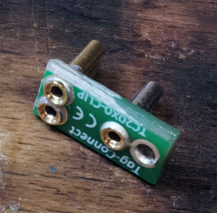
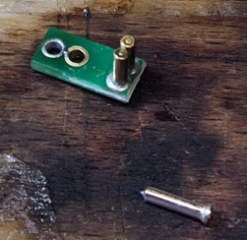
3) If you want to use the Tag-Connect cable I mentioned above then you also might want to obtain a TC2030-CLIP (This clip fastens the Tag-Connect cable to the controller board. This part is obsolete and hard to find. But you can use TC2050-CLIP and re-solder one receptacle to match the TC2030-MCP-NL cable interface. This clip can be purchased here https://www.digikey.com/en/products/detail/tag-connect-llc/TC2050-CLIP-3PACK/12318009 )

1774643761959.png

1774643775852.png

1774643788437.png

This clip can hold the Tag-Connect cable connected

1774644115681.png

4) Obtain an RJ11 to pins adapter ST-RJ11-R-BB if you want to use the Tag-Connect cable I mentioned above (This adapter is to connect Tag-Connect cable plug and have convenient access to the pins. The adapter can be purchased here https://www.digikey.com/en/products/detail/schmalztech-llc/ST-RJ11-R-BB/23307380 )

5) You also might need to obtain some jumper wires for wiring between the ST-Link V2 and the ST-RJ11-R-BB adapter (To connect the ST-Link dongle to ST-RJ11-R-BB. Bulk of such wires can be purchased here https://www.digikey.com/en/products/detail/digikey/DKS-20FF-20/17038802 )

Now you can flash the bin firmware file:

1) Make sure ST-Link V2 drivers are installed if you have not installed it yet. ST Link V2 drivers can be downloaded here https://www.st.com/en/development-tools/stsw-link009.html

2) Download and install ST-Link Utility application for PC. It will offer to install drivers during installation, install those too. Here is the official download of ST-Link Utility application https://www.st.com/en/development-tools/stsw-link004.html

3) Connect the ST-Link V2 dongle to the BRAIN board P7(STM32) interface using the Tag-Connect cable and other parts I mentioned above and wire it following the pinout from the BRAIN board KiCAD files. (3.3V to 3.3V, GND to GND, SWDIO to SWDIO, SWCLK to SWCLK, NRST to RST). You can use a multimeter in ringing mode to check the pins on the Tag-Connect cable and where they go.

1774644632647.png

4) Stick the ST-Link V2 dongle to USB in your computer

1774645601474.png

5) Launch the ST-Link Utility you downloaded and installed earlier

6) In the launched ST-Link Utility application click "Target-->Connect"


1774645197322.png

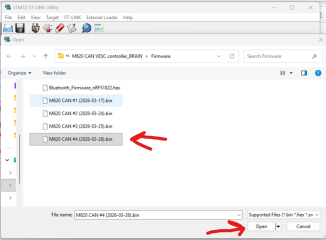
7) Then click File --> Open File and select the firmware bin file that you need.

1774645717559.png

1774645781357.png

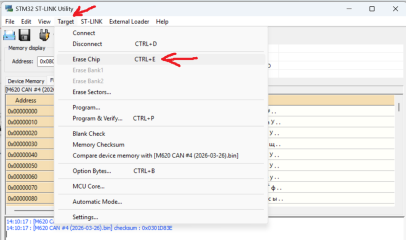
8) Then click Target --> Erase Chip

1774645857235.png

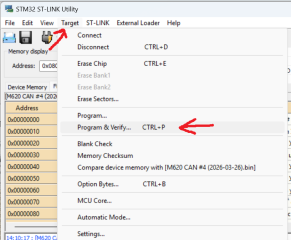
9) After erasing process is complete click Target --> Program & Verify
1774646015610.png

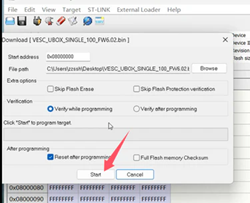
10) Click the "Start" button and wait until it has complete flashing the firmware bin file and verification is done
1774646179359.png

1774646290742.png

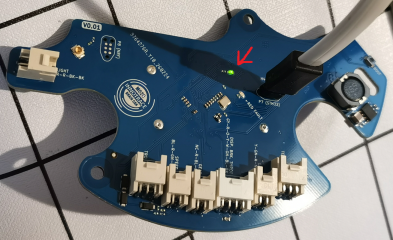
After some time after flashing is complete you should see the green LED turns on
1774646439525.png

11) Click Target --> Disconnect

1774646508694.png

12) Eject the ST-Link V2 dongle from PC and disconnect the controller

1774646686194.png

13) Now you should be able to connect the controller to the VESC Tool application ( you can use a USB-C cable (can connect without powering the controller up with battery), or Bluetooth (needs to power the controller up with battery or USB), or VESC Express dongle (needs to power the controller up with battery)).

14) After connecting the controller to the VESC Tool application apply the appropriate motor configuration xml file (at the moment the current motor configuration file is "M620 CAN #4 (2026-03-26) motor config.xml" )

File --> Load Motor Configuration XML

1774647143444.png

Select the motor configuration xml file you need
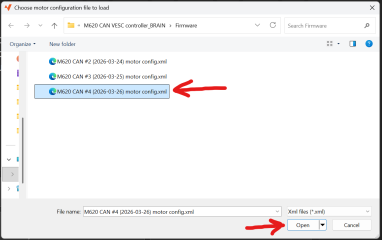
1774647261398.png

Click the Write Motor configuration button in the right side menu of the VESC Tool application
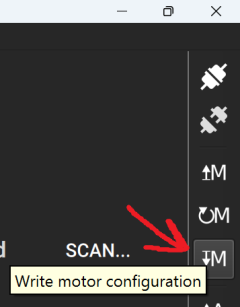
1774647356157.png

After this you can calibrate the rotary encoder (you do not need to change the amount of poles, it is already set correct) and setup your battery voltage limits, battery cells amount and setup your motor current and wattage through the VESC Tool application.
 

Attachments

  • 1774644085875.jpeg
    1774644085875.jpeg
    1.1 MB · Views: 3
Last edited:
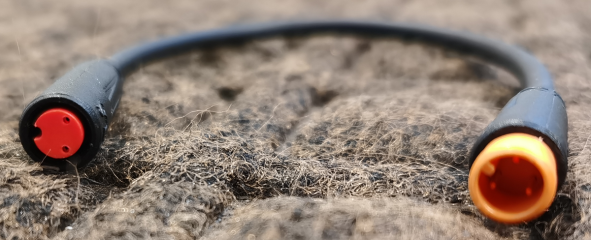
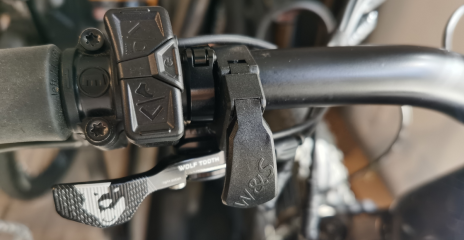
The new thumb throttle I planned to install has arrived and looks great! It works without issues. It is smaller than the original Bafang throttle and mounded with a split clamp without sliding it on the handlebar which is very convenient.


The controller with the throttle does not make more power on my setup with 14S battery, the top speed with throttle alone is just about the same as with pedal assist alone. It can make more power with throttle though if you will use higher voltage battery and the motor RPM will overcome the cadence you can spin the pedals with (on the VESC M600 and the VESC M560 controllers with 16S battery the controller can spin the motor faster than I can keep with it up)


1774671457178.png

1774671678522.png

1774671770207.png
 
Last edited:
Hey, you're awesome as always! If you have time, could you make a Luna CAN firmware for the FS MK5 controller? That would be awesome.
 
Hey, you're awesome as always! If you have time, could you make a Luna CAN firmware for the FS MK5 controller? That would be awesome.
I am not familiar with the VESC and Luna firmware. I know where the power limits are and the circuit with code for Bafang UART torque sensor though (and I posted the instructions how to deal with those), I also know the firmware source code files location with latest Luna updates can be used to build the latest Luna firmware, but this is not enough to modify the Luna firmware for other controller. It will require a lot of time and research figuring out that controller circuits, exploring the VESC and Luna codes and algorithms and figuring out how that VESC/Luna firmware works and interacts with the MCU. At this point it will be faster to design and solder a controller with the shape and size you want using the Luna controller for reference so it will work with the Luna firmware without changing it much.

If you really want to make that controller works with Lina firmware you need to figure out the schematics for that controller and see how the pins are connected to the MCU, check if there are voltage dividers or something scale the signals voltages down. Then you need to figure out what sensors you want to use with your controller and explore those sensors outputs, voltages signals (throttle, cadence sensor, torque sensor). Then knowing the controller schematics and your sensors outputs you can plan how you can connect your sensors to the controller. Then you need to figure out how the VESC or Luna firmware assigns the pins to different functions in the code and how it reads and process the sensors outputs, how it reads the values and how it uses those values, voltages and signals. You basically go through all those files with the code and explore the code in each file to figure out the architecture of the firmware and values it uses and processes. It might require not much changes in the firmware, but 99.9% of time will be spent on the exploring to figure out those changes. That is enormous amount of work for someone who did not make the VESC or Luna firmware.

It looks like there are some people on the VESC Discord server familiar with the VESC stuff and they might know what exactly should be changed in the Luna firmware to make it works with that controller and you can try your luck there. They advertise their consulting services there so do not expect they will do it for free, but it might be the most effective route. If you are not the only one who needs that custom Luna firmware you might crowdfund it to pay what the VESC guys would ask for this effort. I did not have luck with their consulting services though (they simply did not respond).

The whole idea of the controllers we designed and reversed is to split the work and responsibilities and to not spend too much time. We designed the hardware and Marcos keeps working for the firmware for the hardware we designed so we do not need to spent time figuring the firmware out.

You might noticed even the people somewhat familiar with the VESC stuff prefer to design, build and code whole separate overhead boards to control the VESC controllers through the standard VESC inputs rather than mess with the VESC firmware directly.
 
Last edited:
I am actually tinkering with an idea of designing a modular integrated bare bone smallest most power dense "Shrimp" shaped universal motor controller specifically for mid drive motors (because of most mid drive motors have the same architecture with a "Shrimp" shaped cavities that controller would fit) that would work with the Luna firmware and a user just need to check their bike sensors outputs and solder the wires to the controller to connect those sensors and use a Bafang display. So you can Luna any mid drive motor, Bosch, Yamaha, Bafang, DJI, you name it. But it might not work, will see. But designing and soldering that thing would certainly will be faster and easier, than messing with the Luna firmware, even it might take months.

1774744706604.png
 
Last edited:
Will complete motors with this controller or sending a motor for conversion be available in the future?
 
I am not familiar with the VESC and Luna firmware. I know where the power limits are and the circuit with code for Bafang UART torque sensor though (and I posted the instructions how to deal with those), I also know the firmware source code files location with latest Luna updates can be used to build the latest Luna firmware, but this is not enough to modify the Luna firmware for other controller. It will require a lot of time and research figuring out that controller circuits, exploring the VESC and Luna codes and algorithms and figuring out how that VESC/Luna firmware works and interacts with the MCU. At this point it will be faster to design and solder a controller with the shape and size you want using the Luna controller for reference so it will work with the Luna firmware without changing it much.

If you really want to make that controller works with Lina firmware you need to figure out the schematics for that controller and see how the pins are connected to the MCU, check if there are voltage dividers or something scale the signals voltages down. Then you need to figure out what sensors you want to use with your controller and explore those sensors outputs, voltages signals (throttle, cadence sensor, torque sensor). Then knowing the controller schematics and your sensors outputs you can plan how you can connect your sensors to the controller. Then you need to figure out how the VESC or Luna firmware assigns the pins to different functions in the code and how it reads and process the sensors outputs, how it reads the values and how it uses those values, voltages and signals. You basically go through all those files with the code and explore the code in each file to figure out the architecture of the firmware and values it uses and processes. It might require not much changes in the firmware, but 99.9% of time will be spent on the exploring to figure out those changes. That is enormous amount of work for someone who did not make the VESC or Luna firmware.

It looks like there are some people on the VESC Discord server familiar with the VESC stuff and they might know what exactly should be changed in the Luna firmware to make it works with that controller and you can try your luck there. They advertise their consulting services there so do not expect they will do it for free, but it might be the most effective route. If you are not the only one who needs that custom Luna firmware you might crowdfund it to pay what the VESC guys would ask for this effort. I did not have luck with their consulting services though (they simply did not respond).

The whole idea of the controllers we designed and reversed is to split the work and responsibilities and to not spend too much time. We designed the hardware and Marcos keeps working for the firmware for the hardware we designed so we do not need to spent time figuring the firmware out.

You might noticed even the people somewhat familiar with the VESC stuff prefer to design, build and code whole separate overhead boards to control the VESC controllers through the standard VESC inputs rather than mess with the VESC firmware directly.
Thanks for the detailed explanation! I guess I didn't explain myself clearly—I just need to integrate part of the Luna code for the Bafang CAN display so I can connect the display to the controller via the CAN bus!
 
I do not know how and where VESC firmware code controls this communication. Maybe there is a dedicated file with code in the Luna source code folder just for this display functionality that picks the values and sends them to the display. In this case you need to find this file somehow (exploring the VESC code files I guess) , then you need to figure out how the STM32IDE application builds the bin file (how it picks those files for building the bin file (it is probably a line with the file name of that display code or something somewhere in the VESC files), then you need to figure out where the files with the code commanding such thing for your motor controller firmware are located and then you need to modify the code somehow to make that display communication code to be included during the bin file building process. After this you need to figure out what is the "target" (a dedicated word with your controller name, model and revision) for your controller (I believe there is a file with list of controller names somewhere the VESC firmware files, it probably can be found there) and you can use that word building the firmware bin file for your controller just like I used the word luna_m600_Rev5 in the bin file building process example I posted.

If this display code is not a dedicated file but a file with other codes for other functions, then you need do do even more research of how this code works and how to integrate it in your controller firmware code.

I know for sure how the display can be connected though. You connect GND to GND pin on the display, voltage between 12V and 60V to the 12V pin on the display, CANL to CANL, CANH to CANH.The KEY pin on the display might require figuring out the electrical circuit on the controller and maybe there is a programmed function in the firmware making the STM32 controls the buck converter on the controller PCB to turn the buck converter on and off to turn the display and controller MCU power supply on and off. Or you can leave it disconnected and turn the controller with the display on and off different way. I do not know how exactly the display communication algorithm in the Luna firmware works with the Bafang display, but you might need to sincronize the moment of turning the display and the controller on to make the display works properly without error messages in case you deside to turn the display and the controller separately without figuring out the electrical circuits for the KEY pin.
 
Last edited:
It looks like we need the best practice PCB assembly instructions. You can do it your own way, just make sure you do it in well organized manner and track the parts you soldered or placed on the PCB.

So if you are going to solder the PCB with hot plate here is the process I recommend:

Before you started:

- Do not apply solder paste on the PCB before organizing the the working place, organizing all the parts you are planning to solder and before preparing the hot plate itself.
- Find some prototyping PCBs and test the temperatures, timings and and soldering on it with your soldering tools firs observing how the solder melts and when to take the PCB out from the hot plate

These prototyping PCBs can be used for exercising, they have the pads on the edges you can use to apply solder paste and see how it behaves during soldering process.


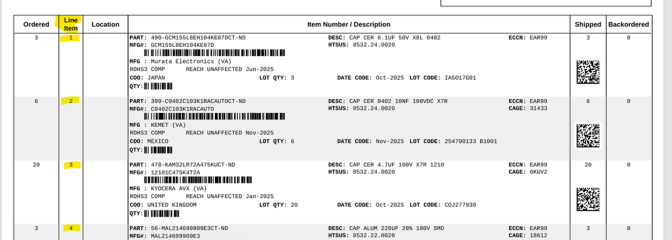
1) If you ordered the parts using the links from the KiCAD files I posted I specified those mostly from DigiKey for convenience. There are some parts from different suppliers, but most of them from one (DigiKey). So go the DigiKey page with your order and download and open the Packlist PDF file with your ordered parts and download other suppliers packlists).

1775011320496.png


2) Sort the bags from DigiKey by the bag numbers so you can quickly find parts in the bag with the number you want by the bag number. You can organize those bags by the numbers in a bin for instance, here is an example:

1775011753792.png

The bag numbers match the Lina Item in the DigiKey Packlist.

1775011971587.png


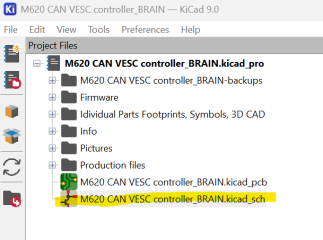
3) Open the KiCAD program and open the PCB project file you are planning to solder. Open schematic


1775012236797.png

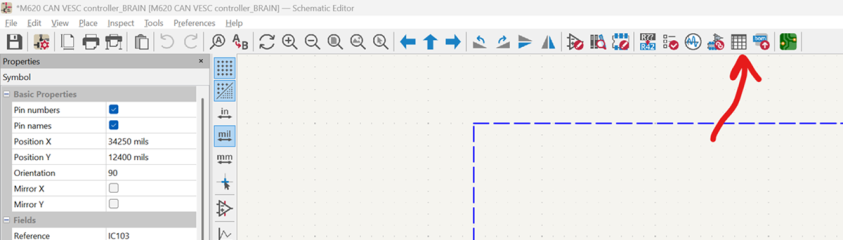
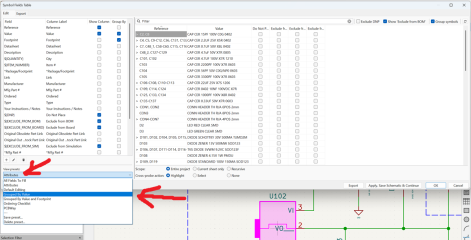
Open the Edit Symbol Fields


1775014028515.png

Select the View Preset and select Grouped by Value

1775013978954.png

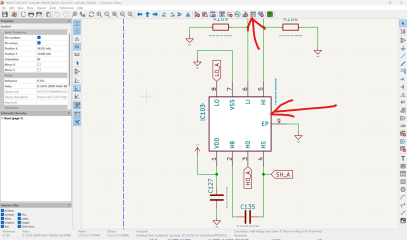
Close the Edit Symbol Fields and open the Schematic Editor

1775012450179.png

Open the 3D View

1775012493930.png


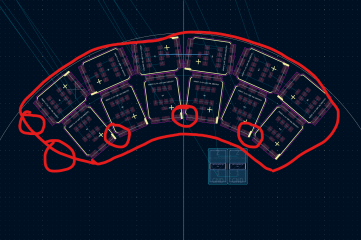
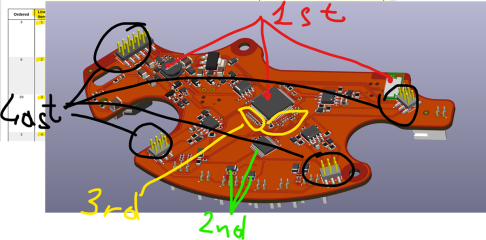
4) Look on the 3D view and plan how you are going to place your components. I recommend to start placing big low profile components first (like inductance coils) and go smaller and smaller (from big diodes, resistors, transistors, capacitors etc to smaller diodes, resistors, transistors, capacitors etc). The last thig you want to place on the PCB is the tall components like USB connector, headers, etc.

1775012840099.png

5) If everything is ready apply the soldering paste to your PCB. Here is an example


6) Bring the PCB to the working area (I used microscope) an start placing the components (I used the electric suction tweezers I mentioned earlier)

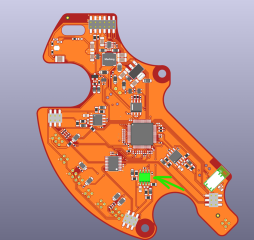
7) To start placing the components in organized manner and to track them see on the 3D view and notice which component you want to place, let say this one

1775013591157.png

8) Notice where the component is go to the PCB editor and click on that component. (I recommend to turn off the footprints from opposite side of the board and turn off other stuff and layers to see what you want better and to pick want you want easier).

Select footprint of the components you want to place and click on the Schematic Editor icon

1775013656804.png

9) The components you selected in the PCB editor will be centered in the Schematic editor, click on it and click on the Edit Symbol Fields icon

1775013810863.png

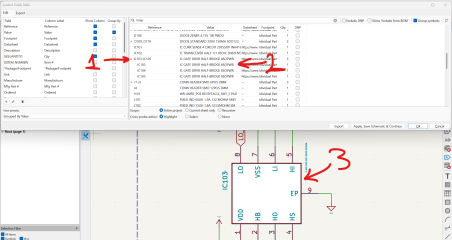
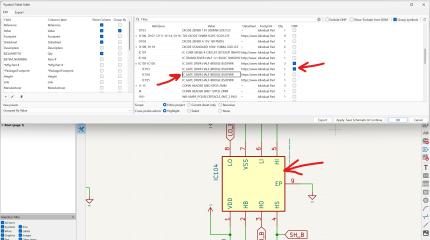
10) In the opened table the group with the same components will be highlighted. Expand the group to see all the components with the same value (same components), click on the value and copy the text (Ctrl+C). The component you clicked in the table will be centered in the graphic view of the Schematic Editor, click on the component in the Schematic Editor and Alt+Tap to the 3D view window

1775014444822.png

The component you clicked will be highlighted. This is where you should place the next component with the value you just copied text of.

1775014594947.png

11) Go to the opened Packlist PDF file from DigiKey and find the component with the value you copied (Ctrl+F, then paste the value using Ctrl+V, then press Enter). See the Line Item number of the component. This is the number of the bag with the components you go and take.

Be careful and do not pick the number accidentally from the "Ordered" column instead of the "Line Item" column!

1775014827219.png

12) Place the component on the same place highlighted in the 3D View.

Pay attention the component orientation! If it is a diode, or an integrated circuit, it a polarized capacitor etc watch the marks on the components, watch the marks on the PCB and watch the marks in the 3D View to properly orient the part.

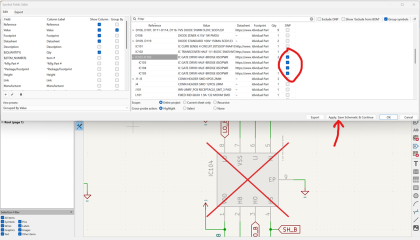
Alt+Tab to the Schematic Editor in the Symbol Fields table and mark the component you placed as DTP (which means do not populate). Click on the next component with same value in the Symbol Fields Table and click on the centered component in the graphic view in the Schematic Editor. Alt+Tab to the 3D view again and see the next highlighted component with the same value you need to place. Place it and go to the next one the same way. Of the component is on opposite side of the PCB to not place it of cause and do not mark it as DNP.

1775015346952.png

1775015473141.png

13) Once you place the component with the same value on the PCB and marked the placed conponents as DNP in the Symbol Fields Table click the "Apply, Save Schematic & Continue" button and Alt+Tab to the PCB Editor window

1775015670059.png

14) Update the PCB from Schematic

1775015790423.png

15) Go to the 3D view and check the components you placed are disappeared in the 3D view

1775015876928.png

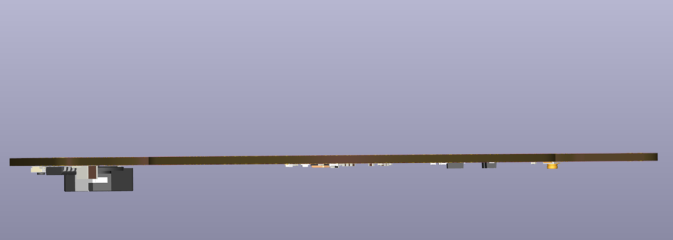
16) Place the bag with the components back to place where you keep it and go to the next batch of coponents placement the same way you did in the steps 7 to 15 until all the components are placed on one side of the PCB. You can rotate the 3D view to see it from the rib to check if there is anything left to place
 
Last edited:
Thanks for the detailed explanation! I guess I didn't explain myself clearly—I just need to integrate part of the Luna code for the Bafang CAN display so I can connect the display to the controller via the CAN bus!
By the way, it looks like markos copied the early version of Trampa 75/300 (or 100/250)motor controller and Luna BBSHD Ludicrous V2 and early revisions of Luna M600 Ludicrous V2 controllers are basically Trampa 75/300 which means in theory Luna firmware (particularly Luna BBSHD Ludicrous V2 firmware) might work with early versions of Trampa 75/300 controller natively without modifications of the code if you are looking for a readily available controller to make it works with Bafang display. If you know there are other companies copied Trampa 75/300 (100/250) then maybe there are even more options. But of cause there is a risk there are some changes can render it not working.
 
Last edited:
We recently explored a weird behavior of the controller on the throttle on stand still bicycle. I did not know such behavior exists because of I never used throttles on stand still bicycles or VESC controllers before, but other people who also fabricated and tested this controller noticed it.

I tested the controller today with throttle on a real ride to check it and I found if I stay still on the bicycle and start pressing the throttle (even slightly) the motor hits the transmission and backs off, then hits the transmission over again and backs off again and do it jerking back and forth over and over like an impact wrench and almost does not move the bicycle (well, maybe moves it a little). The motor can hit the transition quite hard doing it's jerking thing. If I roll the bicycle even slightly and then press the throttle the motor starts working normally.

I tried the throttle curves, the throttle voltages limits and other throttle adjustments with slow response in the VESC Tool and it did not help (while it does make it softer if you use the throttle on the rolling bicycle it still can start jerking on stand still bicycle). Also even if I press the throttle just slightly and very carefully from stand still is still can start jerking.

I never was able to achieve such jerking behavior using pedals (with the pedals the motor does not start working before you start cranking the pedals at least a little and when you cranking the pedals the bicycle obviously is moving already and the motor starts working without issues). The pedal assist mode had never issues for me.

The people who use this controller also reported the throttle works fine if you select "Duty" mode on the VESC Tool. I did not not test it, but as I understand the pedals assist does not work in the mode on the Luna firmware.

The assist level on the Bafang display and the power you set in the VESC Tool also affect that "impact wrench" behavior. In the Eco mode the throttle starts spinning the motor on stand still bicycle without impact wrench behavior for instance.

The controller does have a rotary encoder and this encoder does work (I tested it in encoder mode and in sensorless mode and there is a big difference in how the motor can start).

There is a thread on this forum that looks like discussing about similar behavior of the VESC controllers. Maybe this is a common thing for the VESC firmware.


So if you are going to make this controller be avare of such thing.

The possible solution is to modify the firmware the way the motor works in that "Duty" mode and the torque sensor value obtained from the torque sensor drives that "Duty" value in the VESC firmware.

I guess the Duty cycle in the VESC firmware is the motor RPM target or something. In the firmware in order to make the torque sensor works that RPM target can be calculated from knowing the existing motor RPM and the torque value on the crank arms torque sensor and maybe mixed with the cadence value and decays and ramping ups. Doing so the torque sensor motor torque control can be emulated through the Duty cycle.

I think marcos is the one who is responsible for solving those firmware issues since the Luna controllers use the same firmware and have the same behavior so if you have concerns I would recommend you to bother him first. While he might ignore our controllers but he is still obligated so solve the Luna controllers firmware issues.
 
Last edited:
DUTY CYCLE will work with the torque sensor if you put it in PAS only, go to APP SETTING>GENERAL TAB>APP TO USE and put PAS but the throttle won't work its either one or the other. IF you go to APP SETTING>ADC>GENERAL TAB>CONTROL TYPE you will notice that DUTY CYCLE has NO REVERSE BRAKE ADC2 option like CURRENT mode and I think that's why the throttle and torque sensor doesn't work. When you choose APP SETTING>GENERAL>APP TO USE AND PUT ADC AND PAS both work in current mode? I tried every setting in Current mode and the only way to stop that clunk is to tie wrap the rear freewheel which is not the best setup.
 
Another alternative is to obtain the VESC based INNOTRACE X1 firmware from Krasnodar and integrate the Krasnodar code into the Luna firmware if Marcos does not want to fix his stuff. Now I feel like this VESC firmware behavior is the reason the VESC guys so obsessively demanded the INNOTRACE X1 firmware to see how Krasnodar resolved that throttle jerking behavior of the VESC firmware.
 
Last edited:
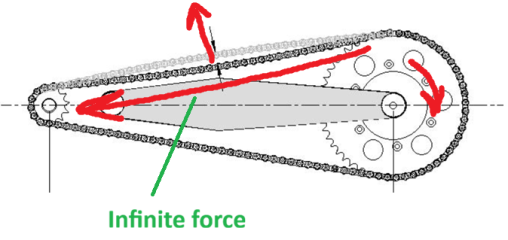
Here is what happens. If you have some slack in your drivetrain the top portion of the chain is slacked down under the gravity force. Plus the motor gears transmission has some slack. When you press the throttle from stand still and got some slack the transmission gears slack allows the rotor of the motor to build some kinematic energy and quite high RPM before it removes the slack in the gears of the motor transmission. Once the slack in the gears transmission is over it starts pulling the chain. When you pull the chain you remove the chain slack but the chain gains some kinematic energy and starts moving up and passes the straight line position and starts pulling the chainring in opposite direction with infinite force (because of the angle between chain kinematic force and the chain line is 90 degree initially). The opposite side of the chain rests on the cog and the whole bike and rider inertia force hold it back. Because of there is quite high gear ratio between the chainring and the motor rotor even light motion of the chain in the opposite direction causes the motor stator rotates back instantly and noticeably no matter how much speed and torque the motor stator gained because of it fights with infinite force initially through quite rigid motor gearbox with no clutch or anything. As result the motor gains quite high RPM, then instantly stops and bounces back with infinite force and quite high RPM gaining kinematic energy in opposite direction (the M620 rotor is quite heavy) because of the chain and the gearbox. VESC controllers never dealt with high gear ratio gearboxes with slacks and chains without clutches and possibility rapidly being bounced back with infinite force withing split second so whatever the control algorithm VESC firmware uses it is not prepared for such scenario.

1777605777037.png
 
Last edited:
Tried adding DUTY CYCLE NO REVERSE BRAKE ADC2 to VESC firmware with but was not successful hopefully someone could figure this out?
 
Last edited:
Tried adding DUTY CYCLE NO REVERSE BRAKE ADC2 to VESC firmware with but was not successful hopefully someone could figure this out?
What is the chainring size you use? You might try to install smaller chainring (like significantly smaller, maybe about eMTB size chainring) and that might work as a band aid solution.
 
Yes It rachet so hard once it broke my clutch bearing, for a band aid solution I put a tie wrap on the rear cog to the spoke to keep the rear cog tight.
 
OK, just for the record I use pretty big and heavy 46T steel chainring with M620. I did not test the throttle from stand still on other ebike with INNOTRACE m560 controller or VESC for M600 controller with small chainring though, but even if it works OK it might be not a completely correct comparison due to modified firmware, smaller motor size and different gearbox.
 
I just connected the VESC Tool to the INNOTRACE M560 controller and experimented with the Duty cycle control mode and the torque sensor does not work too in this mode even it has different torque sensor and different code to process that torque sensor signal. It looks like the VESC firmware uses throttle only in this mode and who knows if it still processes the torque sensor and the cadence sensor signals in this mode on the background. It needs to be explored how it processes those signals and what it does switching to the Duty cycle control mode to figure out how to make the pedal assist works in this mode. If it processes those signals it might be possible to override the throttle signal value with the torque sensor value so both the throttle and the torque sensor + cadence sensor will drive the duty cycle value. Or maybe it is possible to code a hybrid mode when the torque sensor works as usual and the throttle controls the Duty cycle value.

1777698427334.png
 
Back
Top