• Hello ES! We could use some help to get us past the finish line on building the new knowledgebase for the forum.
    Can you donate? Please see our fundraising page. Thank you!

Battery Design Software

HomeIO

🔌 New-ish
Joined
May 23, 2022
Messages
28
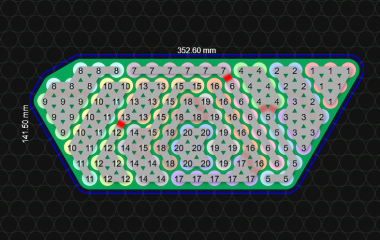
Hello everyone, I developed a battery design software to make it super easy to plan out complex lithium-ion battery packs made from 18650s, 21700s and other cylinder cells.

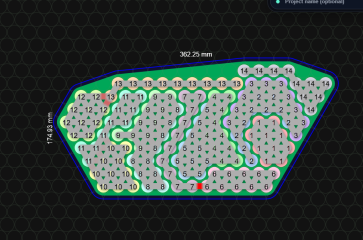
You can do all kinds of stuff in this program. You can determine how many cells can fit in a given space, you can generate STL files for 3D printing, you can generate buss bar files to print and use as a template, you can simulate the battery and estimate the voltage drop and power loss and much, much more.

It has a super easy to use point and click paint style interface that is a lot like, it's a lot more like MS Paint than it is like Fusion 360. Yet the results you get from it are something that would normally take you hours to design in any other program.


1760368584479.png
 
Last edited by a moderator:
I don't see any links to the software, or anything attached to the posts in the thread?

If it's software you're selling, rather than freely available, I'll move this to the items-for-sale-new section where such ads for things should go. ;)
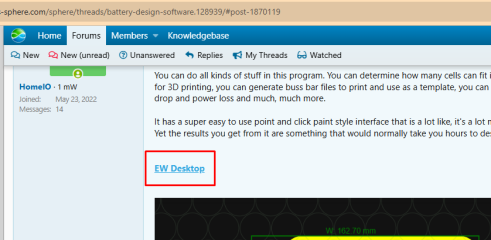
The software is the website link.

It is in the first post and named EW Desktop.
 
Looks great! A screen recording demonstrating workflow laying out a battery would be very helpful.
 
It would be nice to get these resources in one place. We discussed software like this recently -

 
And here I am gonna series a 12v battery in just for extra juice. That is really cool, though.
 
Regarding auto layout option.
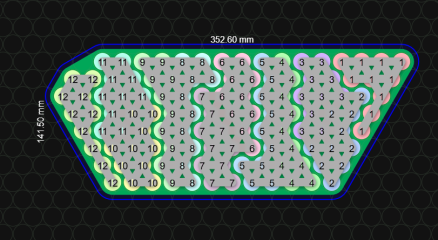
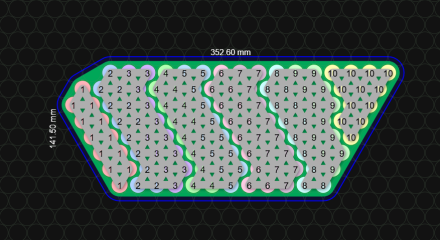
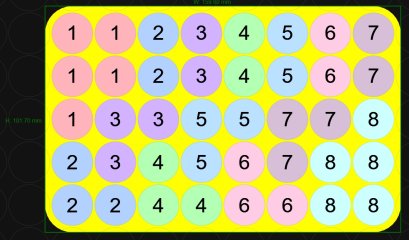
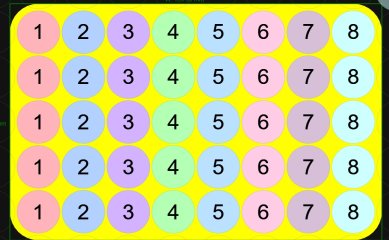
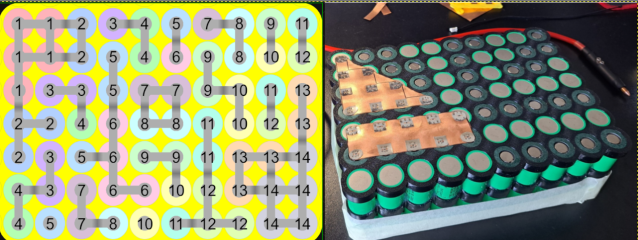
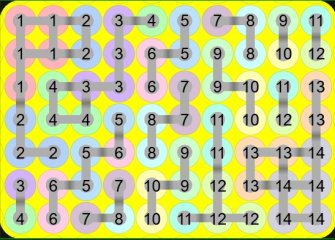
Why 8s5p autolayout (pic1) is 84% when it can be clear seen that 8s5p groups can be done in 100% consistency like in pic2

pic1
Screenshot 2025-11-30 095915.jpg

pic2
Screenshot 2025-11-30 100641.jpg
 

Attachments

  • Screenshot 2025-11-30 095915.jpg
    Screenshot 2025-11-30 095915.jpg
    128.2 KB · Views: 0
  • 1764489757330.png
    1764489757330.png
    190 KB · Views: 1
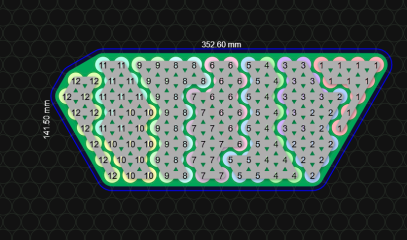
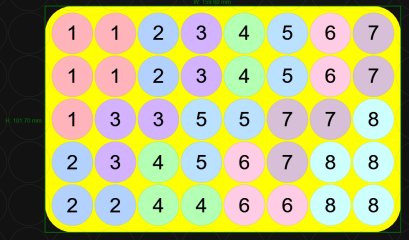
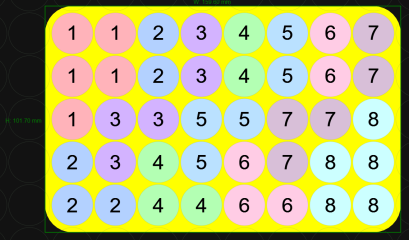
another example how autolayout works compared to your right top pic 14s5p. Autolayout consistency shows like this:
viber_image_2025-11-30_10-50-47-554.png
another try 14s5p 84% consistency:
Screenshot 2025-11-30 105815.jpg

why such inconsistency between consistencies :D and in real application is done like in top right pic. What's the point of layout than.
 
The program is good, but there are some remarks. And the most important one for me is the inability to draw the connections between elements manually. Because, in my opinion, the automatic connection is not very flexible.
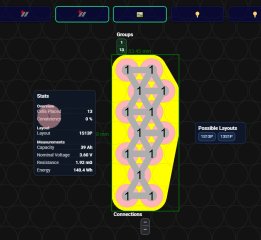
The funniest result is achieved when you try to arrange the 13S1P assembly not in a line, but, for example, in two rows. See the screenshot.

And it would be good and clearer if + and - were indicated on the drawing/diagram.
 

Attachments

  • 13S1P.jpg
    13S1P.jpg
    262.2 KB · Views: 11
Last edited:
The program is good, but there are some remarks. And the most important one for me is the inability to draw the connections between elements manually. Because, in my opinion, the automatic connection is not very flexible.
The funniest result is achieved when you try to arrange the 13S1P assembly not in a line, but, for example, in two rows. See the screenshot.

And it would be good and clearer if + and - were indicated on the drawing/diagram.
A: You *can* manually draw the buss bars, by laying out the cells.
B: The automatic generation has been *dramatically* upgraded and always works now.
 
Well, that's gonna tank any other cell layout design tool, dang!
There were not any until I released this. Now everyone wants to be a software developer and make their own battery design program. Good news is, they are all garbage. My competition has no idea what they are doing.
 
Link on first post is broke.

Login or sign up · logicaldb

Issue with SSL stuff then goes to a white page.
And yes. It will still ask you to log in because the app is not publicly available. But its definitely there, and there are no SSL issues on the new, permanent links.
 
another example how autolayout works compared to your right top pic 14s5p. Autolayout consistency shows like this:
View attachment 381442
another try 14s5p 84% consistency:
View attachment 381443

why such inconsistency between consistencies :D and in real application is done like in top right pic. What's the point of layout than.

wHaTs tHe PoInT iN ThE LaYouT TheN?

Well. There is a beginning for everything and you were complaining about it at the very beginning. The cell layout generator is much, much better now. You do realize, that this is the only thing on the planet that does this, right? That means that no matter how bad or good it is, its the best one in the world lol.

Literally nothing but my software does cell layout generation.
1786984157977.png

1786984175548.png1786984193206.png1786984207120.png1786984217334.png1786984230333.png

If its at all possible, the new version will absolutely find a layout. It even shows you where the buss bars are overloaded. It also calculates the resistance, voltage drop, and power loss of each buss bar.

1786984285575.png

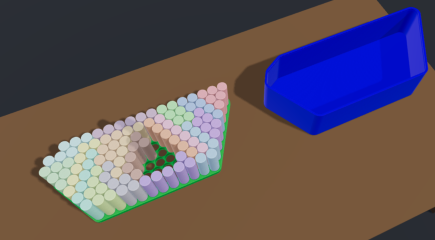
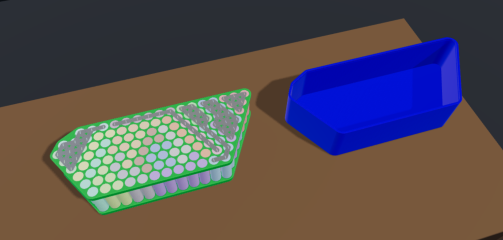
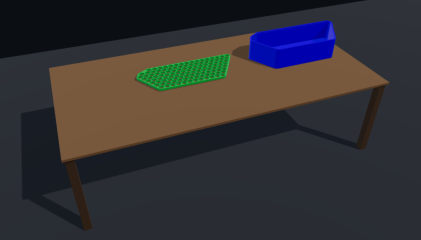
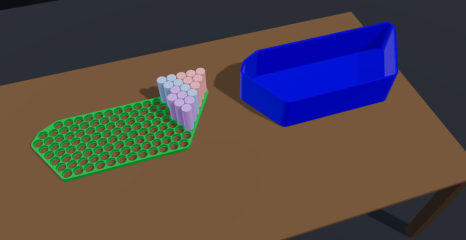
Also, there's an all-new real-time 3D design view that makes it really easy to visualize the situation. There is a build mode that walks you through every step of putting the battery together, too:
1786984394135.png
1786984411161.png
1786984432735.png
1786984461643.png

Also, by popular demand, the Battery Designer now has support for multiple layers!
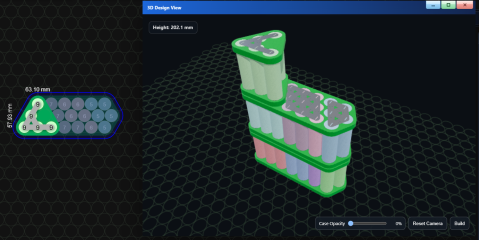
1786984600151.pngAddtionally, the case generator is aware of the layers:
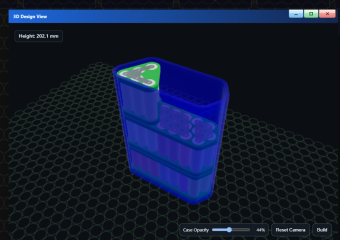
1786984639900.png

Also, there is an all-new custom frame tool:
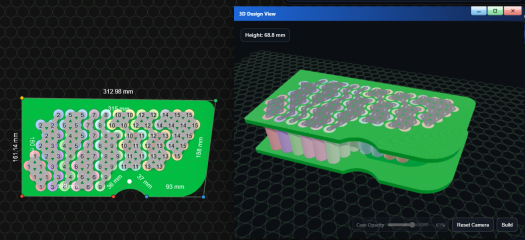
1786984769309.png
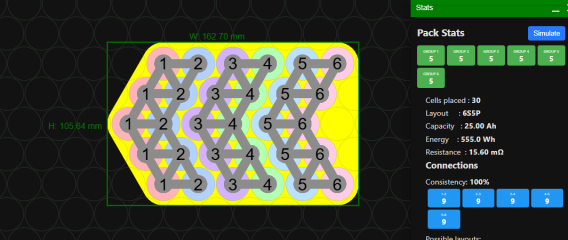
Another important update is the stats engine, which has been totally overhauled and now includes weight:
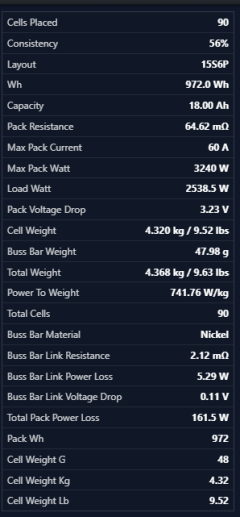
1786984825703.png

Listen. Seriously. If you build custom batteries and don't use this tool, you are operating at a serious strategic disadvantage compared to your competition that uses this program.

Being able to instantly answer when a customer wants to know how much battery can fit in a given space helps keep the sales conversation lively and flowing. Being able to show them beautiful renders of the battery they are wanting to buy is extremely helpful.

After the sale is closed, this tool cuts out literal hours of work because you can instantly generate the frames, buss bars, case, and every other part that uses to take so long to make for every. single. build. No matter how good you are at AutoCad or fUsIoN, you simply cannot compete with this.

This tool takes literally all of the tedious, time consuming work required to design a custom battery completely out of the equation. The Battery Designer gives battery builders their time back, so they can use it on things that really matter, like actually building the battery, handling customer relations, and promoting your business.

Dont throw your time away, you only get it once and it cannot be replaced. Use this tool to free yourself from the burden of battery design work so you can actually enjoy the battery design process instead of drudging through it yet again.
 
Back
Top