• Hello ES! We could use some help to get us past the finish line on building the new knowledgebase for the forum.
    Can you donate? Please see our fundraising page. Thank you!

Nanjing far driver controllers

How do I get Forward, Neutral and Reverse?

Unlike the other controllers I’ve worked with, Fardriver only includes a Reverse pin and Forwards is NC. Sigh. Neutral should be open and include a Forwards pin ffs.

So, can I use the ‘Park’ pin for neutral? Top position of switch Neutral (gnd-Park), middle position Forwards (open, NC) and bottom position Reverse (gnd-Reverse pin). If so do I need to set something in the app to make it work?
The common short manual going around is obviously confusing. It says Cruise and Boost then says Park/Cruise. I just need a definitive answer, but definitive answers are rare with Chinese controllers it seems.

Funny, I used to curse at Curtis for not explaining the parameters in more detail when I was learning. After a bout with Kelly and now Fardriver I see Curtis has very in depth manuals.
 
I recently received a 961000B controller with an encoder. I encountered a problem: the throttle response is very slow when reversing. Even with the throttle fully open, it takes 3 or 4 seconds for the car to start moving. This is very annoying. Does anyone know how to speed up the response? I've adjusted the reverse gear RPM, but it doesn't help.
 
I recently received a 961000B controller with an encoder. I encountered a problem: the throttle response is very slow when reversing. Even with the throttle fully open, it takes 3 or 4 seconds for the car to start moving. This is very annoying. Does anyone know how to speed up the response? I've adjusted the reverse gear RPM, but it doesn't help.
Hello, pls try to set following data and see if it works
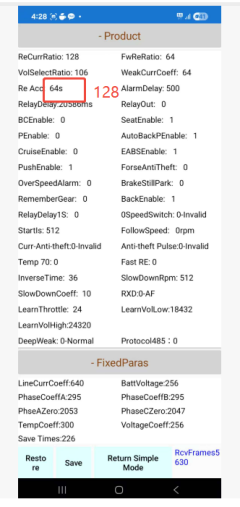
1. Re Acc 64s revise to 128
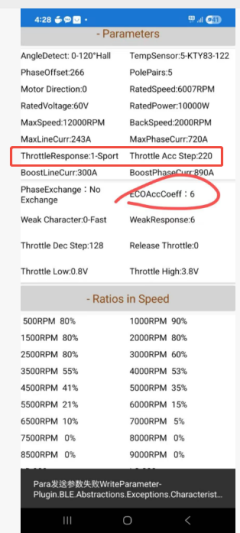
2. ThrottleResponse choose Sport option
3. Throttle Acc Step choose 220
4. ECOAccCoeff revise to 6.
See below pictures.
1763599064700.png1763599080017.png
 
Thank you, the problem was solved by increasing the reverse speed to 2300. If I set it to 2000, the problem returns. It looks like this is a software bug that needs to be fixed. I also had a new problem: I couldn't find the connector for the cruise control wire. Did the manufacturer remove them? I have the version with an encoder.
 
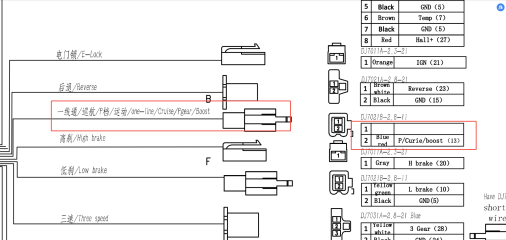
For your ND961000B encoder version controller, the one-line/cruise/P gear/Boost functions are all in the blue red wire. See below diagram definition for your ref. Thanks to check if it correct.
1764123830194.png
 
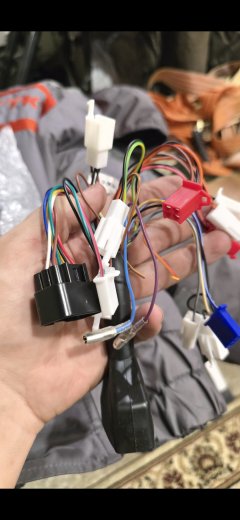
Unfortunately, I don't have such a connector, it's missing.
 

Attachments

  • Screenshot_20251205_121442_Gallery.jpg
    Screenshot_20251205_121442_Gallery.jpg
    1.7 MB · Views: 12
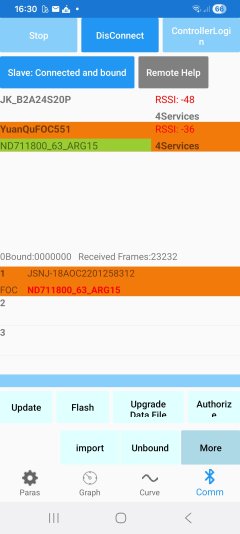
How do I get rid of this damned
"Slave: connected and bound"
I can't change the values I want anymore. This appeared after an App Update.
Screenshot_20251208_163048.jpg
 
Last edited:
How do I get rid of this damned
"Slave: connected and bound"
I can't change the values I want anymore. This appeared after an App Update.
Best guess is the new app isn't compatible with the firmware on your controller. That has happened with other devices before. (don't know if it has with this app / controller combo).

If you can't downgrade the app, you could try looking for it's apk at the various apk archives around the web. Unfortunately there is not yet a Fardriver archive thread like this votol one.
 
I already tried to downgrade the app, but the problems are the same, I can't change currents or anything important.
They downgraded me to a "slave". 😉

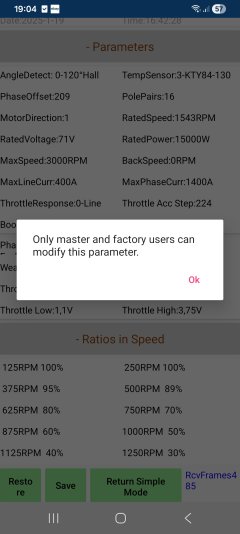
Screenshot_20251208_190425.jpg
 
I disagree with these two descriptions:


when I had that set it would keep giving the motor a small amount of torque after I let off the throttle, I assume as a way to offset the drag created by a direct drive motor when coasting.


I was able to adjust the phase offset, on my controller, I followed a suggestion from a youtube video to eliminate some noise during startup. The auto learn came up with 208, and I ended up with 225 after testing different values while doing a hill start.

I have the same problem with the motor applying 1A or so depending on speed when it should be coasting. I'm not using throttle. Has anyone found a fix for it? I want to keep the regen on brake signal function.
 
Nope, did my TüV approval with 32kW settings on a rainy day, so got another two years driving, before I have to fear again that someone could recognize there is too much power in this old scooter.
 
The problem was resolved remotely by the manufacturer. As far as I understand, this is due to the fact that two accounts were linked to the controller, but they did not have the same control rights. As a result, both were deleted and a new account with administrator rights was created.
 
With the manufacturer or with the seller.
Do you have an E-Mail adress or another contact form?
I mailed Fardriver a few times but never got feedback.
 
Guys, I need help. At first we wanted to connect at app but there was a binding problem because of seller of controller( probably he once connected so it doesn't give us permission to make changes) .

So I decide to do it in PC. Can find the connection but can't activate the auto learn. Please help. Shall I login or what? I tried a few passwords but didnt work. Please helppp
 
With the manufacturer or with the seller.
Do you have an E-Mail adress or another contact form?
I mailed Fardriver a few times but never got feedback.
the client contacted the seller, and the seller contacted the factory
 
Guys, I need help. At first we wanted to connect at app but there was a binding problem because of seller of controller( probably he once connected so it doesn't give us permission to make changes) .

So I decide to do it in PC. Can find the connection but can't activate the auto learn. Please help. Shall I login or what? I tried a few passwords but didnt work. Please helppp
You can write to the original owner and ask them to remove the controller binding from their app.
 
I already tried to downgrade the app, but the problems are the same, I can't change currents or anything important.
They downgraded me to a "slave". 😉
when you get to this popup again, just unplug and re-plug the hall sensor connector 20+ times. After it senses 20 cycles of unplugging and plugging back in, it will start a force unbind with a popup asking if you want to unbind the controller from all devices. Select Unbind. Then simply make a change to a setting, and it will throw another popup saying you don't have permission to make changes unless you bind, and will ask if you want to bind. Click Bind. [new popup] Click Bound. [new popup] Click OK.
Done. Bound. You're now the master, no longer the slave.

If it goes into a countdown, just wait for it to count down, or try unplugging and re-plugging the hall sensor to speed up the countdown. Once the countdown ends, it'll automatically unbind from all devices.
 
I have the same problem with the motor applying 1A or so depending on speed when it should be coasting. I'm not using throttle. Has anyone found a fix for it? I want to keep the regen on brake signal function.
Definitely do not change the phase offset like the guy you replied to did.
What do you have "Brake" set to? What do you have "Follow" set to?
If you change "Brake" to disabled, "Follow" to disabled, and EABSEnable to 0; does it still do it?
 
when you get to this popup again, just unplug and re-plug the hall sensor connector 20+ times. After it senses 20 cycles of unplugging and plugging back in, it will start a force unbind with a popup asking if you want to unbind the controller from all devices. Select Unbind. Then simply make a change to a setting, and it will throw another popup saying you don't have permission to make changes unless you bind, and will ask if you want to bind. Click Bind. [new popup] Click Bound. [new popup] Click OK.
Done. Bound. You're now the master, no longer the slave.

If it goes into a countdown, just wait for it to count down, or try unplugging and re-plugging the hall sensor to speed up the countdown. Once the countdown ends, it'll automatically unbind from all devices.
Tried this already without success.
Will try it again , but to get to my hall connector it takes me over an hour of disassembling and reasembling the fairing
 
Tried this already without success.
Will try it again , but to get to my hall connector it takes me over an hour of disassembling and reasembling the fairing
Well it's the only way to do it. And it works 100% of the time. The key is that you need to be connected to the controller with the app when you do it. And you want to hear the controller beep once when you first unplug it, then just keep unplugging and plugging back in. Once it detects 20 cycles from the first disconnect beep, it'll give the option to force unbind. And technically it only has to sense a disconnect on the power wire to the hall sensor. So if your sensor is hardwired, just cut the power wire and strip the ends, twist the ends together, power everything up, make sure you're connected, then disconnect the wires til you hear a beep, then touch them together for 1 second, remove for 1 second, touch for 1 second, remove for 1 second... 20+ times. It will work.
 
For your ND961000B encoder version controller, the one-line/cruise/P gear/Boost functions are all in the blue red wire. See below diagram definition for your ref. Thanks to check if it correct.
View attachment 381243
Hi Vito

Could you please specify which pins are suitable for reprogramming (repining) for functions such as boost, parking, cruise? I spent 2 days and didn't find a clear answer, only questions from other people

My Fardriver is ND72450ALH85 (new one/gen2)

For Cruise function PIN17 🔵🔴 (cruise/parking) is suitable obviously since this is indicated in the pinout. I assume PIN18 🟤 (one-line/boost/alarm?) is also suitable for functions? What about the other pins?

I sent an email to Fardriver requesting a manual and software for my controller as suggested on the product page, but I have not received a response

Thank you
 
I am very familiar with the boost function. Use it on all my bikes. Just upgraded my ND96850 with working boost for an ND961000. This apprears to be a gen2 controller as all the pin outs were different. And the pin6 (brown wire) is for a display, not boost.

So remap the cruise pin (pin 17) to boost as mentioned above should work? I tested this with pin 8 and pin 17. Both remapped to boost. Neither work for boost. Both tested and confrimed to work as reverse and cruise functions. I made sure no other pins are assigned to the same pin as boost.

I do have the boost settings all setup correctly. 20sec boost 30 sec cool down. Main line amps is 2a and boost is 20a (for testing only). Grounding the pin assigned to boost never activates boost on the APP. What is the issue here?

-thank you!
 
Yesterday I hit the button and reset my controller.
After this it now shows me as "Owner connected" and I can raise the line current and phase current values again.
The controller has kept all his values except pole pairs and motor temperature sensor and upper and low voltage level.

But now the controller is stuck in Auto Learn and does not turn the motor anymore.
I have done the Auto Learn with 5 different Fardriver and never had any problem with it.

Brake an throttle voltage get recognized, also motor turning by hand is detected.
Gear "A" ist selected as before, but it always shows "motor stop" and does not turn the motor.
Screenshots from the app in my
Masini Extremo thread

Anyone got a hint, what I'm probably doing wrong?
 
After trying a few different firmwares the controller has finished Auto Learn and I can now drive.
Actually I can't activate regeneration and can't set regen current.
But I changed current to 450/1600A.
When I change the BMS, I will try more line amps.
 
Back
Top