• Hello ES! We could use some help to get us past the finish line on building the new knowledgebase for the forum.
    Can you donate? Please see our fundraising page. Thank you!

OpenBafangTool - New Open-Source Bafang Configuration Tool

View attachment 371357
Only original Besst Tool is supported. There is no other supported converter
Hi,
is an account at Bafang mandatory or is your tool with this Hardware sufficient to do the programming? I have heard that some Chinese sellers don't provide a key/password or it expires after some time...
 
Last edited:
Hi,
is an account at Bafang mandatory or is your tool with this Hardware sufficient to do the programming? I have heard that some Chinese sellers don't provide a key/password or it expires after some time...
You need no account, only device
 
  • Like
Reactions: ctm
Hi,
I have a 2025 M620 with Canbus. Can someone tell me what I need to change this irritating low battery cutoff at around 25-30%.
And if possible the slow response on the throttle on first activating? (if you push it rapidly efter first activate it answer directly)
 
@AndreyPr big thanks for your time creating a much needed App

Couple of sort of confusing issues, my display a DPC245 has only 5 levels unlike the DPC242. Your program displays 9 levels but only 5 torque assist levels. Can I pressume that 1 & 2 are a level equally 3-4 etc ?

I run a 52 volt battery, the APP shows it as 48 volts. Is there anyway of changing this to get the best battery cut offs ?

Has anyone yet found a good discription of what the torque assist sensor parameters actually do. Some are sort of self explanetry but others don't seem to make much difference. It would be nice to be able to know what effect each parameter actually controls and how it intereacts with the other parameters.

Perhaps there are some guides somewhere on the Penhoff sites but Google seems to not be finding them ?

Thanks All
 
Just found Stephans help file which does help a bit.
Search for help files for the one which has the extra Torque tab. Or search for Bafang Ultra torque settings (UART) to get some understanding, it is in a way comparable to the Bafang canbus torque for trying to understand a little wat the table values mean.

In the OpenBafangTool, in my opinion, it has not 5 torque assist but that are sort of speed ranges or rpm ranges? it doesn't matter, it are probably ranges just like on the UART torque.

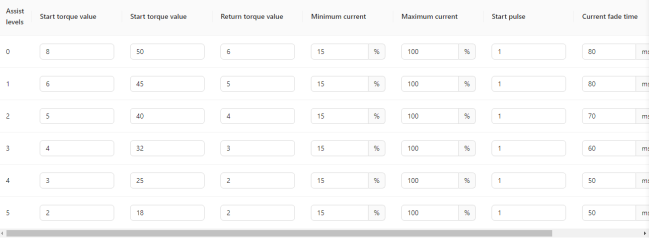
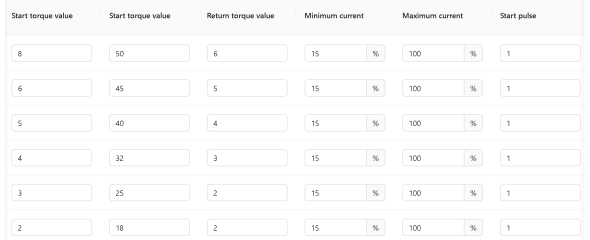
First vertical column in OpenBafangTool are those ranges. The second column are the start torque value's in Kg for each range. The third vertical column (also named start torque?) is the full load Kg. Say your idle torque voltage is 750mV and (for example) your max assist the torque sensor can provide is a voltage of 3300mV and the value in that column is for example 50 (Kg) then you need 50Kg force on your pedals to get the FULL load torque assist in that particular speed range.
The further you go down in the speed table (first column) you will see that you need less and less Kg on the pedals to get certain torque assist at higher speeds.
I would not blindly start to change settings.. it can mess things up and battery consumption go's up too a lot if you make some drastic changes.
Also i would look if All the value's in "electrical settings" are correct before changing and saving things.
The above explanation are just my own thoughts how i think it works by comparing it to the torque settings of the UART model so i can be wrong...
 
Last edited:
@AndreyPr big thanks for your time creating a much needed App

Couple of sort of confusing issues, my display a DPC245 has only 5 levels unlike the DPC242. Your program displays 9 levels but only 5 torque assist levels. Can I pressume that 1 & 2 are a level equally 3-4 etc ?

I run a 52 volt battery, the APP shows it as 48 volts. Is there anyway of changing this to get the best battery cut offs ?

Has anyone yet found a good discription of what the torque assist sensor parameters actually do. Some are sort of self explanetry but others don't seem to make much difference. It would be nice to be able to know what effect each parameter actually controls and how it intereacts with the other parameters.

Perhaps there are some guides somewhere on the Penhoff sites but Google seems to not be finding them ?

Thanks All

Bafang motors are have 9 assist levels in firmware, but some displays show only some of them (5, 3, etc). Its not first N levels, but some of them from first to last (for example, first, 5th and 9th). I don't know which levels exactly are on your display, I guess 1, 3, 5, 7 and 9.

If firmware of your motor has writable parameters, you can set battery cutoff values.

Look for manual for torque configuration of bafang ultra, it was uart motor, but settings are compatible
 
Thanks guys for the guidance.

I’m not sure that my M820 is actually responding to tinkering with the torque assist settings. If I set up the motor using the Bafang App and then reread the motor, none of the figures are changing other than the initial assist levels. Mmmm I may well be in no man’s land if indeed the motor is actually resetting the torque sensor settings which are not accessible via the Bafang App.
 
Bit of added reading, a very good article on what the torque tabs are and how they are not quite what we think. This Ultra tuning is very much in development stages and a full understanding is still being sought it would seem.

 
@AndreyPr I have a few questions to ask, would it be better for you if I PM'd you ?

The M820 sensor I think is the same or a copy of the Ultra, both are ISIS and both are not compatible to the GO+ tuning. Your program definatively will change the torque curve on the M820.

Thanks.
 
hey . this tool requires besst account ? is there some sort of manual how to change settings and not make things worse ? i played with demo settings but not see an option to save existing settings in case i set something wrong

i basically want to set right wheel size , lov voltage cutoff lower and make assists levels more consistent and weaker generally . current softstart and instant stop when not pedaling would also be nice addition
 
@AndreyPr I have a few questions to ask, would it be better for you if I PM'd you ?

The M820 sensor I think is the same or a copy of the Ultra, both are ISIS and both are not compatible to the GO+ tuning. Your program definatively will change the torque curve on the M820.

Thanks.
I don't know about compatibility of this sensors. Settings for torque are available (or not available) on motor (depends on firmware)
 
hey . this tool requires besst account ? is there some sort of manual how to change settings and not make things worse ? i played with demo settings but not see an option to save existing settings in case i set something wrong

i basically want to set right wheel size , lov voltage cutoff lower and make assists levels more consistent and weaker generally . current softstart and instant stop when not pedaling would also be nice addition
?
 
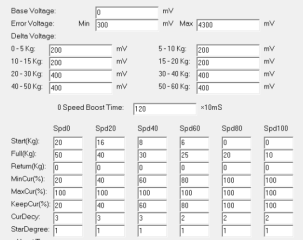
AudreyPR's is nearly there, but I think its missing part of the setup, that of the torque sensors Delta Voltage
1752326484421.png
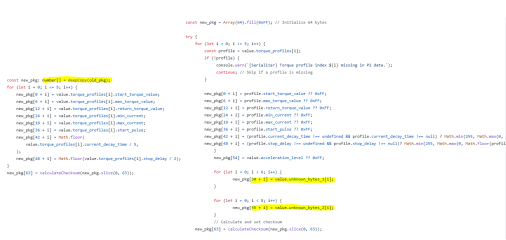
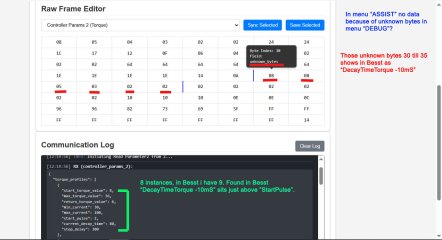
Ah, I guess this are the bytes that @bart594 calls "Unknown Bytes" (index 30 to 35 and 55 to 62) He reads and writes them, just like @AndreyPr, but we have no menu to edit them yet. But should be very simple to implement. @bart594 has a smart debug function, that let you have a look in the variables and raw data (y)
Of course, we have to identify, which byte stands for which value in the delta voltage table.


Code:
 "unknown_bytes_1": [
    0,
    0,
    0,
    0,
    0,
    0
  ],
  "unknown_bytes_2": [
    130,
    150,
    100,
    110,
    5,
    1,
    0,
    0
  ],

1752422301026.png

1752422369320.png
Screenshot Mask Andrey.PNG
Screenshot Mask Parameter Block 2.PNG
 
Last edited:
I don't know about compatibility of this sensors. Settings for torque are available (or not available) on motor (depends on firmware)
@AndreyPr. Thanks for the reply. The Spd functions are available on this motor ( Spd is not speed per see but a part of the overall torque sensor function calculation ), I would suspect that the Voltage part of that sensor is also there and if we could access it in the same manner that those tuning the Bafang Ultra motor do, then we could tune that torque curve ( which the motor desperately needs to be anything like a good motor ).

The little M820 motor has so much potential, 2.7kgs, seems happy to put out 600Ws, is very compact and yet the manner it operates from the factory really makes it almost one to not bother with. Resetting the Spd columns does improve the motor however but unless we can get to the voltage section, then we will never really know it’s full potential.

Thanks for your time to get the program this far, we can probably get a reasonable tune with just the Spd parameters.
 
Last edited:
It seems that index 30 -35 belongs to 6 instances "Decay time of the torque - 10ms" visible in BESST program itself. I think it 's just not yet implemented to show up in Andrey and Bart tool.
 
visible in BESST program itself
Do you have a screenshot of that tab? I have no BESST and didn't find a screenshot of the torquesensor settings in the internet :confused:

Regarding this post:
The linked article says, that the speed table defines, which parameters are valid in which speed range. So the rows (the columns in the old UART tool) have nothing to do with the assist levels, but with the speed range. That seems to be important to know!

This table could be represented graphically as follows:
1752429931219.png

1752429867574.png
This means in the speed range 0-5.5 mph you need 40kg on the pedal to get the max. current, at >25mph you need only 20kg on the pedal to get the max. current.
The mapping is better explained in a single diagramm perhaps.
1752433786271.png

But how are the assist levels, chosen in the display, are influencing the current then? The BESST tool let you set a "amplifying factor" for the human power. That's a reasonable approach for me :)

Speed Limit % is used to adjust the power-assisted speed of different levels to enrich the feelingofriding. The smaller the value, the speed of that support level will be lower. It requires high-level value≥low-level value.
Assistance % is the motor output power / human power. The larger the value, the powerful thepowerassistance.
Max. Power is used to adjust the percentage of current limiting for different levels. The smaller thevalue, the weaker the power in the current level and the more power efficient. It requires high-level value≥low-level value.
Acceleration determines the time before the system reaches the maximum power assistance. The largerthe value, the shorter the time.
 
Last edited:
I can provide that but i had just shutting everything down in my hobby place because way to hot inside. But no worry i will take a screenshot.
 
can someone who knows better - explain what they mean and how to set them up for smooother ride ?
especially "torque value" "Start pulse" ?

"Current fade time , Stop delay" - they are responsible for power ramping AFTER pedaling stops ?
 

Attachments

  • Zrzut ekranu 2025-07-13 195141.png
    Zrzut ekranu 2025-07-13 195141.png
    30.5 KB · Views: 11
Back
Top