
It will go to 54 and 54 is acceleration which you actually wil find at the end of "MOTOR" parameters 6011 for whatever reason 54 (from parameters 6012) is placed there. here you can see it too if you scroll down. Higher then 53 (54) i can not see, like for example "MOUNTAIN" on the above link. I guess that's parameter 6017 but on my controllers it seems i don't have that. But i will check tomorrow because i paid never much attention to it.

-
Hello ES! We could use some help to get us past the finish line on building the new knowledgebase for the forum.
Can you donate? Please see our fundraising page. Thank you!
You are using an out of date browser. It may not display this or other websites correctly.
You should upgrade or use an alternative browser.
You should upgrade or use an alternative browser.
OpenBafangTool - New Open-Source Bafang Configuration Tool
- Thread starter AndreyPr
- Start date

stancecoke
Minor legend
So the meaning of bytes 55-62 is not documented yet. But we read various data in that area. Maybe this is the missing voltage table data, somehow.It will go to 54
Yes, I got this. But bytes 55-62 exist and carry information. It's not just 0xFF with my controller, as you can see in #218. We can read them and we can write them. It's just not documented by now, what the meaning of this bytes is.53 is the last one i can see in BESST.
Maybe this bytes are populated in my case, because the controller uses the old analogue signal transmission with a ADC input for the torque and digital input for the PAS/cadence.
Maybe, the torquesensors with CAN don't use it and linearize the torque signal internally.
This means, you can't tweak the output power by misstunig the voltage table.
Maybe some middrives use the analogue sensors, too?
Last edited:
Here is the rest.
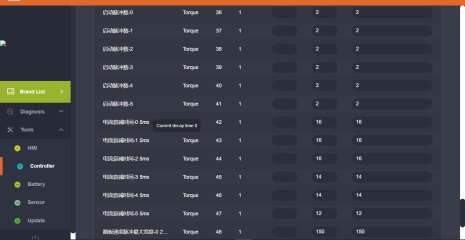

05106012 1 40
05146012 8 0-7 Bytes Value
05150000 8 8-15 Bytes Value
05150001 8 16-23 Bytes Value
05150002 8 24-31 Bytes Value from the github link. first time i notice this, 2 times 31.
05150003 8 31-39 Bytes Value
05150004 8 40-47 Bytes Value
05150005 8 48-53 Bytes Value + FF FF
05150006 8 FF FF FF FF FF FF + CheckSum8 Modulo 256
53 is the last one i can see in BESST.
05106012 1 40
05146012 8 0-7 Bytes Value
05150000 8 8-15 Bytes Value
05150001 8 16-23 Bytes Value
05150002 8 24-31 Bytes Value from the github link. first time i notice this, 2 times 31.
05150003 8 31-39 Bytes Value
05150004 8 40-47 Bytes Value
05150005 8 48-53 Bytes Value + FF FF
05150006 8 FF FF FF FF FF FF + CheckSum8 Modulo 256
53 is the last one i can see in BESST.
Waynemarlow
Regular
I think the amplfying factor in the old UART progam is dealt with in the 9 assist levels in the Basic tab. AndreyPr's is similar."amplifying factor" for the human power.

Ultra Tuning: Setting up PAS levels in the Basic Tab
While most of the discussion of Bafang Ultra motor's settings revolves around the somewhat cryptic Torque Tab, the Basic Tab, on which you set up your PAS level behavior, is the simplest yet most important tab to setup. I think every Ultra rider should setup the Basic Tab, as no OEM does it...
 forums.electricbikereview.com
Start pulse is in effect the angle of rotation before starting. I think some motors have 24 pulses per 360 degrees, others 48."torque value" "Start pulse" ?
Torque value is torque in kgs, the max torque is 60kgs on the pedal. But this torque figure is just part of the equation to get the power output to the motor. On the Spd table on my motor I have to disagree with the poster in that I can dial out the Speed component, not entirely but largely by altering the spread of the Max kg and altering the Return kg. Its this Return Kg that I'm most confused on, any clues ?
Last edited:
Waynemarlow
Regular
I think the older designs using the older torque sensor still use the analogue output. Bafang on the M510 and M560 advertise it has twice the sensitivities of the older motor ( Sorry I can't remember where I read that so that could be incorrect ), has the new design now gone to different method of calibration and torque curves ?Maybe, the torquesensors with CAN don't use it and linearize the torque signal internally.
This means, you can't tweak the output power by misstunig the voltage table.
Maybe some middrives use the analogue sensors, too?
Motor firmware have standard settings. It does not matter, how it calculates value from sensor inside. Settings are sameI think the older designs using the older torque sensor still use the analogue output. Bafang on the M510 and M560 advertise it has twice the sensitivities of the older motor ( Sorry I can't remember where I read that so that could be incorrect ), has the new design now gone to different method of calibration and torque curves ?
stancecoke
Minor legend
I don't know about compatibility of this sensors. Settings for torque are available (or not available) on motor (depends on firmware)
?!Motor firmware have standard settings.
Well, i know that QWIC has always good settings, they have usually a little more amps too. I have a uart M420 36V motor with eco and sport mode. I changed the torque settings on mine like the ones on the 36V QWIC UART motor. Much better in sport mode now. I need less force on the pedals. But you need to watch out to not go overboard with the settings because more torque help asks more battery power too. Keep in mind, this are just 250W motors so a little more help for my legs was welcome 
I did not bother with what was what, i know QWIC has a little more sportier settings compared to same motors from others and i put the same in mine long ago.
I did not bother with what was what, i know QWIC has a little more sportier settings compared to same motors from others and i put the same in mine long ago.
Waynemarlow
Regular
I agree but the way that value is calculated must be able to be altered to suit different uses. An EMtb needs to be able to have full power at low speeds to climb steep uphill tracks and yet have modulation to be able to slow down for all the objects that nature puts in our way .Motor firmware have standard settings. It does not matter, how it calculates value from sensor inside. Settings are same
Road use is to have a nice linear power according to speed and to have some modulation for hills and starting.
I do suspect though that the later motors do things differently.
Torque sensor is connected directly to motor. Different motors have different firmwares, which can compute values from sensors in different ways. I don't know if its possible to physically replace sensor of one model with other, etc.
But firmwares of motors have unified settings, that could be configured in common way (if this settings are not locked).
Its like electrical oven: heating element could be designed in different ways, but user just have to set temperature with knob, which is pretty same on all models
Setting are standard. Way how firmware interacts with torque measuring hardware makes no difference for user.I agree but the way that value is calculated must be able to be altered to suit different uses. An EMtb needs to be able to have full power at low speeds to climb steep uphill tracks and yet have modulation to be able to slow down for all the objects that nature puts in our way .
Road use is to have a nice linear power according to speed and to have some modulation for hills and starting.
I do suspect though that the later motors do things differently.
I don't think that bafang has any emtb-specified algorithms
Waynemarlow
Regular
I disagree, I seem to be able to alter the parameters within your program and get quite a different response from the motor. Thats good, I just need to understand about that more to be able to get the motor "tuned".Way how firmware interacts with torque measuring hardware makes no difference for user.
stancecoke
Minor legend
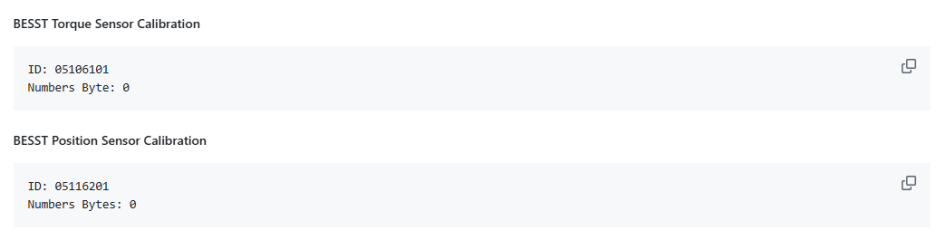
Hm, the BESST has the function to do a torque sensor calibiration, the command is documented, but there is no feedback from the community, what happens during this calibration?!has the new design now gone to different method of calibration and torque curves ?
The torque sensor sends a fourth byte, that is called "progressive Byte" in the documentation. Any idea, what that means?
Last edited:
Can't say for other motors but on the M400 CAN motor clicking on torque calibration does nothing. The M400 CAN has hall sensors in motor. The M420 CAN has no hall sensors. Maybe it has something to do with that of torque calibration works or not. That fourth byte i don't know but it counts / changes fast so call me crazy but i use it as "torque sensor is online".
Last edited:
Waynemarlow
Regular
The calibration function simply spins the motor for a short period of time with zero load on the torque sensor. If you change a controller you also have to run the calibration process for the motor to function.Hm, the BESST has the function to do a torque sensor calibiration, the command is documented, but there is no feedback from the community, what happens during this calibration?!
The torque sensor sends a fourth byte, that is called "progressive Byte" in the documentation. Any idea, what that means?
stancecoke
Minor legend
That is the motor position calibration, not the torque sensor calibration?!The calibration function simply spins the motor for a short period of time with zero load on the torque sensor. If you change a controller you also have to run the calibration process for the motor to function.
Last edited:
Waynemarlow
Regular
Ah so it is different.
There are two different things to calibrate: encoder and torque sensor. Encoder already could be calibrated with OpenBafangTool. Torque sensor not. I know how to launch torque sensor calibration process, but I don't exactly know how it works, so I didn't included this function in release because I don't know how to correctly use it and can not provide technical support on it.
If you can provide information about physical meaning if torque sensor calibration, in may be included in future release
stancecoke
Minor legend
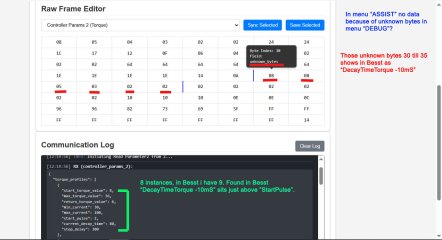
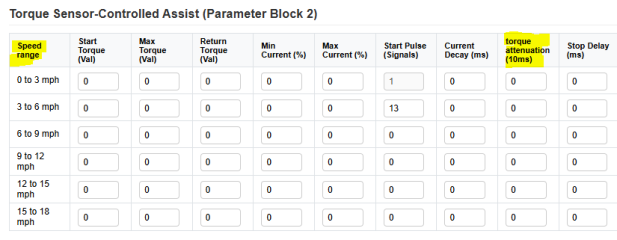
OK, I've added the bytes to the torque table in @bart594 's tool. I also edited the titles of the rows, according to the link of @Waynemarlow, knowing, that the speed ranges will not be correct. But better than to call them "levels", as it has nothing to do with the assist levels. To be honest, I have no idea, what this new parameter does....Here they are.

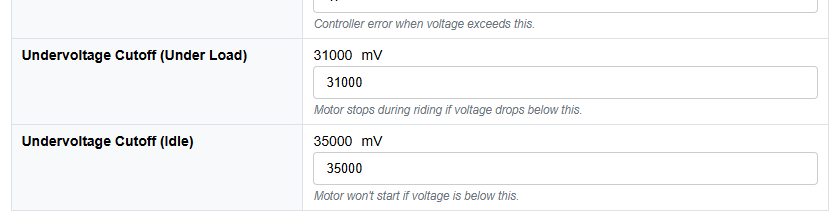
I changed the fields for undervoltage settings according to @DPC18RI 's hint, that they are now 16bit values. But this will only work for newer firmwares obviously, as the values seem to be showed wrong in the original BESST tool actually also. So don't use this version, if the values are shown correctly in the original tool! You will brick your controller!!!
I also found, that this values are read only on my controller. Perhaps someone can test, wether he can change the values on his controller.
Here my controller hardware and firmware version:

Commits · stancecoke/bafang_canable_pro
Bafang Besst software replacement for M500, M510, M560 etc - Commits · stancecoke/bafang_canable_pro
 github.com
perhaps we should push the things concerning @bart594's tool into an own thread...
Edit: new finding, I can change the torque table at runtime, and read the new values from the controller, but after a new start of the display, the old values are back
regards
stancecoke
Last edited:
Waynemarlow
Regular
@Stancoke, I think calling those fields a speed field could be as confusing as calling them levels. Speed is part of its calculation but you seem to be able to dial that speed function almost totally out by lowering the Return Torque ( I think ). I'll look it up later but I think the Smogasboard poster had the complete calculation.
I think the sooner we can move the Bart594 tool into its own thread the better, do you want to set one up ?
I think the sooner we can move the Bart594 tool into its own thread the better, do you want to set one up ?
Last edited:
stancecoke
Minor legend
I think you can tune the assistance in dependence of the speed with the table, quite similar, as Bosch does it with it's "custom ride modes". So you can set a mountain bike mode, with much assistance at low speeds, or a commuting mode with high assistance at high speeds, or, or, or....could be as confusing as calling them levels
Custom Riding Modes for Nyon
I just purchase the custom ride options for the Nyon. I am playing with different settings and would be curious to know what others have done. or are thinking of doing. My settings are posted below. In mode 1, I was trying to create an assist level that would just help to get me started and...
forums.electricbikereview.com
Last edited:
Hallo, is there somewhere a list of all terms and meanings of the items in the Programming tool? A search gave deviating results, depending on translation and motor model... I have here a CAN BBS01B and a VD618 Display (which doesn't seem to be programmable with the tool).
for example "current loading time" [in seconds]... is that the time the current will be lifted from "start current" to the max current?
"Current shedding time" [in sec]... is that the time the current will drop to zero once the brake was pulled or pedaling stopped?
"Motor trigger": I have here a number: "4"; but when I click the pull-down I see text (3 selectable items (like "pedal and throttle", ...))
my setup has 5 support levels; the software shows 9... somewhere I have seen that the correlation is:
1 = 2
...
4 = 8
5 = 9
that seems strange... what is the situation here?
Thanks in advance... I'm in a learning curve (hopefully steep).
for example "current loading time" [in seconds]... is that the time the current will be lifted from "start current" to the max current?
"Current shedding time" [in sec]... is that the time the current will drop to zero once the brake was pulled or pedaling stopped?
"Motor trigger": I have here a number: "4"; but when I click the pull-down I see text (3 selectable items (like "pedal and throttle", ...))
my setup has 5 support levels; the software shows 9... somewhere I have seen that the correlation is:
1 = 2
...
4 = 8
5 = 9
that seems strange... what is the situation here?
Thanks in advance... I'm in a learning curve (hopefully steep).
Waynemarlow
Regular
the DPC245 acts in this mannermy setup has 5 support levels; the software shows 9... somewhere I have seen that the correlation is:
1 = 2
...
4 = 8
5 = 9
Similar threads
- Replies
- 16
- Views
- 3,565


- Replies
- 772
- Views
- 76,076

- Replies
- 102
- Views
- 14,488
