

-
Hello ES! We could use some help to get us past the finish line on building the new knowledgebase for the forum.
Can you donate? Please see our fundraising page. Thank you!
You are using an out of date browser. It may not display this or other websites correctly.
You should upgrade or use an alternative browser.
You should upgrade or use an alternative browser.
Bafang GO+ parameters change
- Thread starter pxl666
- Start date

Bengy22
⚡ Regular
- Joined
- Dec 31, 2019
- Messages
- 224
Emtbforums has more info on this. Requires a bluetooth 5.1 display which isn't common for bafang most being 5.0 and don't work. I've also seen reports of it still not working with latest phone updates. This thread has some info but I've also seen people talk about the app in build threads. Bafang Go+, is it a new App for all motors ?
I can confirm that this is possible, but you ned also a Bafang Account to login into the app.
For this you ned a firmware was supporting these parameters and also da last generation of Display.
in my case a use a m620 can with DPC C010 an here it works, but only with the newest Version 41.1.
In the app you can set the same parameter as in de Bafang Besst Pro Software.
Hope that helps
For this you ned a firmware was supporting these parameters and also da last generation of Display.
in my case a use a m620 can with DPC C010 an here it works, but only with the newest Version 41.1.
In the app you can set the same parameter as in de Bafang Besst Pro Software.
Hope that helps
Bafang Go+ v3.1.0 works with a C245 display for me. I can set and read settings for each PAS level.
The app requires (imho) far too many permissions, and requires you to log into a server, presumably in China. So I can't run it on an old non-internet-connected phone while riding. The Bluetooth communication and display should not require any of this stuff. I will not be using it except to change parameters occasionally.
I'm endeavouring to decode the Bluetooth protocol it uses between display and app, in order to do some of Go+ functions without needing the login, and to get back some of the functions the old Go had (e.g. motor power and amps)
The app requires (imho) far too many permissions, and requires you to log into a server, presumably in China. So I can't run it on an old non-internet-connected phone while riding. The Bluetooth communication and display should not require any of this stuff. I will not be using it except to change parameters occasionally.
I'm endeavouring to decode the Bluetooth protocol it uses between display and app, in order to do some of Go+ functions without needing the login, and to get back some of the functions the old Go had (e.g. motor power and amps)
what motor firmware u have ? what can you change and did u need some account to change things ?Bafang Go+ v3.1.0 works with a C245 display for me. I can set and read settings for each PAS level.
The app requires (imho) far too many permissions, and requires you to log into a server, presumably in China. So I can't run it on an old non-internet-connected phone while riding. The Bluetooth communication and display should not require any of this stuff. I will not be using it except to change parameters occasionally.
I'm endeavouring to decode the Bluetooth protocol it uses between display and app, in order to do some of Go+ functions without needing the login, and to get back some of the functions the old Go had (e.g. motor power and amps)
hey ... need help!!
i bought new m510 and dpc 245 v3 . all seems fine except I can't go into motor tuning... I have "operation failed " message ...
can't set wheel or max speed ... anyone knows what might be wrong?
i bought new m510 and dpc 245 v3 . all seems fine except I can't go into motor tuning... I have "operation failed " message ...
can't set wheel or max speed ... anyone knows what might be wrong?
Attachments
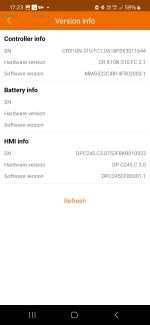


My display is DPC245CF80301.2 (DPC 245 3.0), motor HW is FC2.1.
I need to log in to Go+ to do anything (even to connect the app to the display).
I can change the speed % and it sticks. The reduced speed seems to be obeyed but it's a soft cutoff.
I need to log in to Go+ to do anything (even to connect the app to the display).
I can change the speed % and it sticks. The reduced speed seems to be obeyed but it's a soft cutoff.

That’s OK as long as you have your receipts. Check the Bafang warranty. It’s covered for 2 years and has the contact information for each country.not really . motor from one guy, display from another . but they are compatible and they should normally work . since there is no bafang representative to ask for help , I'm hoping that someone here might know better
no . never heard of this . it's bafang closed system . newest hardware AFAIK so i was pretty sure they will work together . anyway i can login and i can communicate via bluetooth with the display but why this particular settings are refused to work is beyond me . seems that chinese stuff is useless even if considered premium ...

stancecoke
🏍️ Giga poster
I started tinkering with a Bafang CAN Bus system, since windmeile.de offers hub motor controllers with BB torquesensors and displays for the CAN system meanwhile.
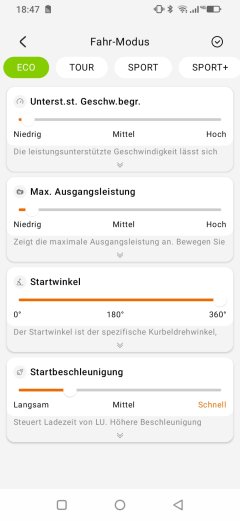
I'm recently sniffing on the CAN Bus with only the controller and the display connected and the most recent Bafang Go app (v4.0.6, without "+") paired with the display.
The app has the device ID 0x13 on the bus obviously and I can see the app settings are transmitted with four blocks of 64 byte payload each. Most of the commands are undocumented since now, or I did not find the right repo yet.
https://github.com/OpenSourceEBike/Bafang_M500_M600/tree/main/CANBUS
https://github.com/andrey-pr/OpenBa...8b991dbff/src/constants/BafangCanConstants.ts
I wonder if there would be a screen in the app for the torquesensor settings, if it would be connected. I can only see the classical PAS settings in the app. Any experience?
regards
stancecoke
I'm recently sniffing on the CAN Bus with only the controller and the display connected and the most recent Bafang Go app (v4.0.6, without "+") paired with the display.
The app has the device ID 0x13 on the bus obviously and I can see the app settings are transmitted with four blocks of 64 byte payload each. Most of the commands are undocumented since now, or I did not find the right repo yet.
https://github.com/OpenSourceEBike/Bafang_M500_M600/tree/main/CANBUS
https://github.com/andrey-pr/OpenBa...8b991dbff/src/constants/BafangCanConstants.ts
I wonder if there would be a screen in the app for the torquesensor settings, if it would be connected. I can only see the classical PAS settings in the app. Any experience?
regards
stancecoke
| Source | Target | Operation | Data lenght | command | subcommand | Data 0 | Data 1 | Data 2 | Data 3 | Data 4 | Data 5 | Data 6 | Data 7 |
| 13 | 2 | 4 | 8 | 60 | 12 | 0 | 0 | 0 | 0 | 0 | 0 | 0 | 0 |
| 13 | 2 | 5 | 8 | 0 | 0 | 0 | 0 | 0 | 0 | 0 | 0 | 0 | 0 |
| 13 | 2 | 5 | 8 | 0 | 1 | 0 | 0 | 0 | 0 | 0 | 0 | 0 | 0 |
| 13 | 2 | 5 | 8 | 0 | 2 | 0 | 0 | 0 | 0 | 0 | 0 | 0 | 0 |
| 13 | 2 | 5 | 8 | 0 | 3 | 0 | 0 | 0 | 0 | 20 | 0 | 0 | 0 |
| 13 | 2 | 5 | 8 | 0 | 4 | 0 | 0 | 0 | 0 | 0 | 0 | 0 | 0 |
| 13 | 2 | 5 | 8 | 0 | 5 | 0 | 0 | 0 | 0 | 0 | 0 | 0 | 82 |
| 13 | 2 | 6 | 8 | 0 | 6 | 96 | 64 | 6E | 5 | 1 | 0 | 0 | FF |
| 13 | 2 | 4 | 8 | 60 | 11 | 24 | 0F | 2F | 18 | 79 | B8 | 88 | 10 |
| 13 | 2 | 5 | 8 | 0 | 0 | 27 | 5 | 14 | 5 | 0 | 0 | 0 | 20 |
| 13 | 2 | 5 | 8 | 0 | 1 | 2 | 0 | 0 | 8 | 6 | 0 | 46 | 5 |
| 13 | 2 | 5 | 8 | 0 | 2 | 5E | 0B | 75 | 0 | 92 | 0 | 66 | 0 |
| 13 | 2 | 5 | 8 | 0 | 3 | 7 | 0 | 0C | 24 | 1 | 0 | 0 | 0 |
| 13 | 2 | 5 | 8 | 0 | 4 | 3 | 6 | 6 | 6 | 6 | 6 | 6 | 6 |
| 13 | 2 | 5 | 8 | 0 | 5 | 64 | 2 | 4 | 4 | 4 | 4 | 4 | 4 |
| 13 | 2 | 6 | 8 | 0 | 6 | 4 | 64 | 0 | 0 | 0 | 0 | FF | 23 |
| 13 | 2 | 4 | 8 | 60 | 10 | 32 | 1 | 2 | 2 | 3 | 3 | 2 | 4 |
| 13 | 2 | 5 | 8 | 0 | 0 | 8 | 8 | 1E | 0 | 3C | 0 | 64 | 0 |
| 13 | 2 | 5 | 8 | 0 | 1 | 8C | 0 | AA | 0 | C8 | 0 | F0 | 0 |
| 13 | 2 | 5 | 8 | 0 | 2 | 22 | 1 | 54 | 1 | F4 | 1 | 32 | 14 |
| 13 | 2 | 5 | 8 | 0 | 3 | 0 | 0 | 0 | 0 | 0 | 0 | 0 | 0 |
| 13 | 2 | 5 | 8 | 0 | 4 | 0 | 4 | 0F | 0F | 0F | 0F | 0F | 0A |
| 13 | 2 | 5 | 8 | 0 | 5 | 0A | 8 | 6 | F4 | 1 | 1 | 5 | F4 |
| 13 | 2 | 6 | 8 | 0 | 6 | 1 | 60 | 9 | 60 | 9 | 60 | 9 | 4E |
| 13 | 2 | 4 | 8 | 60 | 0F | 64 | 64 | 64 | 64 | 64 | 64 | 64 | 64 |
| 13 | 2 | 5 | 8 | 0 | 0 | 64 | 64 | 64 | 64 | 64 | 64 | 64 | 64 |
| 13 | 2 | 5 | 8 | 0 | 1 | 64 | 64 | 0 | 0 | C4 | 9 | 4 | 4 |
| 13 | 2 | 5 | 8 | 0 | 2 | 4 | 4 | 4 | 4 | 4 | 4 | 4 | 1 |
| 13 | 2 | 5 | 8 | 0 | 3 | 0 | 1 | 0 | 1 | 0 | 0C | 5 | 1 |
| 13 | 2 | 5 | 8 | 0 | 4 | 64 | 64 | 64 | 64 | 64 | 64 | 64 | 64 |
| 13 | 2 | 5 | 8 | 0 | 5 | 64 | 0 | 0 | 0 | 0 | 0 | 0 | 0 |
| 13 | 2 | 6 | 8 | 0 | 6 | 0 | 0 | 0 | 0 | 0 | 0 | 0 | 92 |
Last edited:
stancecoke
🏍️ Giga poster
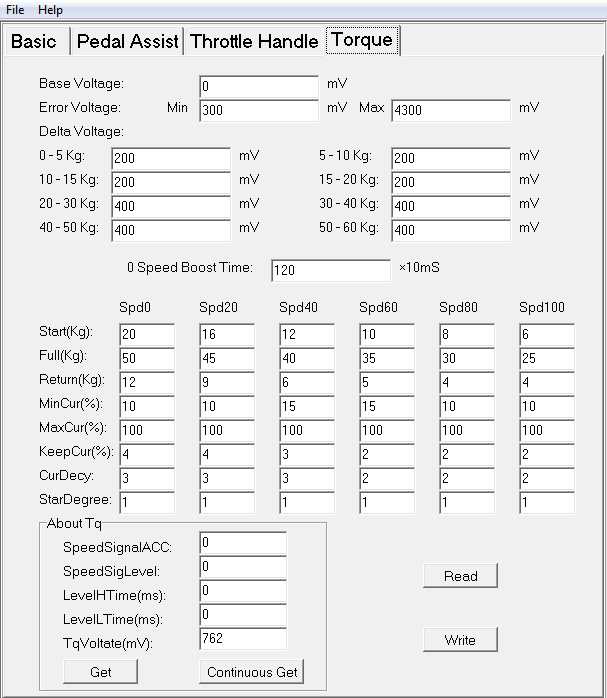
I'm asking, if there is a screen in the app, that let you set up the torquesensor parameters, if a CAN-Torquesensor is attached.may you elaborate on what are you asking
Similar to the UART system:
Waynemarlow
🚴♂️ Mega poster
The Go+ App is OK and there is much talk about it bricking motors etc but I think if you set the unit up to the motor its actually being used with ( if you have say a M510 and M820 motor I have to manually configure it to change its settings over to each motor otherwise it will 0 out all the settings for the wrong motor ). To be aware though that the Go+ App will only set what is available to be set in your region hence the need to set up an account and log in. Speed for example is not accessible nor wheel size, they can only be changed using BESST by a dealer or using the Python hack many use. On some motors the assist levels are the only thing able to be changed.
Go+ also with some motors will only allow a max of 400% assist and yet with BESST it will allow up to 500%
If you have an older Bafang display with only BTE 5.0 then use the older Bafang Go App, has many of the same features and in some ways a bit more robust.
Go+ also with some motors will only allow a max of 400% assist and yet with BESST it will allow up to 500%
If you have an older Bafang display with only BTE 5.0 then use the older Bafang Go App, has many of the same features and in some ways a bit more robust.
Last edited:
Waynemarlow
🚴♂️ Mega poster
Depends on the motor, the later M510's and M560's using Go+ have a very nice way of setting the A's rate and ramp up of the motor but the M820 does not have this despite being released later than the M510.I'm asking, if there is a screen in the app, that let you set up the torquesensor parameters, if a CAN-Torquesensor is attached.
Similar to the UART system:
Last edited:
Similar threads
- Replies
- 4
- Views
- 839

- Replies
- 0
- Views
- 256
- Replies
- 0
- Views
- 378
- Replies
- 48
- Views
- 2,439