


Purpose:
This thread includes some tips on what types of information to provide in order to receive prompt advice, and the level of detail ideally available to diagnose the issue.
Ebike troubleshooting requires information that in most cases, only the requestor can provide or has access to. The quality of information provided is directly related to, and commensurate with, the quality of advice to be provided. Even if you are not able to provide many details, do the best that you can, taking into account the guidance below.
Most ebike troubleshooting issues can be resolved if two things are provided. A clear Issue Description, and an accurate Component Identification.
Issue description:
A clear and concise description will result in better responses from the various forum members that may have knowledge, experience, or expertise for resolving the particular issue. A description that is too brief, with little detail, will require excessive back and forth to determine what the issue is and details surrounding it. Conversely, a long rambling description, poorly constructed, lacking punctuation, with random thoughts inserted, will similarly require back and forth, or may just be ignored if too tedious to read.
Provide a concise description of the issue, that also include the following:
Component identification:
If the issue is with a Prebuilt Ebike: identify the make, model, and year (if known), and whether is stock, or has been previously modified.
Identifying the components of the ebike is important in order to resolve the issue. The ebike is a system, so it may not always be obvious which component or components are causing and issue. At minimum, as much as you know about the type of motor (front or rear hub, mid drive, other), the controller and display (if applicable), and battery is usually needed, including as much as you know about their specifications. Describe whether your ebike operates on pedal assist, throttle, or both.
In addition to your component descriptions, Photos and Links are often even more helpful, especially photos that include the areas of concern.
Photos and links:
Uploading a picture:
While editing your post, click on the image icon at the top of the editing window.

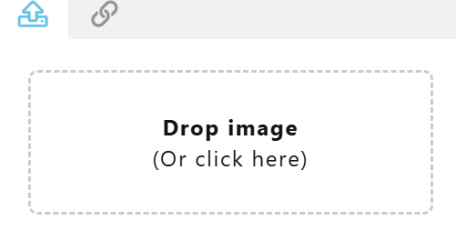
A second window will allow you three options for upload or displaying a pic: 1. upload a pic (first icon), 2. if the pic you'd like to post is online you can paste in the link to it (second icon); or 3. drag and drop an image into the dotted box (dotted "Drop image" area):
Once the photo is uploaded or linked, it will appear in your post. It can be resized if needed (click on the photo and a dotted blue line will appear around it. clicking on one of the corners will allow you to drag and resize the photo).
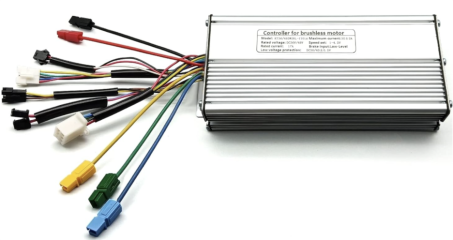
Example photo (multiple photos may be required):
Links:
While editing your post, you may insert a link by clicking on the link icon at the top of the editing window:

A box will appear that allows you to paste in the link (URL). There is a text box to allow you to describe the linked information:

Example controller link:
In this example, the URL field is populated with: "https://a.co/d/4WJDNmB"
And the Text box is populated with "Amazon Controller"
Link:
Amazon Controller
Settings:
If you suspect your issue is setting related, then you may provide what the settings currently are, or provide a screen capture of the settings. Otherwise, if you are not sure, then depending on the nature of the issue, you may be asked to provide this type of information in response to your post.
Examples of issues resolved quickly when clear details were provided up front:
Sticky Proposal:
The ever so popular "How to get the proper advice, read before asking" sticky in the ebike general subforum unfortunately provides no value for seeking advice for ebike troubleshooting. The sticky is geared toward newbies interested in building their first ebike, and things to consider before asking questions regarding a new (first time) build.
The information required to troubleshoot an problem is very different, and requires much more detail. Things like pictures, links, and background really help to streamline troubleshooting; basically obtaining the pertinent details will lead to the best solutions, and having as much of that up front, rather than sprinkled throughout the thread, as members ask questions to fill in the details that would ideally have been provided up front.
I don't mind taking the pen on something like this, if it might provide value. I'd probably leverage some member posts who frequently provide troubleshooting (e.g. amberworlf's "is this a new problem, and if so, what were the circumstances immediately prior to it occurring?", paraphrasing, and other threads where the details had to be painfully extracted through Q&A).
Anyway, detailed pics, links to the equipment or pics of the labels or wiring, detailed background using some specific questions TBD, etc., would be part of the list. I see the same questions being asked all the time by members trying to help, so even if the list is pasted from the sticky into the troubleshooting request, it would save a lot of typing, and hopefully keep all of the pertinent information more in one location rather that throughout the thread as those details are revealed.
EDIT: I think I'd add some examples of a good pic vs bad pic when it comes to laying out/displaying the controller wiring (spread of the conductor/connectors, ability to see the conductors for each connector, etc.). A lot of newbies try hard to provide enough information, but without some guidance, what is provided usually falls short, so examples might help.
This thread includes some tips on what types of information to provide in order to receive prompt advice, and the level of detail ideally available to diagnose the issue.
Ebike troubleshooting requires information that in most cases, only the requestor can provide or has access to. The quality of information provided is directly related to, and commensurate with, the quality of advice to be provided. Even if you are not able to provide many details, do the best that you can, taking into account the guidance below.
Most ebike troubleshooting issues can be resolved if two things are provided. A clear Issue Description, and an accurate Component Identification.
Issue description:
A clear and concise description will result in better responses from the various forum members that may have knowledge, experience, or expertise for resolving the particular issue. A description that is too brief, with little detail, will require excessive back and forth to determine what the issue is and details surrounding it. Conversely, a long rambling description, poorly constructed, lacking punctuation, with random thoughts inserted, will similarly require back and forth, or may just be ignored if too tedious to read.
Provide a concise description of the issue, that also include the following:
- DIY or prebuilt system: Identify whether the ebike was assembled from parts or kit, versus a "factory" ebike purchased pre-built
- Identify whether the issue is occurring on a previously functioning ebike, or
- a new issue as a result of upgrading, replacement of components, or new kit installation
- If the issue occurs on a previously functioning ebike, describe what was happening prior to the issue occurring (e.g. riding full throttle; riding up a steep hill; riding in the rain; crashed; doing maintenance, etc.)
If the issue is with a Prebuilt Ebike: identify the make, model, and year (if known), and whether is stock, or has been previously modified.
Identifying the components of the ebike is important in order to resolve the issue. The ebike is a system, so it may not always be obvious which component or components are causing and issue. At minimum, as much as you know about the type of motor (front or rear hub, mid drive, other), the controller and display (if applicable), and battery is usually needed, including as much as you know about their specifications. Describe whether your ebike operates on pedal assist, throttle, or both.
In addition to your component descriptions, Photos and Links are often even more helpful, especially photos that include the areas of concern.
Photos and links:
Photos should be clear and taken in good lighting. Use multiple photos if needed. Photos of the conductors and connectors provide useful information. Links to the components can be even more useful.
Example for a controller:
- Clear picture, in good lighting, of the component with all conductors and connectors visible
- Clear picture of component labels (if the controller is installed, this may be the best you can do, but it still provides useful information)
- Link to components and/or manuals
Uploading a picture:
While editing your post, click on the image icon at the top of the editing window.
A second window will allow you three options for upload or displaying a pic: 1. upload a pic (first icon), 2. if the pic you'd like to post is online you can paste in the link to it (second icon); or 3. drag and drop an image into the dotted box (dotted "Drop image" area):
Once the photo is uploaded or linked, it will appear in your post. It can be resized if needed (click on the photo and a dotted blue line will appear around it. clicking on one of the corners will allow you to drag and resize the photo).
Example photo (multiple photos may be required):
Links:
While editing your post, you may insert a link by clicking on the link icon at the top of the editing window:
A box will appear that allows you to paste in the link (URL). There is a text box to allow you to describe the linked information:
Example controller link:
In this example, the URL field is populated with: "https://a.co/d/4WJDNmB"
And the Text box is populated with "Amazon Controller"
Link:
Amazon Controller
Settings:
If you suspect your issue is setting related, then you may provide what the settings currently are, or provide a screen capture of the settings. Otherwise, if you are not sure, then depending on the nature of the issue, you may be asked to provide this type of information in response to your post.
Examples of issues resolved quickly when clear details were provided up front:
- TBD
Sticky Proposal:
The ever so popular "How to get the proper advice, read before asking" sticky in the ebike general subforum unfortunately provides no value for seeking advice for ebike troubleshooting. The sticky is geared toward newbies interested in building their first ebike, and things to consider before asking questions regarding a new (first time) build.
The information required to troubleshoot an problem is very different, and requires much more detail. Things like pictures, links, and background really help to streamline troubleshooting; basically obtaining the pertinent details will lead to the best solutions, and having as much of that up front, rather than sprinkled throughout the thread, as members ask questions to fill in the details that would ideally have been provided up front.
I don't mind taking the pen on something like this, if it might provide value. I'd probably leverage some member posts who frequently provide troubleshooting (e.g. amberworlf's "is this a new problem, and if so, what were the circumstances immediately prior to it occurring?", paraphrasing, and other threads where the details had to be painfully extracted through Q&A).
Anyway, detailed pics, links to the equipment or pics of the labels or wiring, detailed background using some specific questions TBD, etc., would be part of the list. I see the same questions being asked all the time by members trying to help, so even if the list is pasted from the sticky into the troubleshooting request, it would save a lot of typing, and hopefully keep all of the pertinent information more in one location rather that throughout the thread as those details are revealed.
EDIT: I think I'd add some examples of a good pic vs bad pic when it comes to laying out/displaying the controller wiring (spread of the conductor/connectors, ability to see the conductors for each connector, etc.). A lot of newbies try hard to provide enough information, but without some guidance, what is provided usually falls short, so examples might help.
Last edited:


