
What I'd quite like to do (and why I added scrollable pages to each dashboard) is to have a real-time values screen, followed by a graphs-over time screen (ideally with export to google fit, but I've not looked into that at all). I'm still working on the protocols at the moment so I'm primarily concentrated on a working app without adding so many functions I can't keep track of them!It's about connecting Garmin devices like a watch or computer and sending data directly to the ongoing training.
Getting Started — ANT for nRF Connect SDK documentation
ant-nrfconnect.github.io

-
Hello ES! We could use some help to get us past the finish line on building the new knowledgebase for the forum.
Can you donate? Please see our fundraising page. Thank you!
You are using an out of date browser. It may not display this or other websites correctly.
You should upgrade or use an alternative browser.
You should upgrade or use an alternative browser.
Protocol specs for Bafang/TSDZx firmwares
- Thread starter badsheepy
- Start date
I'd just like to mention as well, that at present you're presented with a kinda sparse, confusing dashboard layout.My initial question was just a "does anyone have any protocol docs". It seems not, so I've created a repo here: GitHub - speedysheep/ebike-protocols: Repo storing ebike protocols with the protocol data I've discovered/reverse engineered/outright copied from other projects.
I'll be doing some work on this to tidy it up and make it less inaccurate over this weekend, but I'd still be very grateful if anyone has any protocol info for them to open a PR to the GitHub - speedysheep/ebike-protocols: Repo storing ebike protocols repo and I'll merge it. Most of the difficulty in creating this app was the minimal documentation. I've mostly had to reverse engineer open source projects, most of which are from RTOS so are not the most readable projects to work with due to their hardware constraints and my unfamiliarity with C (Haven't done it in 20 years now!).
Anyhow, as mentioned, if you happen to have some documentation, I'd be very grateful to receive it, even if it's just to correct some mistakes in my actually working code.
Also as an aside, the second byte of the torque value from the TSDZ8 factory firmware seems to scale linearly with throttle/power usage. I'm not sure if this is a coincidence or if Tongsheng actually changed the meaning of that field, as it looks to correspond very closely with the amps the motor is drawing. Everything I've read suggests it's an additional torque field, but I'd expect that to not be so variable when under throttle power only (and with no actual bike attached to give any resistance. This particular one is bugging me a lot, so if anyone has any idea why it behaves this way please let me know.
Thanks all!
This is because I plan to ship it with multiple working dashboards so a user can select from a bunch of pre-made dashboards OR create their own entirely from scratch. I figure this is the best compromise between ease of use and ease of editing. Dashboards are also import/exportable for sharing, but that functionality has been barely tested.

stancecoke
🏍️ Giga poster
Still doesn't work for me. Was any one able to install the APK successfully?So hopefully that should install and work for you.
What's the error? Just some generic android nonsense?Still doesn't work for me. Was any one able to install the APK successfully?
I have this installing fine on a completely random (and quite old) phone (although it's in developer mode). If you can tell me the device details I can check in the emulator and see if anything weird is going on.
Thank you for your repeated attempts Stancecoke! It's appreciated.
stancecoke
🏍️ Giga poster
I tried it in different ways, all give error messages;What's the error? Just some generic android nonsense?
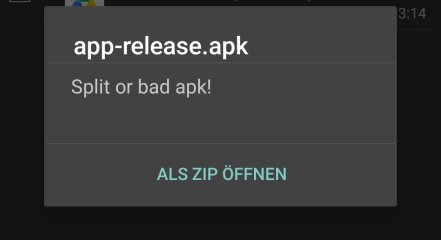
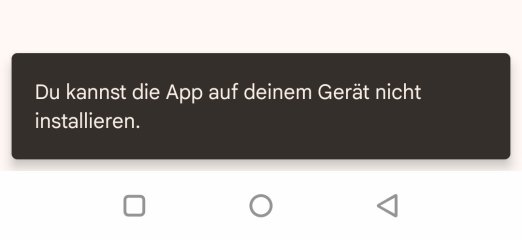
Weird! I'll google that error and see what I can do to resolve it. Not much point making an app no-one can install after allI tried it in different ways, all give error messages;
View attachment 391337

Do you have access to ADB on your dev box?I tried it in different ways, all give error messages;
View attachment 391337
View attachment 391339
I get the following when running this command:
C:\Users\extra\projects\bafflingvision\app\build\outputs\apk\release>adb install -r app-release.apk
Performing Streamed Install
adb.exe: failed to install app-release.apk: Failure [INSTALL_FAILED_UPDATE_INCOMPATIBLE: Existing package com.speedysheep.bafflingvision.BafflingVision signatures do not match newer version; ignoring!]
And upon deleting the app I get:
C:\Users\extra\projects\bafflingvision\app\build\outputs\apk\release>adb install -r app-release.apk
Performing Streamed Install
Success
I don't think you have that existing package info issue (it only happened to me because I've installed this a thousand times...), but the extra data provided by the adb install command might help narrow this down.
Edit: After much further meddling, it seems that the APK installs fine via ADB, but doesn't install directly from an APK, probably because google has become obsessed with making "sideloading" as difficult as possible. I'm not sure yet, but I'm looking into it, Will update when I resolve it.
Unrelatedly, I would strongly appreciate the EU to step in with some anti-monopoly laws here. It's ridiculous the hoops you have to run through to run code on your own device. There should at a minimum be a choice of app stores available. Especially as google has proven themselves completely incompetent at actually removing malware from their stores.
Last edited:
I tried it in different ways, all give error messages;
In a completely bizarre turn of events, it appears if you host the APK on a website, it just... works? At least for me.
Please let me know if you have any issues installing this version, it works on my pixel 4a(!) 6a, and 8, so I'm hoping that's all the major issues resolved (plus its a whole lot easier to install now it's hosted somewhere). And as mentioned, this isn't extremely functional just yet (but it is absolutely capable of going for a ride on if you use a supported motor), just putting it out there for people who are interested.
URL is https://speedysheep.com/downloads/bafflingvision.apk . Thanks for anyone who takes a look! Feel free to criticize any elements of the look and feel (I have a large todo list already...). Eventually it'll ship with some pre-built dashboards so you're not compelled to make your own (note you can already import and export them as a precursor to this), and I'll tidy up the maps integration. But it's back to soldering and the protocol work for now
Thanks all, this forum has been invaluable!
stancecoke
🏍️ Giga poster
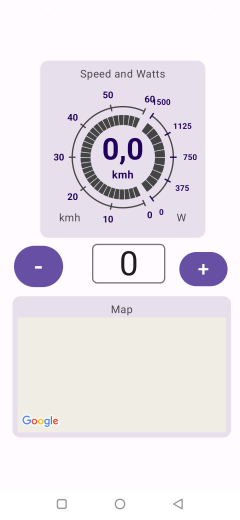
Now it worked, I've just build a quick and dirty dashboard, but of course I have no connection to a motor. The map shows nothing also...Please let me know if you have any issues installing this version
Last edited:
Well at least it installs now!Now it worked, I've just build a quick and dirty dashboard, but of course I have no connection to a motor. The map shows nothing also...
View attachment 391358
The map not working is likely because I broke the API key trying to get the silly thing to build an installable app. Google's bizarre default setting for Google maps without an API key is... To draw a blank window and not tell anyone about the error.
I'll resolve this as I think the mapping is one of the most useful aspects of this app. But beware that it's not SUPER functional just yet (I really only opened this thread to find out if I'd missed any protocol docs that would make the rest of the coding easier). Give me a half hour and Ill update a functional one, assuming no major issues.
If you have a moment for feedback, What's your opinion on a fully user editable "dashboard"? I was half way through development when it occured to me I don't need to impose any kind of dashboard look on the user at all if they have full control of how it looks. I think it'll turn out to be a pretty awesome feature, especially given how little coding it took to achieve.
Also apologies for all these messages! I'd not anticipated install errors at all. Your reply about the DC/DC converter solved almost all my hardware issues in a single image (I literally had one laying around already!)
The link should work now.Well at least it installs now!
The map not working is likely because I broke the API key trying to get the silly thing to build an installable app. Google's bizarre default setting for Google maps without an API key is... To draw a blank window and not tell anyone about the error.
I'll resolve this as I think the mapping is one of the most useful aspects of this app. But beware that it's not SUPER functional just yet (I really only opened this thread to find out if I'd missed any protocol docs that would make the rest of the coding easier). Give me a half hour and Ill update a functional one, assuming no major issues.
If you have a moment for feedback, What's your opinion on a fully user editable "dashboard"? I was half way through development when it occured to me I don't need to impose any kind of dashboard look on the user at all if they have full control of how it looks. I think it'll turn out to be a pretty awesome feature, especially given how little coding it took to achieve.
Also apologies for all these messages! I'd not anticipated install errors at all. Your reply about the DC/DC converter solved almost all my hardware issues in a single image (I literally had one laying around already!)
I fat-fingered an API key which caused a silent failure. As mentioned though, much of the UX is semi-unfinished (or at least in drastic need of some design work) so the support is more a proof of concept than an actual functionality right now. I plan to have the route guidance working much nicer than it does currently at a minimum (It tells you where you are, tells you where/when to turn, but doesn't actually map your route just yet).
Also the maps "next turn" widget will be hidden when maps are not actually navigating anywhere.
Same link as before, different APK: https://speedysheep.com/downloads/bafflingvision.apk
stancecoke
🏍️ Giga poster
The map is shown nowI fat-fingered an API key which caused a silent failure.
But you should offer some pre built dashboard layouts, finding just an empty screen when starting the app will cause irritations for users with less technical affinity
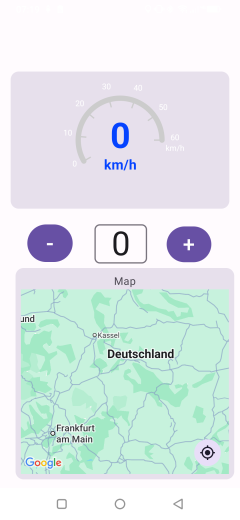
Oh I absolutely agree, I plan to have a list of them pre-prepared. (You can pretty obviously actually copy legitimate hardware displays with the correct widgets too, but I'm avoiding that to prevent any issues)The map is shown now
But you should offer some pre built dashboard layouts, finding just an empty screen when starting the app will cause irritations for users with less technical affinity
View attachment 391395
But I have to finish off the TSD factory protocol (almost complete, just needs a few things confirming), and I'm about 50% through the OSF protocol, and still need to thoroughly test the Bafang one.
Also I have some soldering to do, this whole thing works a whole lot nicer with bluetooth but I have barely tested the bluetooth stuff whatosever. (it should allow for similar functionality to the on/off switches you posted, except entirely app based so you can use proximity or connection status or a widget to disable the bike.
I was mostly hoping someone would know of some more detailed protocol docs to save me some time testing. as it's a complete pain doing this on a desktop and my laptop is kinda falling apart haha
This is at best a 0.1 alpha version
Just wanted to say thanks again for the help Stancecoke!Oh I absolutely agree, I plan to have a list of them pre-prepared. (You can pretty obviously actually copy legitimate hardware displays with the correct widgets too, but I'm avoiding that to prevent any issues)
But I have to finish off the TSD factory protocol (almost complete, just needs a few things confirming), and I'm about 50% through the OSF protocol, and still need to thoroughly test the Bafang one.
Also I have some soldering to do, this whole thing works a whole lot nicer with bluetooth but I have barely tested the bluetooth stuff whatosever. (it should allow for similar functionality to the on/off switches you posted, except entirely app based so you can use proximity or connection status or a widget to disable the bike.
I was mostly hoping someone would know of some more detailed protocol docs to save me some time testing. as it's a complete pain doing this on a desktop and my laptop is kinda falling apart haha
This is at best a 0.1 alpha version
You motivated me to actually do some soldering, and voila: nrf board powered from an e-bike battery, transmitting all the display data via Bluetooth to the connected phone. Thanks! Now to nail down those protocols
Attachments
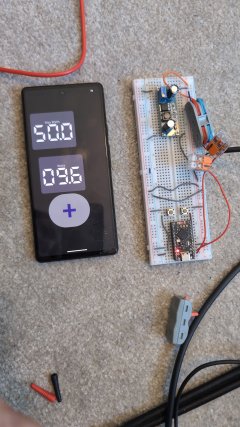
LeoSuperMoin
🔌 New-ish
i started something similar for the tongsheng motors. i already have reverse engineered the BT protocol of the ekd01 display for the tsdz8 and other tongsheng motor. it allows you to pair to it, change the settings, you don't need the account login of the original app and the paid navigation feature also works although that version of the app is not ready to be shared since it need a google api key and for testing i hardcoded my personal one.Just wanted to say thanks again for the help Stancecoke!
You motivated me to actually do some soldering, and voila: nrf board powered from an e-bike battery, transmitting all the display data via Bluetooth to the connected phone. Thanks! Now to nail down those protocols
i can help you with data about the uart communication for tongsheng motors i have a bunch of data about the communication most of it is documented on the tsdz8 osf github page from mstrens. i checked and found a few tiny thing with a logic analyzer for example needing to short battery voltage back to the lock wire i personally used a relay for it in testing. you could also hook up a key switch to it.
i made a working firmware for the raspberry pi pico w and had pas, speed, speed limits and all the settings working along with odometer. i was only having issues with the right timing of the pl wire.
but without notiving i fried by rpi pico w because my dcdc converter that take 10-90v and makes 5v out of it apparently spikes to about 15v on startup really shortly and it fried the pmic on the pi.
i am waiting for my order of 10 rpi pico w to arrive now since i only have normal picos laying around.
if you need anything specific i can dm you the things i have on that
Hey, thanks!i started something similar for the tongsheng motors. i already have reverse engineered the BT protocol of the ekd01 display for the tsdz8 and other tongsheng motor. it allows you to pair to it, change the settings, you don't need the account login of the original app and the paid navigation feature also works although that version of the app is not ready to be shared since it need a google api key and for testing i hardcoded my personal one.
i can help you with data about the uart communication for tongsheng motors i have a bunch of data about the communication most of it is documented on the tsdz8 osf github page from mstrens. i checked and found a few tiny thing with a logic analyzer for example needing to short battery voltage back to the lock wire i personally used a relay for it in testing. you could also hook up a key switch to it.
i made a working firmware for the raspberry pi pico w and had pas, speed, speed limits and all the settings working along with odometer. i was only having issues with the right timing of the pl wire.
but without notiving i fried by rpi pico w because my dcdc converter that take 10-90v and makes 5v out of it apparently spikes to about 15v on startup really shortly and it fried the pmic on the pi.
i am waiting for my order of 10 rpi pico w to arrive now since i only have normal picos laying around.
if you need anything specific i can dm you the things i have on that
One of my major unknowns on the TSDZ8 at the moment is the second torque byte (byte 4 in the 0x43 motor-display packet). It is documented elsewhere as a torque value (and might be on a tsdz2?) but it seems to match the battery current instead.
In my testing on a motor with no cranks attached it reliably goes up with throttle input only.
Can you confirm if that byte kept the same meaning between tsdz8 and tsdz2? It's a little weird that it seems to reliably track motor current both on and off the bike if not. But it's very likely I've made some mistake there.
My main questions for the TSDZ8 are about the second block, header 0x46, 15 bytes long, that seems to be consistently sent along with the 0x43 packet (ebike-protocols/tongsheng/TSDZ_FACTORY_PROTOCOL.md at main · speedysheep/ebike-protocols) Most of those bytes appear to be zero in much of my testing so I haven't been able to reliably tell what the fields are or confirm if my analysis is correct. If you have any info about that specific data then I can finalize factory TSDZ8 implementation in a few hours, so it would be incredibly helpful. I'd also be curious to know if that data exists at all on a TSDZ2 or if it's entirely new for the TSDZ8. I don't have a TSDZ2 to test with.
(Also apologies for that paragraph being slightly unreadable, it's hard to concisely discuss protocols!)
I've been keeping documentation about these protocols in this repo btw: GitHub - speedysheep/ebike-protocols: Repo storing ebike protocols (I don't expect you to browse this repo! Putting the link out therein case it's helpful for others).
I will DM you for more info as requested, thanks for the offer. I somewhat snapped my laptop when doing some previous testing so I'm debugging this via a desktop next to my kitchen which is not at all optimal
Thanks again, will DM you when I get home,
Badsheepy
So you will need additional hardware?! Lishui used to offer professional BT-Modules for Bafang and Lishui/Kunteng UART systems that can be plugged between the controller and the display simply. It has a standard HM-10 BLE module internally and can switch on/off the system by BT.
View attachment 391180
you can find some more common UART protocols on the EBiCS repository:
Kunteng: Old, but still popular in the DIY communitiy (They offer their own BT Module also)
EBiCS_Firmware/Src at master · EBiCS/EBiCS_Firmware
Free FOC firmware for Lishui E-Bike-Controllers. Contribute to EBiCS/EBiCS_Firmware development by creating an account on GitHub.github.com
5s: Many display manufacturers use it, Kingmeter, KeyDisplay, several cheap no name offers also, used by Lishui and JYT controllers
No2: more and more the "standard" protocol for very cheap China hardware like Brainpower with S886 S866, .... displays
J-LCD: Old Kingmeter protocol, rarely used in these days.
I guess, without a detailed tutorial, how to set up the BT-Module and a precomiled apk file, you wont find a user of your interesting project...
Just to clarify, the project is in very-pre-alpha state, I'm not expecting users just yet, this was purely a protocols question
I will obviously make it easier to use. I'm expecting most people to use it via USB serial as everyone who has flashed a bafang controller would already have the cable available, they're cheap and widely available.I just like the NRF solution because it adds a few really cool bonus features. They're essentially unrelated projects though, I have just been somewhat developing them in parallel
Anyhow! thanks again for your help stancecoke, just wanted to clarify the project state! (and also LeoSuperMoin who helped clarify some TSD issues I had). TSD factory protocol seems to be fully implemented now, so I have time to work on the app more. As you can see, it's very rough around the edges right now.
And I assure you this project will become more user friendly with time, I hadn't really anticipated sharing an APK just yet, so you got a glimpse of my active dev branch
I took a look at adding ANT+ support (just to plan it out and see the scope) and it's a surprisingly large amount of effort. I'd really like to add it in future, but the scope on the nrf side is larger than I expected to be, so it definitely will not be done in the initial release. Especially as I don't have any ANT+ devices to use, and you have to sign up to their dev program to implement anything.It's about connecting Garmin devices like a watch or computer and sending data directly to the ongoing training.
Getting Started — ANT for nRF Connect SDK documentation
That said, contributions are always welcome! GitHub - speedysheep/nrfProxy: Proxy serial UART to bluetooth LE for BafflingVision display.
To summarize, it's obviously possible*, but it's not currently on the roadmap. When I have an initial release of the display app I'll revisit this.
*there might be some strange issues sharing the radio. There might not be. I didn't look enough to be sure.
stancecoke
🏍️ Giga poster
Ant+ has an own protocol for Light Electric Vehicles. I started to use this protocol logic for the EBiCS Flutter app, but there was almost no interest in the community, so this project is dead.I took a look at adding ANT+
I don't know, if there is any commercial use of the ANT+ LEV protocol. There are some products linked on the ANT+ homepage, but they seem to be quite exotic, no mainstream....
LEV+ E-Bike Display - THIS IS ANT
ANT is a Wireless Personal Network protocol, by Garmin Canada, with small size, reasonable cost and very low power requirements.
Yeah the protocol seems OK, it's just a load more work than I anticipated, you have to sign up to their developer program to actually access their documentation, I don't have one, and Garmin will apparently discontinue Ant+ and certification programs by June 2025(!). It's not even clear to me if the latest Zephyr/Nrf SDK has support for the ANT+ module.Ant+ has an own protocol for Light Electric Vehicles. I started to use this protocol logic for the EBiCS Flutter app, but there was almost no interest in the community, so this project is dead.
I don't know, if there is any commercial use of the ANT+ LEV protocol. There are some products linked on the ANT+ homepage, but they seem to be quite exotic, no mainstream....
LEV+ E-Bike Display - THIS IS ANT
ANT is a Wireless Personal Network protocol, by Garmin Canada, with small size, reasonable cost and very low power requirements.www.thisisant.com
It's barely even a "nice to have" for me, and it's completely untestable on my side as I don't have one. And Garmin itself seems to have abandoned it?
Primarily though, it's not on my roadmap, and I have a vast amount of higher priority issues to take care of before then. (I didn't release the app yet! this is not the correct time to be adding a load of functionality!)
Similar threads
- Replies
- 0
- Views
- 291
- Replies
- 1
- Views
- 260

- Replies
- 42
- Views
- 2,298

- Replies
- 36
- Views
- 2,175

- Replies
- 13
- Views
- 2,802