• Hello ES! We could use some help to get us past the finish line on building the new knowledgebase for the forum.
    Can you donate? Please see our fundraising page. Thank you!

TSDZ2 OSF for all displays, VLCD5-VLCD6-XH18, LCD3, 860C-850C-SW102.

It's odd the odometer would reset at such a low number! For VLDC5, odometer data is supposedly stored in the controller. Maybe mbrusa can check the code to see if it does reset at 4100 miles or not.

Run the odo to 4095, go for a ride and see if it resets at 4100 again.

Another oddity. I originally started in kilometers because I forgot how to change the display to mi;es. When I found out how to do that, I switched to miles and the odometer showed the equivlent number.

After the VLDC5 reset to 0 miles, I started counting again. I decided to look at the km number, and huh, it hadn't reset. Now past 7000 km. However, if I switch back to miles, I see the lower number after I reset it. So now the display has two different mileage numbers.
 
It's odd the odometer would reset at such a low number! For VLDC5, odometer data is supposedly stored in the controller. Maybe mbrusa can check the code to see if it does reset at 4100 miles or not.

Run the odo to 4095, go for a ride and see if it resets at 4100 again.
The odometer is managed and stored on the display.
 
Hello! I have been using this for a long time and its been great. Recently I installed new lights and so I reflashed the firmware, but first did a git pull. The performance is very bad right now. Previously, setting turbo meant turbo and there was a lot of assistance, but now there is barely any difference between the modes, and I can barely get uphill, just in general very little support. Has something changed? It was roughly a year ago I flashed it initially, so there were quite a few changes since then, and so I might have missed some new detail.

It is 42V battery with a regular 36V 250W controller. I have not calibrated the torque sensor as it worked very well before, using hybrid mode.

edit: meant 36V battery
If you used the same settings in the configurator, you shouldn't notice much of a difference.

Just going from version 2.3 to 6.3, with the same parameters, results in about 10% less assistance, but this difference can easily be compensated for by setting "Pedal torque ADC range adjustment" to +10, and setting it to +20 will result in greater assistance than version 2.3.

If, however, the difference in assistance is significant, it means there are different settings.
The most important one to consider is the torque sensor calibration.
If you didn't calibrate with the previous version and you did with the new version,
and the torque sensor range is good (close to 160), there could be a difference of up to 100%.
But this also happens with the same version.

In addition to increasing "Pedal torque adc range adjustment" up to +20, consider that you can also increase the level parameters, the default values are conservative.
Example: in Power mode in TURBO you can reach 500% (the default is 260%).
 
The odometer is managed and stored on the display.
Thanks!

So this AI overview is wrong? At least they have a disclaimer on the bottom "AI responses may include mistakes."

Where is odometer data stored in VLCD5 display
In an e-bike system with a VLCD5 display, odometer data is stored in
the motor controller's EEPROM, not the display itself. The VLCD5 display acts as an interface that reads and shows the accumulated mileage from the controller, but it does not save the total distance internally.

The process of storing odometer data
  • Speed sensing: A speed sensor on the wheel or motor counts rotations and sends this data to the motor controller.
  • Calculation: The controller's firmware, often Bafang or Tongsheng, calculates the total distance traveled based on the wheel size and the sensor data.
  • Storage in the controller: The accumulated total mileage (odometer) is saved in the controller's non-volatile memory, known as EEPROM (Electrically Erasable Programmable Read-Only Memory).
  • Display function: The VLCD5 display receives the total mileage information from the controller and shows it to the rider.

Implications of this storage method
  • Replacing the display: Since the odometer data is in the controller, replacing a VLCD5 display with a new one will not reset or change your total mileage. The new display will simply pull the existing data from the motor controller.
  • Swapping the motor: If you replace the mid-drive motor and controller (such as a
    Tongsheng TSDZ2
    or Bafang BBS unit), your odometer reading will be reset to zero because the new controller's memory has no prior mileage data.
  • Mileage accuracy: If you have issues with the odometer reading being inaccurate, it's likely caused by an incorrectly set wheel size in the controller's firmware or a faulty speed sensor, not a problem with the display itself.

AI responses may include mistakes. Learn more
 
  • Like
Reactions: dgc
The VLCD5 display is a simple HMI or human - machine interface, which applies basically to all the displays, as long as the display "talks" the same language as the controller there is no problem.
 
The observed miles reset happened at 4100 miles on a new VLDC5 that I was externally clocking for mileage. I went to my wife's bike, and her old VLCD had lost its miles number, but also still shows about the right mileage (6766 km) when switched to metric. So I'll say that this reset only affects the mileage in miles.

My other tongsheng bike is on its second VLDC5, The first one locked up after a few months. Probably had 400 mile. When I put the new display on, it started at zero miles. It did not pick up anything from the controller. So it started at zero, and is now showing 3618 miles, Switched to KM, it shows 5791 km, close enough to 3618. I should get another 300 miles before long. We'll see if that resets too,
 
Last edited:
We have here a foible, (a minor weakness or eccentricity), my TSDZ2(B)s OSF does not clear the speed displayed to zero until I move the back wheel magnet past the speed sensor, another foible. Got to over 3000 miles now so look forward to the mileage reset. Have switched displays on the same bike between a VLCD5, VLCD13 and a DZ41, the mileage has not reset. Mileage will most likely zero when I reprogram the controller to suit the 860C in the near future, but may fit the B02N-U, but would just have the faff of changing the brake sensors and making a display cable up with the brake sensor connectors spliced in.
 
The observed miles reset happened at 4100 miles on a new VLDC5 that I was externally clocking for mileage. I went to my wife's bike, and her old VLCD had lost its miles number, but also still shows about the right mileage (6766 km) when switched to metric. So I'll say that this reset only affects the mileage in miles.

My other tongsheng bike is on its second VLDC5, The first one locked up after a few months. Probably had 400 mile. When I put the new display on, it started at zero miles. It did not pick up anything from the controller. So it started at zero, and is now showing 3618 miles, Switched to KM, it shows 5791 km, close enough to 3618. I should get another 300 miles before winter comes. Weill see if that resets too,
A lot of weird stuff going on! 5791 km should convert to 3598.4 miles but you have 3618 miles?

edit: Suggestion, zero out the odometer, go for a short ride and check if the miles/ km discrepancy remains.

Just checked my LCD3 odometer. 2794.4 miles/ 4471.1 km which is correct. I have 1305.6 more miles before reaching 4100. I'll be sure to check if mine resets to zero then.
 
Last edited:
Have switched displays on the same bike between a VLCD5, VLCD13 and a DZ41, the mileage has not reset.
Did you mean you changed displays (different ones) and each time the odometer reading was carried over?
 
If you used the same settings in the configurator, you shouldn't notice much of a difference.

Just going from version 2.3 to 6.3, with the same parameters, results in about 10% less assistance, but this difference can easily be compensated for by setting "Pedal torque ADC range adjustment" to +10, and setting it to +20 will result in greater assistance than version 2.3.

If, however, the difference in assistance is significant, it means there are different settings.
The most important one to consider is the torque sensor calibration.
If you didn't calibrate with the previous version and you did with the new version,
and the torque sensor range is good (close to 160), there could be a difference of up to 100%.
But this also happens with the same version.

In addition to increasing "Pedal torque adc range adjustment" up to +20, consider that you can also increase the level parameters, the default values are conservative.
Example: in Power mode in TURBO you can reach 500% (the default is 260%).
thank you for your reply. i went from
v20.1C.2-update-2
to
v20.1C.6-update-3

Torque sensor not calibrated in either. I got E07 now for the first time runnung on max assistance level, but the assistance was far lower than before. I enabled lights, that is the only difference
 
If you used the same settings in the configurator, you shouldn't notice much of a difference.

If, however, the difference in assistance is significant, it means there are different settings.
The most important one to consider is the torque sensor calibration.
If you didn't calibrate with the previous version and you did with the new version,
and the torque sensor range is good (close to 160), there could be a difference of up to 100%.
But this also happens with the same version.

In addition to increasing "Pedal torque adc range adjustment" up to +20, consider that you can also increase the level parameters, the default values are conservative.
Example: in Power mode in TURBO you can reach 500% (the default is 260%).
I guess I am one of the few still not getting good enough response in 1,C.6, I never calibrated the torque sensor in 1.C.2 and in my initial trial of 1.C.6, but I did transfer the assist settings. . Very poor assist in hybrid mode.

My last trial, I got the re and re1 numbers and put those into the Java. Also tried a small change in the ADC torque sensor offset. I saw a big improvement in the motor response. Subjectively, I still preferred the 1,C.2 response, but now 1.C.6 was working better.

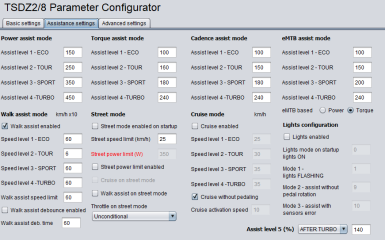
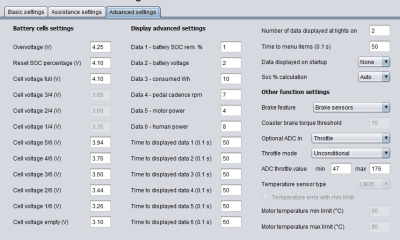
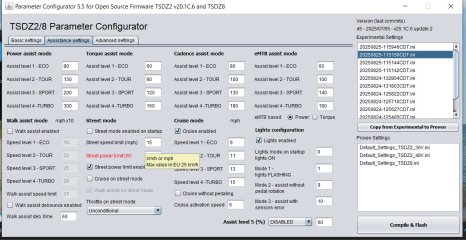
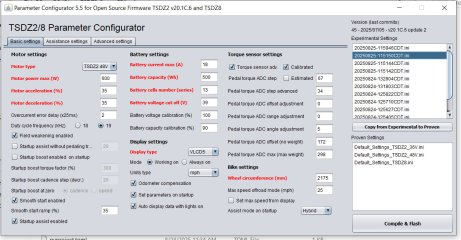
Here are the screens. Should I try a larger ADC offset? This is on a steel 10 speed bike, ridden on pavement at 20-30 km/hour, mostly in eco level. No danger of cooking the motor in 1.C.2, but I'd like to understand the OSF tuning better. Would the results be different in the other modes like emtb or power. Guess I could try them.

s1.jpgs2.jpg
 
Did you mean you changed displays (different ones) and each time the odometer reading was carried over?
Load of bollocks on my behalf, display(s) retain the mileage, was a year or two back.
 
I guess I am one of the few still not getting good enough response in 1,C.6, I never calibrated the torque sensor in 1.C.2 and in my initial trial of 1.C.6, but I did transfer the assist settings. . Very poor assist in hybrid mode.

My last trial, I got the re and re1 numbers and put those into the Java. Also tried a small change in the ADC torque sensor offset. I saw a big improvement in the motor response. Subjectively, I still preferred the 1,C.2 response, but now 1.C.6 was working better.

Here are the screens. Should I try a larger ADC offset? This is on a steel 10 speed bike, ridden on pavement at 20-30 km/hour, mostly in eco level. No danger of cooking the motor in 1.C.2, but I'd like to understand the OSF tuning better. Would the results be different in the other modes like emtb or power. Guess I could try them.
New versions always bring improvements.
If there are any negative differences, it's a matter of understanding the cause and adjusting the parameters.
I almost always do tests and comparisons in "Power assist" mode with "Startup boost" enabled; I consider this the best mode.

I wrote:
In addition to increasing "Pedal torque adc range adjustment" up to +20, consider that you can also increase the level parameters, the default values are conservative.
This advice also applies to hybrid mode. But if you increase the "Power Assist" settings, you also need to increase the "Torque Assist" settings.
There's another important difference in hybrid mode: in versions 6.x, the "Smooth Start" function has been added.
This gives the sensation of less responsiveness during the first pedal strokes. Try increasing the "Smooth start ramp (%)" value.
Or disable the function, but keep in mind that there's a risk of damaging the drivetrain.
In my tests, before adding "Smooth Start," I broke the rear wheel axle while starting uphill in hybrid mode at TURBO level.
 
thank you for your reply. i went from
v20.1C.2-update-2
to
v20.1C.6-update-3

Torque sensor not calibrated in either. I got E07 now for the first time runnung on max assistance level, but the assistance was far lower than before. I enabled lights, that is the only difference
The E07 error was not present in version v20.1C.2-update-2.
It has a dual function:
MOSFET overcurrent protection and blue gear protection from power spikes.
False errors are possible; if frequent, they are annoying.
I had added the "Overcurrent error delay (25ms)" parameter, set to 2 by default.
But I received a bug report; the delay doesn't work; it's as if it were always set to 1.
I fixed it, but I haven't released a new version number yet; I need to make some other changes first.
If you want, you can download the updated master version.
https://github.com/emmebrusa/TSDZ2-Smart-EBike-1/archive/refs/heads/master.zip
 
When flashing new updated Firmware, is it still recommend to charge the battery to 100% before first turn on? I think this was the case some time ago.
 
I have done it both ways but I usually tend to have only ST-LINK V2 programing cable connected, unplug the battery and the display, or as on page 133 program the bare controller by it's self next to my laptop. I think I had hiccups with the programing but think that was a problem with the ST-LINK V2 programing cable I've made up.
 
Oh, sorry, I may have expressed myself incorrectly. Normally, I always disconnect the battery when programming.
But I meant afterwards. So, once the controller has been programmed and everything has been reconnected. I think it used to be recommended that the battery should be at 100% when starting the OSF for the first time, as this calibrates the charge status.
 
When flashing new updated Firmware, is it still recommend to charge the battery to 100% before first turn on? I think this was the case some time ago.
Yes, it's true. After flashing, it was recommended to have a 100% battery charge.
This is because the SOC is set to 99.9% when you first power on.
Otherwise, you had to manually reset the SOC.
A manual reset was required not only when you first power on, but also when you installed a battery that wasn't fully charged.

In the current version, if "Soc % calculation" is set to "Auto" in the configurator, the SOC reset occurs automatically.
But only if the stored SOC differs more than +/- 15% from the actual value; otherwise, a manual reset is still required.
See the procedure in the manual.
 
I have to say I learn something new everyday regarding the firmware.
 
I am at the stage where I am ready to go from v20.1C.2-2 to v20.1C.6-update-3, I am running SDCC version 4.4.0. So before I go for it the question is how, do I strip version 2-2 off my Win 11 laptop after making a copy of my experimental and proven settings. The main reason for asking is that I am a Ubuntu user, have done so for years only using Windows 11 only when I have too, windows updates did my head.
 
Last edited:
Hello everyone,

Thanks for all your work with OSF – really appreciate it!

I'm writing because I'm having an issue with the settings on my kid's bike. He is 11 years old and weighs about 55 kg.

The motor is a TSDZ2B 36V, and after opening the casing, I found the driver marked 36V 16A.
The battery is 36V 560Wh.

The problem is that the motor cuts assistance around 25–27 km/h.
We mostly ride MTB in the mountains, but sometimes we ride on flat asphalt sections where we cruise around 30–33 km/h.
That's the speed my son could manage even without the motor.

When we first got the motor, using the stock firmware, assistance was working fine even at those speeds.
I set the speed limit to 35 km/h on the LCD (B02NU), although I mostly use EKD01 as the display.

Now, here's what we've changed:
At first, we tested everything using the original 42T front chainring (from the motor) and a 12T rear.
But because my son had trouble riding without battery power (too heavy gearing), I replaced the front ring with a 34T.
According to my calculations, we’re not exceeding reasonable cadence values for that gearing:
30km/h - 85 cadence (rpm)
35km/h - 98 cadence (rpm)
40km/h - 112 cadence (rpm)

Here are the main settings, can you help me figure out what might be wrong?
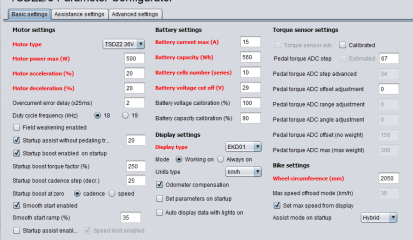
1759306470431.png
1759306498762.png
1759306533029.png


The speed limit is set to 35 km/h on the LCD, and even if I set it to 40 km/h, the motor still stops assisting around 25–27 km/h.
I tested this myself riding his bike, and I can really feel the drop in assistance at around 27 km/h.

can you explain my what is means "set parameters on startup"?

Thanks in advance for any help!
Best regards
 
Last edited:
.....

The problem is that the motor cuts assistance around 25–27 km/h.
....
The speed limit is set to 35 km/h on the LCD, and even if I set it to 40 km/h, the motor still stops assisting around 25–27 km/h.
I tested this myself riding his bike, and I can really feel the drop in assistance at around 27 km/h.

can you explain my what is means "set parameters on startup"?
....
The first thing I see is that you haven't calibrated the torquesensor.
In that case the default setting of it is almost ideal, what isn't mostly the case.
So calibrating can give a better result in this case.
"Set parameters at startup" enabled, means you can change different assist modes from display.
It is also possible to change this option from display (Assistlevel 0 - E02, =two pushes on light button).
You can find other display parameter settings inside the display manual page 3 (inside "Manuals" folder).
Also you can find how to calibrate the torquesensor on page 5.

It is also possible to perform an alternative calibration from display, without flashing again on page 6.
With that you can test if it gives the result you want.
Read carefully, because otherwise this calibration is temporary till switch off the display.
 
Last edited:
I am at the stage where I am ready to go from v20.1C.2-2 to v20.1C.6-update-3, I am running SDCC version 4.4.0. So before I go for it the question is how, do I strip version 2-2 off my Win 11 laptop after making a copy of my experimental and proven settings. The main reason for asking is that I am a Ubuntu user, have done so for years only using Windows 11 only when I have too, windows updates did my head.
To remove version 20.1C.2-2, simply delete the folder.
But it's not necessary to remove it; multiple versions can be installed.
The important thing is that the folders have different names.
 
  • Like
Reactions: dgc
Have I got this right, just unzip in new directory, point shortcut to the java exe and away we go, will my old setting files run version 6.
 
To remove version 20.1C.2-2, simply delete the folder.
But it's not necessary to remove it; multiple versions can be installed.
The important thing is that the folders have different names.
Got it many thanks.
 
  • Like
Reactions: Jrp
Back
Top