
Yes they work, but you will have to verify the new parameters added.Have I got this right, just unzip in new directory, point shortcut to the java exe and away we go, will my old setting files run version 6.

-
Hello ES! We could use some help to get us past the finish line on building the new knowledgebase for the forum.
Can you donate? Please see our fundraising page. Thank you!
You are using an out of date browser. It may not display this or other websites correctly.
You should upgrade or use an alternative browser.
You should upgrade or use an alternative browser.
TSDZ2 OSF for all displays, VLCD5-VLCD6-XH18, LCD3, 860C-850C-SW102.
- Thread starter mbrusa
- Start date
Elinx, thank you for your reply.The first thing I see is that you haven't calibrated the torquesensor.
In that case the default setting of it is almost ideal, what isn't mostly the case.
So calibrating can give a better result in this case.
"Set parameters at startup" enabled, means you can change different assist modes from display.
It is also possible to change this option from display (Assistlevel 0 - E02, =two pushes on light button).
You can find other display parameter settings inside the display manual page 3 (inside "Manuals" folder).
Also you can find how to calibrate the torquesensor on page 5.
It is also possible to perform an alternative calibration from display, without flashing again on page 6.
With that you can test if it gives the result you want.
Read carefully, because otherwise this calibration is temporary till switch off the display.
I'll try to do the torque sensor calibration, but I’m afraid that’s not the issue. I weigh 115 kg, and even when I push hard on the pedals on my son’s bike, there’s no assistance once we go over around 27 km/h.
MMaxim
New here
I bought an SW102/2 to use with the TSDZ8 and the OSF. I opened it to flash the OSF for the SW102 (Initial SW102 firmware install). However, the SW102/2 looks completely different inside than the original SW102, there is no debug pad.
Does anyone know how I can get the OSF flashed onto it? Or is this no longer necessary to flash de OSF for the SW102/2 for setting all the parameters for the TSDZ8 OSF?
Does anyone know how I can get the OSF flashed onto it? Or is this no longer necessary to flash de OSF for the SW102/2 for setting all the parameters for the TSDZ8 OSF?
MMaxim
New here
Found it: TSDZ2 mid drive with 860C, 850C or SW102 displays only -- Flexible OpenSource firmware (Casainho code only)I bought an SW102/2 to use with the TSDZ8 and the OSF. I opened it to flash the OSF for the SW102 (Initial SW102 firmware install). However, the SW102/2 looks completely different inside than the original SW102, there is no debug pad.
Does anyone know how I can get the OSF flashed onto it? Or is this no longer necessary to flash de OSF for the SW102/2 for setting all the parameters for the TSDZ8 OSF?
The new version of the SW102 seems to be fully compatible with the OSF according the posts.
If there's no longer support, it's not a calibration issue.Elinx, thank you for your reply.
I'll try to do the torque sensor calibration, but I’m afraid that’s not the issue. I weigh 115 kg, and even when I push hard on the pedals on my son’s bike, there’s no assistance once we go over around 27 km/h.
Have you tried disabling "Set max speed from display"?
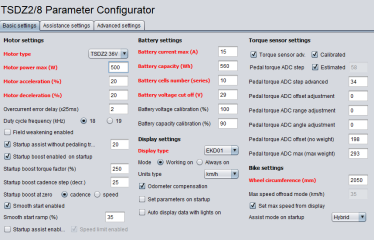
Just out of curiosity. Will this work too with disabled "Set parameters at start up"...... "Set max speed from display"?
Hi all! I'm looking at getting my TSDZ2 system back up and running after it's collected dust for about 4 years. Last I played with it was using the original casainho OSF (I think it was the original). I've lost all my shortcuts from back then and I can barely remember what the reflashing process was, so I'm kind of like starting from scratch again.
Can anyone provide links to the most up to date flashing guide(s); basically the 'for dummies' links? I've had a bit of a search but the ecosystem seems rather more multifaceted than I remember from years ago, and I'd like to know that I'm looking at the most up to date information.
Thanks in advance.
Can anyone provide links to the most up to date flashing guide(s); basically the 'for dummies' links? I've had a bit of a search but the ecosystem seems rather more multifaceted than I remember from years ago, and I'd like to know that I'm looking at the most up to date information.
Thanks in advance.
Hello.
I've done everything, but the feeling is still the same.
I'm starting to think the problem might be with the front 34T. I'll replace it with the original 42T and check.
Is it possible to display the actual cadence on the EKD01?
I've done everything, but the feeling is still the same.
I'm starting to think the problem might be with the front 34T. I'll replace it with the original 42T and check.
Is it possible to display the actual cadence on the EKD01?
If you've compared stock and OSF firmware with different chainrings, this is the first thing to consider.
You wrote that there's no support after 27 km/h; I interpret this as meaning the power drops to zero.
At maximum cadence (100 rpm at 18 kHz), the power decreases but doesn't drop to zero.
The maximum cadence can be increased by setting the frequency to 19 kHz and enabling "Field Weakening."
Various operating data can be displayed, including cadence.
You should read the manuals for this.
Temporary setting to display cadence when the lights are on:
"Auto display data with lights on" = enabled
"Data 1" = 7 (pedal cadence RPM)
"Time to display data 1" = 0 (continuous)
"Number of data displayed lights on" = 1
Warning: The cadence value changes scale when it exceeds 99.9; 100 becomes 10.0.
The best performance is achieved between 80 and 90 rpm.
You wrote that there's no support after 27 km/h; I interpret this as meaning the power drops to zero.
At maximum cadence (100 rpm at 18 kHz), the power decreases but doesn't drop to zero.
The maximum cadence can be increased by setting the frequency to 19 kHz and enabling "Field Weakening."
Various operating data can be displayed, including cadence.
You should read the manuals for this.
Temporary setting to display cadence when the lights are on:
"Auto display data with lights on" = enabled
"Data 1" = 7 (pedal cadence RPM)
"Time to display data 1" = 0 (continuous)
"Number of data displayed lights on" = 1
Warning: The cadence value changes scale when it exceeds 99.9; 100 becomes 10.0.
The best performance is achieved between 80 and 90 rpm.
You should at least tell us what display you use.Hi all! I'm looking at getting my TSDZ2 system back up and running after it's collected dust for about 4 years. Last I played with it was using the original casainho OSF (I think it was the original). I've lost all my shortcuts from back then and I can barely remember what the reflashing process was, so I'm kind of like starting from scratch again.
Can anyone provide links to the most up to date flashing guide(s); basically the 'for dummies' links? I've had a bit of a search but the ecosystem seems rather more multifaceted than I remember from years ago, and I'd like to know that I'm looking at the most up to date information.
Thanks in advance.
Yeah my bad.You should at least tell us what display you use.
860C

Final question I have both the v20.1C.2-update-2 and v20.1C.6-update-3 running fine on my laptop, thanks for your help, can I use the experimental and proven settings from 2-update-2 in 6-update-3 or will that "bugger the works up". Otherwise I can plug my spare monitor into the laptop and go dual screen so can have 2-update-2 and 6-update-3 across the two screens.
Last edited:
Yes, you can use the .ini files from version 2.2, but version 6.3 has new parameters. Check the manual to see if the default settings are OK for you.Final question I have both the v20.1C.2-update-2 and v20.1C.6-update-3 running fine on my laptop, thanks for your help, can I use the experimental and proven settings from 2-update-2 in 6-update-3 or will that "bugger the works up". Otherwise I can plug my spare monitor into the laptop and go dual screen so can have 2-update-2 and 6-update-3 across the two screens.
To compare the two versions, you can open both configurators on the same PC at the same time.
Many thanksYes, you can use the .ini files from version 2.2, but version 6.3 has new parameters. Check the manual to see if the default settings are OK for you.
To compare the two versions, you can open both configurators on the same PC at the same time.
If you have a TSDZ2 with an 860C display and have already tried the casainho firmware, there's a new version you can installYeah my bad.
860C
Release Firmware open source TSDZ2-v20.1C.5-update-1-860C · emmebrusa/TSDZ2-Smart-EBike-860C
There's the TSDZ2-vv20.1C.5-1-1-860C.hex file
for the motor, which can be flashed with "ST Visual Programmer".
The 860C_v20.1C.5-1-1-bootloader.bin file is for the 4-year-old 860C display, which can be flashed with "Apt Burn Tools".
There's also the manual, which you should read carefully.
If you've already done this, you should have the tools to do it.
To refresh your memory, here's a link for the motor.
TongSheng TSDZ2 what Firmware options are there?
The website for the display no longer exists; I had saved it as a PDF.
Attachments
Very nice you have saved eco cycles instructions.If you have a TSDZ2 with an 860C display and have already tried the casainho firmware, there's a new version you can install
Release Firmware open source TSDZ2-v20.1C.5-update-1-860C · emmebrusa/TSDZ2-Smart-EBike-860C
There's the TSDZ2-vv20.1C.5-1-1-860C.hex file
for the motor, which can be flashed with "ST Visual Programmer".
The 860C_v20.1C.5-1-1-bootloader.bin file is for the 4-year-old 860C display, which can be flashed with "Apt Burn Tools".
There's also the manual, which you should read carefully.
If you've already done this, you should have the tools to do it.
To refresh your memory, here's a link for the motor.
TongSheng TSDZ2 what Firmware options are there?
The website for the display no longer exists; I had saved it as a PDF.
That is fantastic. Thank you very much for putting that together.If you have a TSDZ2 with an 860C display and have already tried the casainho firmware, there's a new version you can install
Release Firmware open source TSDZ2-v20.1C.5-update-1-860C · emmebrusa/TSDZ2-Smart-EBike-860C
There's the TSDZ2-vv20.1C.5-1-1-860C.hex file
for the motor, which can be flashed with "ST Visual Programmer".
The 860C_v20.1C.5-1-1-bootloader.bin file is for the 4-year-old 860C display, which can be flashed with "Apt Burn Tools".
There's also the manual, which you should read carefully.
If you've already done this, you should have the tools to do it.
To refresh your memory, here's a link for the motor.
TongSheng TSDZ2 what Firmware options are there?
The website for the display no longer exists; I had saved it as a PDF.
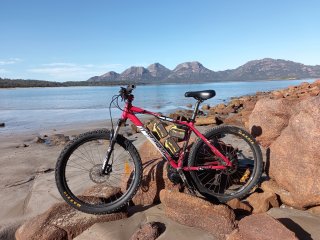
The DeWalt-o-cycle will rule the beaches once again!
Attachments
Hello everyone,
I still have two issues I can't seem to figure out. I've read the documentation several times and I really don’t know what I'm doing wrong. My display is the B02NU, and in the software I select EKD01 as the display type.
If I want to check things like motor power, cadence, or current, I have to reflash the firmware each time, changing the “Number of data displayed at light on” to the specific Data number. Is this really how it’s supposed to work?
From what I understand in the display manual, turning the lights on and off should cycle through Data 1 to Data 6, but in my case, it's stuck on Data 1.
This feels like a significant loss of support after crossing that 25–27 km/h mark. Is this normal behavior? If so, please correct me — this is my first e-bike and I don’t have a reference point.
Thanks in advance for your help and patience!
I still have two issues I can't seem to figure out. I've read the documentation several times and I really don’t know what I'm doing wrong. My display is the B02NU, and in the software I select EKD01 as the display type.
Problem 1:
I'm trying to switch between the advanced display settings (Data 1 to 6) using the light on/off toggle. I’ve correctly set the options in the firmware to display different data depending on the light status. However, I can’t seem to switch — it always shows Data 1 no matter what I do.If I want to check things like motor power, cadence, or current, I have to reflash the firmware each time, changing the “Number of data displayed at light on” to the specific Data number. Is this really how it’s supposed to work?
From what I understand in the display manual, turning the lights on and off should cycle through Data 1 to Data 6, but in my case, it's stuck on Data 1.
Problem 2:
From the display, I can see that:- Max cadence with 34T-11T is around 80 RPM
- Max current is about 15-16A (I’ve set 15A in the firmware)
- At around 25–27 km/h, the motor assists nicely and shows around 500W (which I’ve also set in the firmware)
This feels like a significant loss of support after crossing that 25–27 km/h mark. Is this normal behavior? If so, please correct me — this is my first e-bike and I don’t have a reference point.
Thanks in advance for your help and patience!
May be an idea, go back to page 113 when I was messing with my 48V TSDZ2B "but as the torque sensor seemed a bit limp or I am just a light weight, I increased by 20% the Power and Torque Assist Mode values to give me the same feel as on my other bike, did not want a this point in time to open the TSDZ2B up and mess with the torque sensor, know what load cell elements are like" I have put the screen shots there and no I did not a calibration, been fine since January.Elinx, thank you for your reply.
I'll try to do the torque sensor calibration, but I’m afraid that’s not the issue. I weigh 115 kg, and even when I push hard on the pedals on my son’s bike, there’s no assistance once we go over around 27 km/h.
No, that's not the case.Hello everyone,
I still have two issues I can't seem to figure out. I've read the documentation several times and I really don’t know what I'm doing wrong. My display is the B02NU, and in the software I select EKD01 as the display type.
Problem 1:
I'm trying to switch between the advanced display settings (Data 1 to 6) using the light on/off toggle. I’ve correctly set the options in the firmware to display different data depending on the light status. However, I can’t seem to switch — it always shows Data 1 no matter what I do.
If I want to check things like motor power, cadence, or current, I have to reflash the firmware each time, changing the “Number of data displayed at light on” to the specific Data number. Is this really how it’s supposed to work?
From what I understand in the display manual, turning the lights on and off should cycle through Data 1 to Data 6, but in my case, it's stuck on Data 1.
Problem 2:
From the display, I can see that:
But when I pedal faster, the displayed motor power suddenly drops to around 100–150W. Shouldn't the motor keep pushing at 500W as long as I’m pedaling and under load? Max speed set from soft 40km/h. I did and set like you wrote.
- Max cadence with 34T-11T is around 80 RPM
- Max current is about 15-16A (I’ve set 15A in the firmware)
- At around 25–27 km/h, the motor assists nicely and shows around 500W (which I’ve also set in the firmware)
This feels like a significant loss of support after crossing that 25–27 km/h mark. Is this normal behavior? If so, please correct me — this is my first e-bike and I don’t have a reference point.
Thanks in advance for your help and patience!
When the lights are turned on, the data is displayed sequentially, for the time set for each piece of data.
If you set a time to zero, that piece of data is displayed continuously and the sequence is interrupted.
You probably set the "Data 1" time to zero.
If you want to see the next piece of data, the time must be different from zero, max 250 (25 seconds).
You also need to understand the system's limitations.
Setting a high number of data is fine for values that change slowly (temperature, voltage, used Wh) and with short display times.
But if the data changes quickly (cadence, power, current) and is displayed over long periods of time, you'll end up no longer knowing which piece of data you're looking at.
That's why, to display cadence, I recommended displaying just one piece of data.
Yes, above 80 rpm the power starts to decrease; that's normal.
It may even drop to 100/150 W if the cadence is very high, above 100 rpm at 18 kHz and 110 rpm at 19 kHz, and further increasing the cadence will cause the power to drop to zero.
Keep in mind that pedal pressure also affects power; the force applied at 100 rpm is less than at 80 rpm, even if it feels the same to you.
At those speeds, you're definitely pedaling on flat ground, and it's easy to exceed the cadence limit beyond which you lose power.
I've seen 300 W at 110 rpm, but in different conditions, a very steep climb and a low gear.
If you need more speed and you ride mostly on flat ground, choose a larger chainring, but if you ride a lot of hills, stick with the 34T chainring and settle for 27 km/h. The motor will heat up less and last longer.
I find it strange to only reach 27 km/h with a 34T chainring, I have a 30T chainring and 29" wheels, at 80 rpm I reach 28 km/h, you probably have smaller wheels.
ahagge
New here
I have to ask - is this 3 18v batteries wired in series or 2 52V batteries wired in parallel? Any issues with the configuration (with unequally charged batteries or batteries with unequal capacity, for example)?That is fantastic. Thank you very much for putting that together.
The DeWalt-o-cycle will rule the beaches once again!
When connecting batteries in parallel, it is essential that all batteries have the same voltage before connection. Differences in capacity do not matter.
I have to ask - is this 3 18v batteries wired in series or 2 52V batteries wired in parallel? Any issues with the configuration (with unequally charged batteries or batteries with unequal capacity, for example)?
When connecting batteries in parallel, it is essential that all batteries have the same voltage before connection. Differences in capacity do not matter.
When the batteries are connected in series, the voltage increases, but I would say you need matched batteries. When the batteries are connected in parallel, the capacity increases, I have used a double battery discharge module as I have a 36V 10 Ah main battery along with a 36V 7 Ah range extender battery, in this case both batteries are the same make.I have to ask - is this 3 18v batteries wired in series or 2 52V batteries wired in parallel? Any issues with the configuration (with unequally charged batteries or batteries with unequal capacity, for example)?
Similar threads
- Question
- Replies
- 3
- Views
- 1,194

- Replies
- 4
- Views
- 3,455
- Replies
- 5
- Views
- 2,853
- Replies
- 11
- Views
- 3,731
- Replies
- 8
- Views
- 4,002
