Bafang Canable Pro Master - discussion

So I have good USB connections, I have the green wire on the H, and the software boots and it shows "connected". Do you see data as soon as it connects? Or is there something I have do to get it?

Or is my bafang not compatible? I have a DPC010 display on this motor.
 

Attachments

  • Bafang.jpg
    Bafang.jpg
    32.6 KB · Views: 2
I looked at BBSxx log and byte 28 and 29 (if i counted the position correct) gives upper limit as set in controller as 500%.
My display has 5 levels, and level 5 slider is set (standard) at 360% assist ratio. So i guess (not checked yet) the "upper limit", read from controller, will prevent me to set the level higher as 500%. Which i think is not a bad thing.

I can imaging that if upper limit would be editable some people will enter ridiculous value to try and then perhaps facing unexpected problems. I don't know but for the different M motors they probably don't have the same "upper limit" so in that case it's not bad that the upper limit is kept as "read from controller".
But it looks like you already got a way around it in your open firmware if i understand it =>"torque override implemented" (y)
 
So here is what I see. Any suggestions?
 

Attachments

  • Untitled1.jpg
    Untitled1.jpg
    100.5 KB · Views: 17
  • Untitled2.jpg
    Untitled2.jpg
    105.5 KB · Views: 17
Last edited:
@ 34Ford
The second picture, as far as i can see all looks good as it should. I would check the canbus line connection if the 2 wires are connected to correct input on the canable. Green wire has to go on H / CAN_H and the white wire to L / CAN_L
Better post a picture with the wires how you have them connected to the canable.
See this post too.

And if your wires are in correct position, start over. Switch everything off. Connect canable with your bike. Plug canable in PC. Switch your DPC010 on and after it is on, start the program on the PC. After clicking connect button it should read on "controller tab" some of the top lines automatically.
For the electric parameters you have to click "Sync controller data". If your display is set to auto-shutdown after 5 minutes... And it's off then canable reads nothing. If you want to play with the program then set the auto-shutdown in the display longer than 5 minutes and set it back to 5 minutes when you go out for a ride .
 
Last edited:
gives upper limit as set in controller as 500%.
I can make this editable
Hm, I need values up to 3300, as I want to use it for the torque override threshold. But I was able to set the needed values for each level in the GUI, so no problem for me. I can set what ever I want for the max value from controller side of course. So no need to make it editable. If it was not used by the canable tool, I could use it for something else, but there are so many unused parameters left, that there is no need to use it.

1771361630548.png
 
Last edited:
@ 34Ford
The second picture, as far as i can see all looks good as it should. I would check the canbus line connection if the 2 wires are connected to correct input on the canable. Green wire has to go on H / CAN_H and the white wire to L / CAN_L
Better post a picture with the wires how you have them connected to the canable.
See this post too.

And if your wires are in correct position, start over. Switch everything off. Connect canable with your bike. Plug canable in PC. Switch your DPC010 on and after it is on, start the program on the PC. After clicking connect button it should read on "controller tab" some of the top lines automatically.
For the electric parameters you have to click "Sync controller data". If your display is set to auto-shutdown after 5 minutes... And it's off then canable reads nothing. If you want to play with the program then set the auto-shutdown in the display longer than 5 minutes and set it back to 5 minutes when you go out for a ride .
Ok it is working now. Must of been the way I was I was booting everything up. Here is the screen now if you see something not right let me know. Thanks for replying.
 

Attachments

  • Untitled.jpg
    Untitled.jpg
    95.9 KB · Views: 17
This is a message from the controller to the display. (source=2, target=3)
This should be ignored by the Canable tool?! @mdi what do you think 🤔

I can replicate that... Sort of because if i do that i get this parser error for params 0/1/2

That specific display when it starts up is asking the controller for the params 6010/6011/6012 and start up angle which then get reported by the controller to that display.

If the canable program at that point was already running, that is before display get switched on/ starts up, the parser error shows up when the display comes on and starts the request to controller for those params .

if like described in post 306 display is already on and only after display is already on then starting the canable program then there are no parsing errors because the requests by the display are already done when canable program starts up. (at least on my side).
 
Last edited:
The DPC010 when it starts up it also ask for the start up angle, the controller Hw and softw. version etc. Those have no parser error and get broadcasted ok. It's when it asks for 6010 / 6011 / 6012 that the parser error shows up.
But as said, when the canable program get started after the DPC010 display is already on then there are no errors.
 
You can download it from the Varstrom homepage:

There are very few reports about it yet. The few that I know are not convincing ;)
Thank you, have been away for a few days, just downloaded it will try to use it as soon as I can & will report back.
 
Is there a "reset to factory settings" function somewhere? It would be quite useful for the Open Source development, as there is a risk, that all settings get weird, if you update the firmware with additional parameters in the struct that is read from the virtual EEPROM at startup. If this command doesn't exist in the original Bafang world, I will have to use a command that has a different meaning normally...
 
If this command doesn't exist in the original Bafang world
Function does exist in besst pro "Reset params". But it depends on controller if that functions shows up in besst pro or not. I never used it, but today i did on BBS01B canbus (for which i have no firmware file). Had unexpected results which i finally in the end had to fix with.... canable pro.
I will not use that besst pro function again with a bbs01B canbus because although i changed params, and have them reset to original params worked but something else seems not correct. I do have a log.
 
Bonjour. Notre communauté pourrait être intéressée et contribuer à améliorer les fonctionnalités de cet excellent écran, qui propose de nombreux réglages absents sur d'autres modèles. J'aimerais notamment que les réglages avancés soient disponibles pour les moteurs plus anciens comme le M420, le M500 et le M600.
Un nouveau firmware (SW : EKD01_CAN_BF_N22) a récemment été publié pour l’afficheur Varstrom EKD01 CAN HW : B02NC. Ce firmware offre un grand nombre de réglages, notamment :
1. Accélérer le personnage
2. Puissance de sortie maximale
3. Limite de vitesse en vitesse
4. Investisseur providentiel
5. Réglage d'une limite de vitesse jusqu'à 99 km/h avec une réinitialisation rapide à 25 km/h en appuyant simultanément sur les touches « + » et « - ».
6. La possibilité d'installer des roues de tout diamètre.
7. Modification de la tension pour un affichage correct de la charge de la batterie.
8. La possibilité de personnaliser l'affichage de la tension ou du pourcentage de charge de la batterie.
Testé sur Bafang M510, fonctionne parfaitement, tout est parfaitement applicable.
Je l'ai également testé sur un Bafang M420 et malheureusement toutes les fonctions ne fonctionnent pas, notamment les « paramètres avancés » ne sont pas appliqués :
1. Accélérer le personnage
2. Puissance de sortie maximale
3. Limite de vitesse en vitesse
4. Investisseur providentiel

Ce sujet contient toutes les informations le concernant ainsi que le logiciel firmware, car je ne peux pas le joindre ici en raison de sa taille importante.


Hello. Maybe our community will be interested and will improve the functionality of this excellent display with huge settings, which are not available in other displays. In particular, I would like to see advanced settings applied to older engines such as m420, m500, m600.
Recently a new firmware SW: EKD01_CAN_BF_N22 was released for the Varstrom EKD01 CAN HW: B02NC display, which has a huge number of settings, including:
1. Speed up Character
2. Max Output Power
3. Speed limit in Gear
4. Start up Angel
5. Setting a speed limit of up to 99 km/h with a quick reset to 25 km/h by simultaneously pressing the "+" and "-" keys.
6. The ability to install any wheel diameter.
7. Changing the voltage for correct display of the battery charge.
8. The ability to customize the display of voltage or % of battery charge.
Tested on bafang m510 works great, absolutely everything applies.
I also checked it on a bafang m420 and unfortunately not all functions work on it, namely the "advanced settings" are not applied:
1. Speed up Character
2. Max Output Power
3. Speed limit in Gear
4. Start up Angel

This topic contains all the information about it and the firmware software, as I can’t attach it here due to the large volume.
HI Deko, If I flash my M420 43V CAN , with the firmware CRX10VC4313E102006.3(Boot3.0)_201006.bin
Do you know if advanced settings will applied and work ?
 
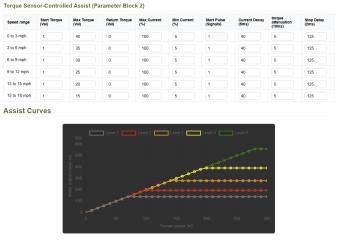
Hi, is there a way (what parameters to set) for changing the curves so I can obtain 600W putting only 100W of human power on my M820?
I just need to make the ramp more steep.
Screenshot001.png
 
Last edited:
Yes and it worked like a charm right out of the box.
Thanks for your answer DPC18RI, but the link is broken... can you check it please?
 
Last edited:
so I made a dumb question... sorry... :confused:
I was misled by seeing parameters and graph together.
Thank you DPC18RI for pointing me to that. 🙏
 
Back
Top