

I don't see a reason not to attach it to your post. (unless it is specifically forbidden by the software maker)
Ok thanks, so here it is.

I don't see a reason not to attach it to your post. (unless it is specifically forbidden by the software maker)
And what should I do if I get error 30 because I interrupted the update process?Is it possible you mixed the extracted one from your controller and the one i had send you? According to HxD the .bin you used (fw.bin) is a match with mine. So that is probably the wrong one for your controller.
A warning, if you do not have Besst tool or K1 flash i would not attempt to try to flash your extracted bin.
If you get error 30 like me IN the process of flashing, even Besst can not reach the controller anymore via the normal way..
Battery 48v. The firmware was previously set to 43v. It seems that the old motor controller was the first one, and then I tried all the methods. Did you also have no control information after an unsuccessful update attempt? Does your display also not respond to the power off button? Can you provide the exact procedure for flashing the "motor controller"?@Deko
1) Какое напряжение у вашего двигателя?
2) Вы пробовали работать с селектором «Контроллер двигателя» ДО того, как решили использовать «Старый контроллер двигателя», или «Старый контроллер двигателя» был вашим первым выбором?
Он должен работать, просто нужно правильно обновить его, если ваш двигатель поддерживает одну из доступных процедур. Если обновление не удалось и возникла ошибка 30, лучше всего выключить мотоцикл. Отсоедините аккумулятор на несколько минут, закройте запущенную программу и удалите canable, а затем повторите попытку.
Не знаю, тестировал ли кто-нибудь M420, но есть как минимум две версии, и, думаю, в вашем случае метод «старый контроллер двигателя» не подходит для вашей версии двигателя. Конечно, я могу ошибаться, поскольку у меня до сих пор нет такого контроллера M420 (сейчас проверяю M410). Судя по тому, что я вижу, для обновления нужно выбрать «контроллер двигателя».
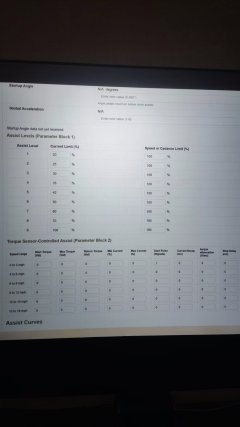
This was the case before, with this 43v firmware, with the torque sensor parameters set to 0. I'd like to know if these parameters can be changed and if they will work in practice. They are written to the controller, and the next time you connect, you can see that the changes have been applied.With some controllers or display's? firmw update, sorry can't remember exactly which ones but it happened few times to me that after a firmware update that on the other "tabs" the data did not refresh. Then you need to "reset" controller. (The besst tool does something similar, after firmw upd with original tool if i'm not able to read controller i have to click reset on the tool or the reset button on the Besst screen ).
How to check with canable after firmw update if it is needed to "reset" controller?
If you want to do a firmw upd. start program fresh and Before you start the firmw upd. click "info tab" should be empty (do NOT click sync data).
Then do your firmw upd as usual. After success go back to "info tab" which should still has no data. Now click "sync" and data should be visible. If no data shows up then you know that in this case you need to "reset" after the firmw upd.
A full "reset" from everything is the following,
close program, remove canable, remove battery for a minute and then connect everything again.
But before you do the above, most of the time you can reset by just switching display off wait a little and switch it back on. Click sync on info tab, if data comes then no need to do full reset.
i don't know when you checked your torque settings right after the firmw upd or not or after a power cycle.
Did it had torque data with the 43V controller firmware before you did the update to 48V firmware?
Before updating firmw. you can make a video with your phone with all original settings then you can compare after a firmw update.
It is also advised to install the latest version from bafang canable pro.
Maybe mdi-9 can add version number somewhere in the top part of the program.
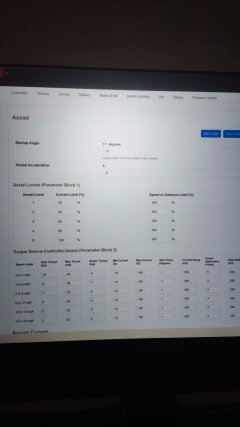
After you changed overvoltage from 47v to 56v did you afterwards clicked "sync" to see if the value really changed to 56v ?The only thing is that when changing the overvoltage parameter from 47v to 56v, although it is applied (at least the change is displayed), it doesn't actually work, since error 07 persists.
As far as I can tell from my two-month tests with Bafang Go and Canable firmware, the conclusion is as follows:So you now flashed 36V firmware and all tabs can be read? That means the update procedure is ok.
Firmware files even for same controller, some are locked and some are not. But it is strange that with your 48v firmware nothing can be read?
After you changed overvoltage from 47v to 56v did you afterwards clicked "sync" to see if the value really changed to 56v ?
If you start playing with "controller" tab value's then you really should install latest version. if some value's from "controller" tab get written to controller and in case controller silently refuses it, it can lead to a wrong checksum. With latest version you get a warning an can correct it.
If your controller does accept your change from 47V to 56v then i guess it is normal you still have error 7 because your controller is still running with his "startup 36 volt value's". I guess it needs a power cycle to put the new value in place.
If the firmware perhaps has a routine to check for correct / plausible value's between system voltage, cutoff under load, recovery voltage and overvoltage i don't know.
So if after you changed voltage value's and you do a power cycle by switching display off or removing battery and after this power cycle controller will not come "ON" anymore don't blame me lol. You are swimming in difficult water trying to change all these voltages.
Your safest bet is to search for and try other 48V firmware...

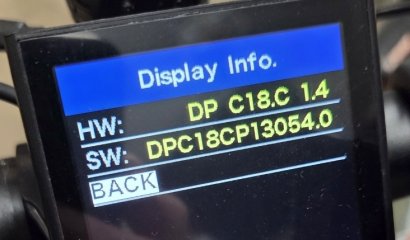
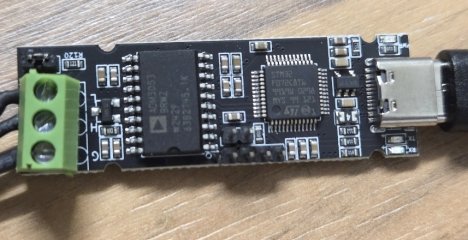
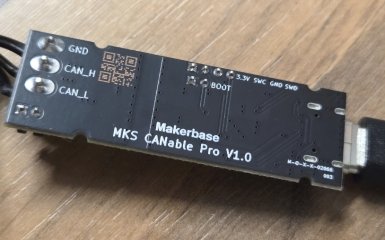
[21:32:48]RX (unknown_source_0x0): { "original_frame": { "canCommandCode": 0, "canCommandSubCode": 12, "canOperationCode": 0, "sourceDeviceCode": 0, "targetDeviceCode": 0, "data": [ 0, 48, 4, 0, 0, 0, 0, 0 ], "originalSourceByte": 32 } } [21:32:48]RX (unknown_source_0x0): { "original_frame": { "canCommandCode": 0, "canCommandSubCode": 12, "canOperationCode": 0, "sourceDeviceCode": 0, "targetDeviceCode": 0, "data": [ 0, 48, 2, 0, 0, 0, 0, 0 ], "originalSourceByte": 32 } }Today I went to my dealer and got a replacement screen under warranty (i just told them about my button problem and they never asked if I did anything, so I was not lying about the reason why it didn't work). They had a BESST tool and software and checked all sort of things. Updated the HMI (display) but to no avail. Eventually they tried a new display they had lying around and that solved my problems. I am so happy that the issue is solved that I am afraid of trying anything againAfter you messed up, according to your display it still can read the canbus data. So does bafang canable pro program recognizes your canable? Does it show the canable name? if it does and you click connect it should work... So check your wiring again. How did you actually made the wires connection?
Keep in mind that if you used an extension cable to tap in the canbus lines it needs to be one having the bafang colors and then you only tap in the green wire for can High and white wire for can Low.
Just curious, when you messed up, how exactly had you connected the brown and orange wires??

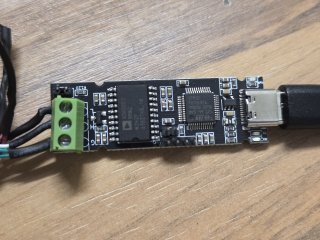
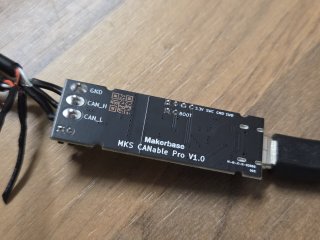

So totally wrongThis is my wiring, top to bottom: black, white, green:
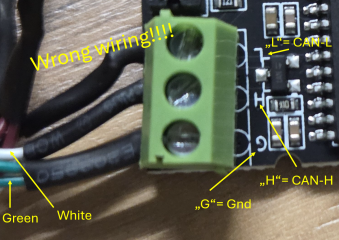

Oh my god.. I feel like such a noob..So totally wrong
View attachment 380250
You have connected
Green to Ground
White to CAN-H
Black to CAN-L
It has to be:
Green to CAN-H
White to CAN-L
Black to GND (is not necessary)
See the picture in the github repo. Different manufacturers use diffentet pinouts, so you have to read the imprint on the PCB carefully

I was afraid that this would happen to a user one day, see #30I never suspected they could be so completely different
All board have CAN-L CAN-H prints, I think everyone is smart enough to read that.


